
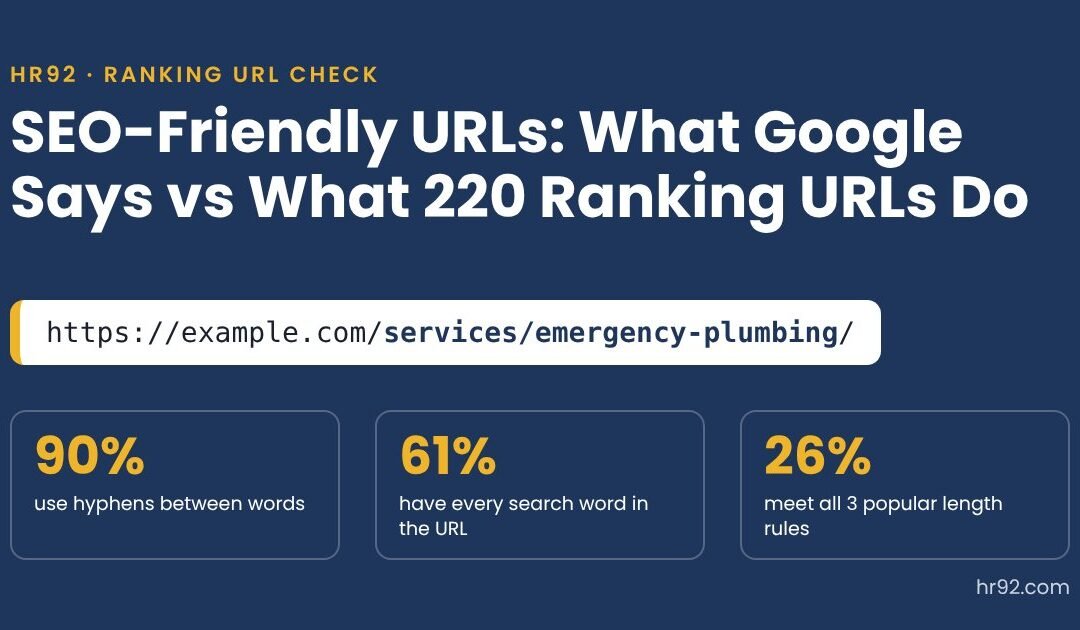

Google’s Gary Illyes and Cherry Prommawin spent a whole Search Central video on URLs on October 14, 2026. Hyphens beat underscores, emoji in domains aren’t allowed, and keywords in a URL barely move rankings.
Many “SEO-friendly URL” guides still hand out hard rules: 3 to 5 words, under 60 characters, keyword first. Google’s own AI Overview for this search repeats them. So I checked them against what actually ranks: 295 Google results for 30 everyday searches, 220 of them inner pages on sites that chose their own URLs. Below is what Google says, what the data shows, the checker above, and when you should leave your URLs alone.
- Google recommends descriptive words, hyphens, lowercase and as few parameters as possible. It doesn’t set a length limit or a word count.
- Keywords in a URL are “an incredibly small signal” that becomes “basically irrelevant” once Google sees content on the page, per Google’s October 2026 video.
- In our check, 90% of ranking inner pages used hyphens, but only 61% had every query word in the URL, and just 26% met all three length rules from Google’s AI Overview.
- For local service searches, a third of the top results were homepages. Your URL wording matters less than the page and the business behind it.
- Don’t change URLs that already rank just to make them prettier. If you must, use permanent redirects and keep them for at least a year.
What makes a URL SEO-friendly?
An SEO-friendly URL is one that Google can crawl without trouble and that a person can read and trust before clicking. Google’s URL structure best practices split this into hard requirements for crawling and softer best practices for understanding.
| Google’s URL guidance | Type | What it means for you |
|---|---|---|
| Follow IETF STD 66 and percent-encode reserved characters | Requirement | Your CMS does this. Problems start with hand-built links. |
| Don’t use URL fragments (#) to change content | Requirement | Single-page apps should use real paths, not #/pages. |
| Use the common parameter format (key=value, joined with &) | Requirement | Avoid custom formats like brackets or double commas. |
| Use descriptive, readable words instead of long ID numbers | Best practice | /services/roof-repair/ beats /index.php?id=4821. |
| Use your audience’s language | Best practice | Arabic or Spanish words are fine in the URL for those audiences. |
| Separate words with hyphens, not underscores | Best practice | Matters for new URLs. Not worth a migration. |
| Use as few parameters as you can | Best practice | Trim sort, session and tracking parameters from the canonical URL. |
| Remember URLs are case sensitive | Best practice | /Services and /services are two URLs to Google. Pick one. |
Notice what isn’t on Google’s list: a character limit, a word count, a rule about keyword position or a folder limit. Those come from SEO tools and blog posts, not from Google. Google’s SEO Starter Guide adds one more reason URLs matter: parts of the URL can show up as breadcrumbs in search results, so people use them to judge whether a result is worth a click.
Do keywords in a URL help SEO?
Keywords in a URL help Google rank a page very little. In the October 14 video, Gary Illyes put it bluntly: “it is an incredibly small signal. It really only matters when we have absolutely nothing else to go on.” He added that once Google sees content on the page, keywords in the domain and URL “become basically irrelevant.”
That matches Google’s written guidance. The SEO Starter Guide says keywords in the domain or URL path “alone have hardly any effect beyond appearing in breadcrumbs.” Search Engine Roundtable lists more than a dozen earlier Google statements saying the same thing over the years.
The ranking data backs it up. Almost every ranking inner page (218 of 220) had at least one word from the search in its URL, which is just good labeling. But only 134 of 220 (61%) had all of them. The number one result for “car accident lawyer” lives at /practice-areas/auto-accident-attorneys/. No “car,” no “lawyer.” Google clearly understood it.
What we found in 220 ranking URLs
We collected Google’s top 10 web results for 30 searches HR92’s clients care about, from plumbers and personal injury lawyers to CRM software, standing desks and cold brew coffee. That gave 295 results. We set aside 50 that sit on platforms where the site owner doesn’t choose the URL (Reddit, YouTube, Facebook, Instagram, Quora, Yelp and Amazon search pages), leaving 245 site-owned results. Of those, 25 were homepages and 220 were inner pages with their own slug.
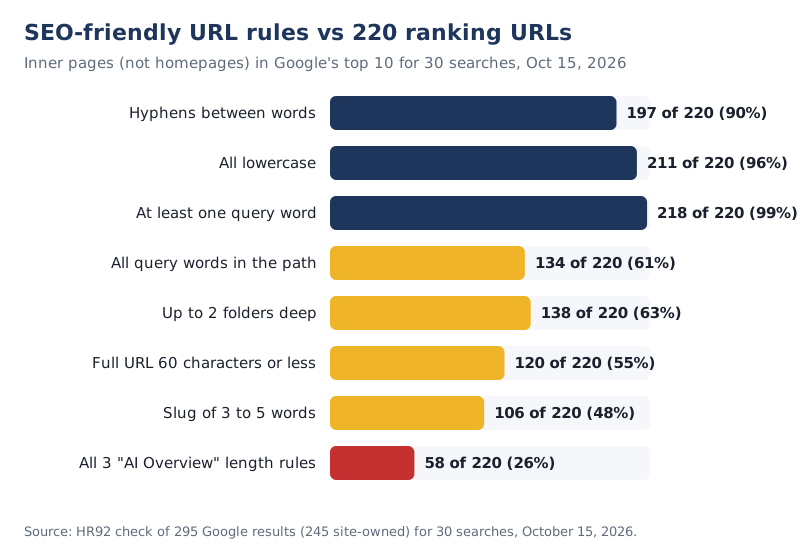
Three findings stood out:
- The basics are near universal. 211 of 220 URLs were all lowercase and 197 used hyphens between words. Only 6 used underscores, and 3 of those were Wikipedia.
- Exact-match keywords are optional. 39% of ranking inner pages left out at least one word of the search. Synonyms like “attorneys” for “lawyer” and “AC” for “HVAC” ranked fine.
- Length rules are loose at best. The median URL was 57 characters with a 3-word slug, but 100 of 220 ranking URLs were longer than 60 characters, and the longest that ranked was 115 characters.
Local service searches look different
For the 7 local and service searches (emergency plumber, personal injury lawyer, wedding venues, dog grooming, commercial cleaning, car accident lawyer and web design agency), 20 of the 63 site-owned results were homepages. For the other 23 searches, it was 5 of 182.
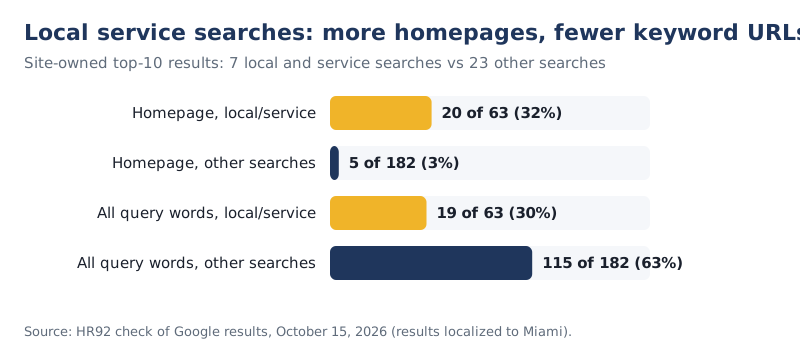
Only 19 of those 63 local results (30%) had every search word in the URL. A law firm’s homepage at its own brand domain doesn’t say “personal injury lawyer miami” anywhere in the URL and still ranks. For local businesses, the work that moves rankings is in the Google Business Profile, reviews and the page itself, which is where our local SEO work goes first.
Do the common URL rules hold up?
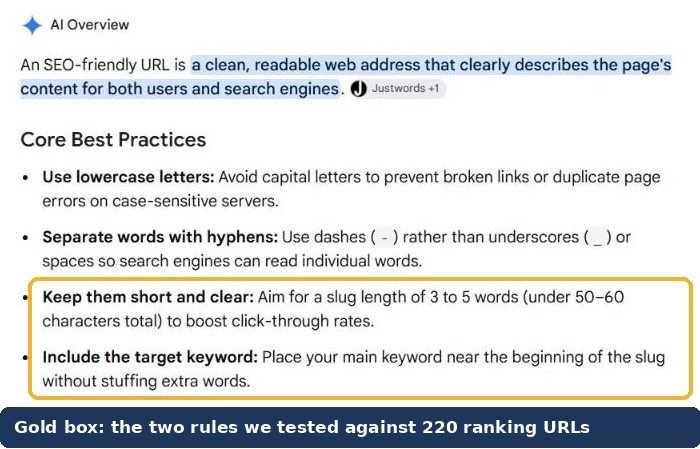
The popular URL rules hold up as tidy habits, not as ranking requirements. Google’s AI Overview for “seo friendly url” told me to keep slugs to 3 to 5 words, keep URLs under 50 to 60 characters, put the main keyword near the start of the slug and limit folders to one or two levels.
| Common rule | Ranking inner pages that follow it | Verdict |
|---|---|---|
| Slug of 3 to 5 words | 106 of 220 (48%) | Habit, not a rule |
| Full URL 60 characters or less | 120 of 220 (55%) | Habit, not a rule |
| Keyword is the first word of the slug | 122 of 220 (55%) | No evidence it matters |
| 1 or 2 folder levels | 138 of 220 (63%) | Depends on site size |
| All three length rules at once | 58 of 220 (26%) | Most top pages fail it |
| Hyphens between words | 197 of 220 (90%) | Follow it on new URLs |
| All lowercase | 211 of 220 (96%) | Follow it |
I’m not saying long URLs are good. Short, clear URLs are easier to read, share and remember, and they fit better in search results. I’m saying a 7-word slug that describes the page is fine, and you shouldn’t rewrite a working URL to hit a character count.
Hyphens vs underscores in URLs
Hyphens are Google’s recommended word separator in URLs, and underscores are not. Google’s documentation says hyphens help “users and search engines better identify concepts in the URL,” while underscores are commonly used to keep concepts together, as in programming function names like format_date.
The October video explains that Google can treat words joined by underscores as “one long word,” and that sometimes that’s fine. Google just recommends hyphens because they’re “the universal word separator across the web.”
Real results show the gap is small. Three Wikipedia articles and two cost-estimate pages with underscores ranked in our sample, and the Seobility wiki page at /SEO-friendly_URLs ranked third for “seo friendly url” when I searched it. So:
- New pages: use hyphens. It costs nothing.
- Existing pages with underscores: leave them unless you’re already migrating the site. The redirect risk is bigger than the gain.
- Domain names: underscores aren’t allowed at all. Domains can only use letters, numbers and hyphens (plus internationalized characters through Punycode).
How long should a URL be?
A URL should be as long as it needs to be to describe the page, and no longer. Google’s URL documentation gives no character limit. In our data, half of the ranking inner-page URLs were 57 characters or shorter (including https://), the middle half ran from 49 to 70 characters, and 90% were 82 characters or shorter.
That gives you a sensible range rather than a rule. If your URL runs past about 80 characters, it’s usually carrying extra words: a duplicated folder name, a full sentence as the slug, or a stuffed keyword string. Trim it on new pages. The checker at the top flags URLs longer than 90% of what we saw ranking.
Folders, dates, parameters and case
URL structure is the pattern your site uses to group pages into folders, and Google cares about it mainly on larger sites. The Starter Guide says that on sites with more than a few thousand URLs, grouping topics in directories can help Google learn how often each section changes and crawl it accordingly.
| URL element | Ranking inner pages (of 220) | What to do |
|---|---|---|
| Year in the slug | 3 | Leave years out of evergreen pages. News and dated posts are fine. |
| Long numeric or hex ID | 11 | Fine on big ecommerce and publisher sites. Use words where you can. |
| File extension (.html, .php, .aspx) | 14 | Harmless. Don’t remove it from existing URLs. |
| Uppercase letters | 9 | Pick one case and redirect the other. |
| Trailing slash | 99 | Either is fine. Be consistent and redirect the other version. |
| 3 or more folder levels | 82 | Fine when each folder means something, like /services/roof-repair/. |
What about parameters?
Only one site-owned result in our sample used parameters to choose its content (a category page on an office supply store). Another 13 carried srsltid, a tracking parameter that Google’s Merchant Center auto-tagging adds when someone clicks a product from Google Search to a store. That one isn’t yours to remove; just make sure your canonical tag points to the clean URL.
For your own filters, sorting and session IDs, Google’s guidance is to keep parameters to the ones that change the content and use the standard key=value format. Faceted navigation on large stores is a technical SEO job of its own, because filter combinations can create thousands of near-duplicate URLs.
Should you change existing URLs for SEO?
Usually not. A URL change makes Google recrawl the page, process a redirect and move signals to the new address, all to gain a signal Google calls tiny. WordPress’s own permalink documentation says these URLs are permanent “and should never be changed.”
| Situation | Change the URL? | Why |
|---|---|---|
| Slug is a bit long or has stop words | No | No measurable gain; redirect risk |
| Underscores instead of hyphens | No | Google can still read it; pages with underscores rank |
| Year in the slug of an evergreen page | Only when you rewrite the page | Combine it with a real content update |
| Session IDs or tracking in the canonical URL | Yes | Creates duplicate URLs and wastes crawling |
| Mixed upper and lower case versions both work | Yes (redirect one) | Google treats them as separate URLs |
| Random IDs on a small site (/page-id-4821) | Yes, once | Readable URLs help people and breadcrumbs |
| Site redesign or platform move | Fix it during the move | You’re already redirecting, so clean up then |
If you do change URLs, follow Google’s site move guidance. It says 301 and other permanent redirects “don’t cause a loss in PageRank,” recommends keeping redirects “generally at least 1 year,” and warns that rankings can fluctuate while Google recrawls. Update internal links and your sitemap so Google isn’t walking through redirects, and watch the pages in Search Console. Our test of how long Google takes to index a page shows why patience matters here.
How to write an SEO-friendly URL
Writing an SEO-friendly URL takes about a minute if you decide it before you publish. These are the steps I’d follow for any new page:
- Name the page in 2 to 6 plain words. Describe what’s on the page the way a customer would say it: /roof-repair-cost/, not /blog/2026/10/how-much-does-it-cost-to-repair-your-roof-in-2026/.
- Use lowercase and hyphens. No spaces, underscores or capital letters.
- Drop words that add nothing. “The,” “and” and “a” can usually go. Keep them if the slug reads badly without them.
- Put it in a folder only if the folder means something. /services/emergency-plumbing/ tells people where they are. /category/uncategorized/ doesn’t.
- Leave out years and numbers that will date. “best-crm-2026” becomes a problem in January.
- Keep parameters out of the canonical URL. Filters and tracking can exist; the canonical points to the clean version.
- Run it through the checker above, then publish and don’t touch it again.
- Describes the page in words a customer would use
- Lowercase, hyphens between words
- No session IDs or tracking in the canonical URL
- No # fragments to load different content
- No year in an evergreen slug
- No repeated or stuffed keywords
- Folders that mean something, if any
- One version only: http to https, www or not, slash or not, all redirected
- Set before publishing, then left alone
If you’re planning a redesign or a platform move, that’s the moment to fix URL patterns, because you’ll be setting up redirects anyway. It’s a standard part of our WordPress website builds and Shopify SEO projects.
FAQ
What is an example of an SEO-friendly URL?
https://example.com/services/emergency-plumbing/ is a good example: lowercase, hyphens, a meaningful folder and a slug that describes the page. A poor example is https://example.com/index.php?id=4821&sessionid=9F2A, which tells people nothing and creates duplicate URLs.
Do URLs affect SEO rankings?
Barely. Google says keywords in a URL are a very small signal that matters mainly when Google has nothing else to go on. URLs matter more for crawling (clean, consistent URLs avoid duplicates) and for people, who see URL breadcrumbs in search results and decide whether to click.
Are underscores bad for SEO?
Not bad, just not recommended. Google suggests hyphens because they separate words clearly. Pages with underscores still rank, including Wikipedia articles in our sample, so don’t redirect existing underscore URLs only to swap the separator.
How many characters should a URL have?
Google gives no limit. In our October 2026 check of 220 ranking inner pages, the median full URL was 57 characters and 90% were 82 or shorter. Aim for short and readable, and don’t shorten a URL that already ranks.
Should I include my target keyword in the URL?
Include words that describe the page, which usually covers the main topic naturally. Don’t force the exact search phrase. In our sample, 39% of ranking inner pages left out at least one word of the query, and synonyms ranked fine.
Should I remove stop words from URLs?
Usually, yes, when the slug still reads clearly. Google’s team said descriptive words “and even full sentences” are fine in a URL, so stop words won’t hurt you. Remove them for brevity, not for rankings.
Can I use non-English characters or emoji in a URL?
You can use your audience’s language in the path, and Google recommends it. Links should percent-encode those characters. Emoji in the path work technically but can display as encoded gibberish in some apps, and emoji aren’t allowed in domain names.
Related services: technical SEO, SEO audits and website design and development.