
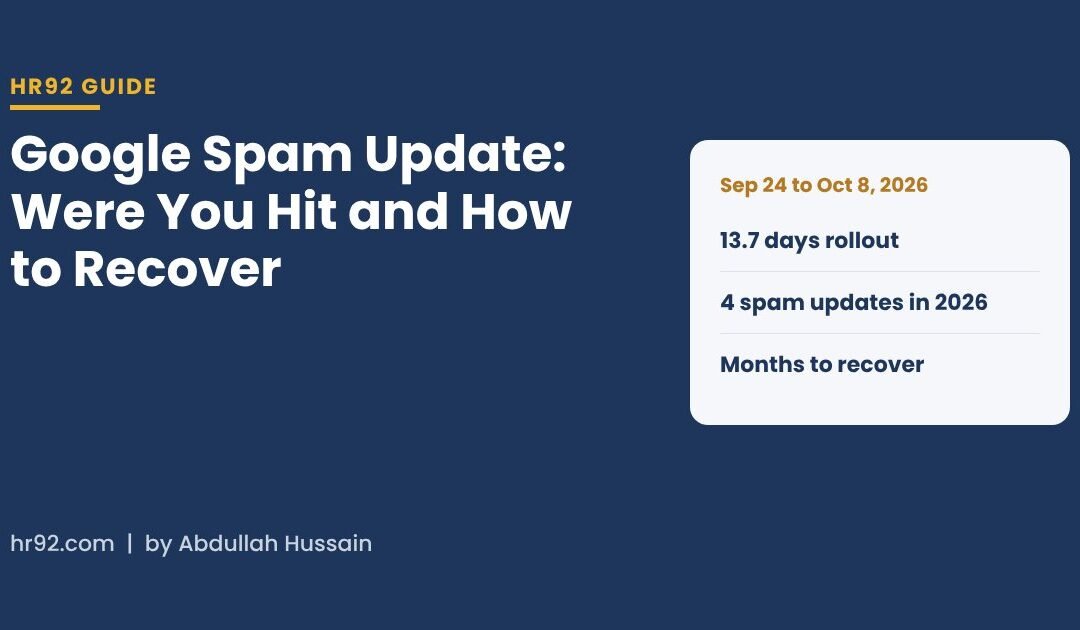

A Google spam update is an improvement to Google’s automated spam detection, mainly its AI system SpamBrain, that can demote or remove pages breaking Google’s spam policies. The latest one, the September 2026 spam update, started on September 24 and finished on October 8, 2026, so if your traffic dropped in that window, the place to start is Google’s spam policies and the Manual actions report in Search Console.
Spam updates cause a lot of panic and a lot of bad advice. Here’s how I’d check if you were actually hit, what usually triggers it, how recovery works for automated demotions versus manual actions, and the timeline data on how long these updates take to roll out.
- The September 2026 spam update ran from September 24 to October 8, 2026, one of the longer spam rollouts on Google’s own record.
- A spam update is automated. A manual action is a human decision and shows in Search Console. They are fixed differently.
- Google says recovery from an automated spam demotion can take months, after its systems learn the site now complies.
- Lost link value from a link spam update doesn’t come back. Fixing links stops the damage; it doesn’t restore old rankings.
What is a Google spam update?
It’s a notable improvement to the automated systems Google uses to detect spam. Google’s spam updates documentation explains that these systems run all the time, and when Google makes a significant improvement it calls it a spam update and lists it on its ranking updates page. SpamBrain, Google’s AI-based spam prevention system, is the main example it gives.
What a spam update is not:
- Not a core update. Core updates re-assess quality and relevance broadly. Spam updates target practices that break the spam policies.
- Not a manual action. No person reviewed your site. A manual action is issued by a human reviewer and you’re told about it in Search Console.
- Not a penalty you can appeal. There’s no reconsideration request for an automated demotion. You fix the cause and wait.
| Spam update | Manual action | Core update | |
|---|---|---|---|
| Who decides | Automated systems | A Google reviewer | Automated ranking systems |
| Are you notified? | No, only the public announcement | Yes, in the Manual actions report and messages | No, only the public announcement |
| What it targets | Spam policy violations | Spam policy violations on your site | Overall quality and relevance |
| How to fix | Fix violations, wait for systems to re-learn | Fix all affected pages, then request review | Improve content quality broadly |
| Appeal? | No | Yes, reconsideration request | No |
What happened in the September 2026 spam update?
Google’s Search Status Dashboard entry says it released the September 2026 spam update on September 24, 2026 at 09:15 PDT, that it applies globally and to all languages, and that the rollout might take up to two weeks. The final entry, at 01:37 PDT on October 8, says the rollout was complete.
Search Engine Roundtable noted at the time that Google called it a normal spam update and didn’t share what share of queries it affected. Two other things were happening around it, which is why it felt bigger than “normal”:
- More manual actions. On October 8, Search Engine Roundtable reported SEOs seeing a rise in manual action penalties over the previous few weeks.
- More spam updates in general. Search Engine Roundtable relayed a recap of the Search Central Live Deep Dive in Europe, where Google reportedly said it’s running more spam updates because there’s much more new content, and that it’s using AI to catch more of it. That recap is secondhand, so I’d treat the wording as indicative rather than official.
How long do Google spam updates take to roll out?
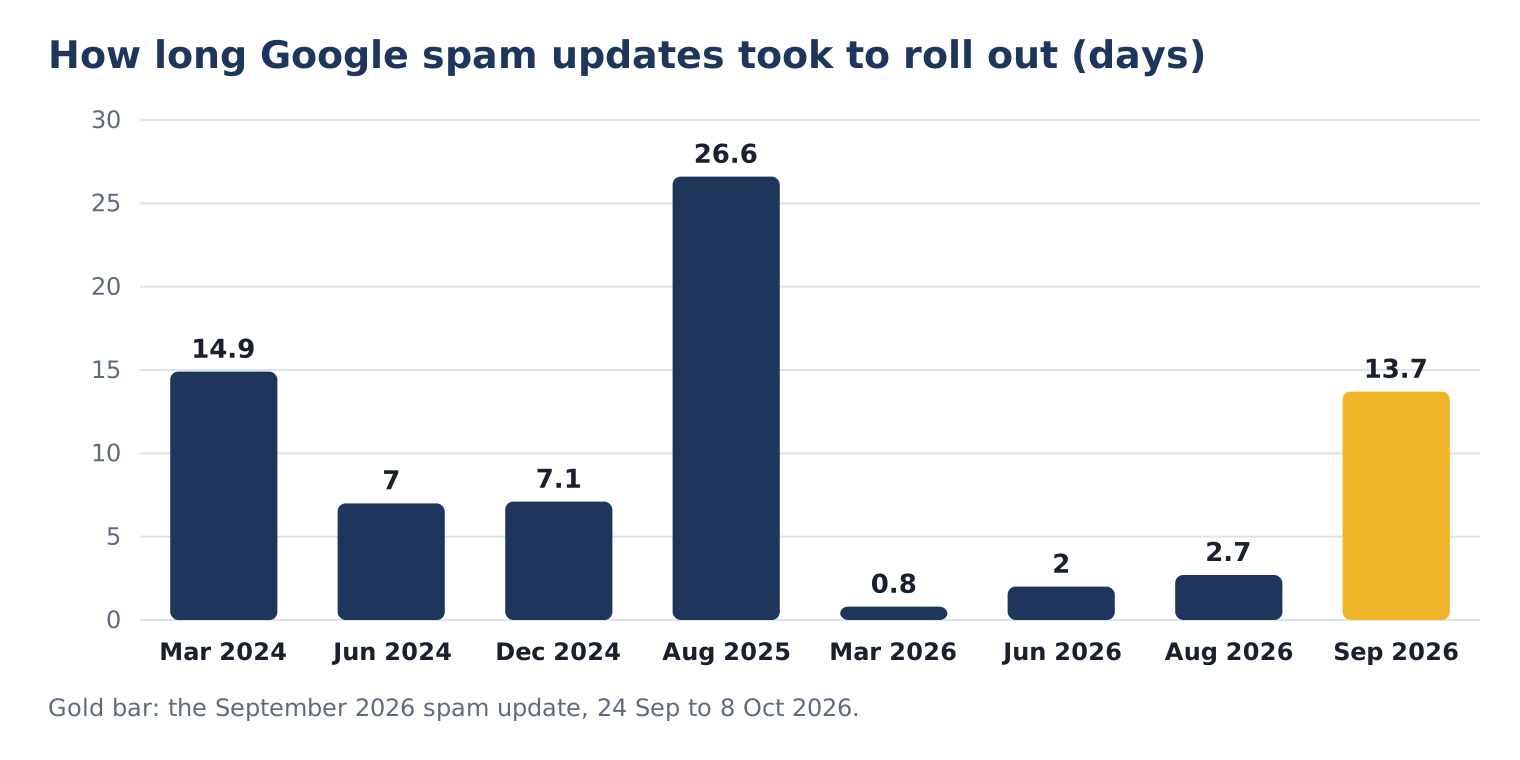
Anywhere from under a day to almost four weeks. I pulled every spam update from Google’s ranking update history for 2024 to 2026 so you can see the range:
| Spam update | Started | Rollout length |
|---|---|---|
| March 2024 | Mar 5, 2024 | 14 days, 21 hours |
| June 2024 | Jun 20, 2024 | 7 days, 1 hour |
| December 2024 | Dec 19, 2024 | 7 days, 2 hours |
| August 2025 | Aug 26, 2025 | 26 days, 15 hours |
| March 2026 | Mar 24, 2026 | 19 hours, 30 minutes |
| June 2026 | Jun 24, 2026 | 2 days, 1 hour |
| August 2026 | Aug 18, 2026 | 2 days, 16 hours |
| September 2026 | Sep 24, 2026 | 13 days, 16 hours |
Source: Google Search Status Dashboard, ranking update history, read October 9, 2026. Times are US Pacific.
What I take from it: 2026 has already had four spam updates, the most in any of the three years shown, and three of them were done in under three days. The September update was the slow one. Practically, that means you shouldn’t judge your traffic until a few days after Google marks the rollout complete, and you should always check the dashboard dates before blaming a drop on “the update”.
How do you tell if a spam update hit your site?
Compare your Google traffic before and after the rollout window, then rule out everything else. A spam update hit usually shows as a sharp drop that starts inside the rollout dates and affects the pages or patterns that break a policy, not your whole site evenly.
- Open Search Console, Performance. Compare the 28 days after October 8, 2026 with the 28 days before September 24, 2026. Look at clicks and impressions by page.
- Find where the drop started. Switch the chart to daily. A drop that starts before September 24 points somewhere else.
- Check the Manual actions report. If there’s an entry, you’re dealing with a human review, not only the update. Go to the manual actions section.
- Check the Security issues report. Hacked content shows here. If there’s an entry, start with the hacked site steps.
- Group the losing pages. Are they one template, one folder, one content type, or pages with lots of outbound affiliate or sponsored links? Patterns point to the policy.
- Rule out the boring causes. Tracking changes, a site migration, noindex added by mistake, seasonality.
If you’d like a fast technical baseline before you dig in, our free SEO audit runs 54 checks, including indexability and on-page basics, so you can rule out self-inflicted problems in a few minutes.
What usually triggers a spam demotion?
A practice that matches one of Google’s spam policies. These are the ones I’d check first on a business site, with Google’s own definitions:
| Policy | Google’s definition (short) | How it shows up on business sites |
|---|---|---|
| Scaled content abuse | Many pages generated mainly to manipulate rankings | Hundreds of near-identical city or service pages, AI pages published without review |
| Hacked content | Content placed on a site without permission through a security hole | Spam posts, injected links, new pages you didn’t create |
| Link spam | Links created mainly to manipulate rankings | Paid links, link exchanges, sitewide footer links sold to others |
| Site reputation | Third-party content published on a host site mainly to use its ranking signals | A “sponsored” section full of unrelated coupon or casino content |
| Expired domain abuse | Buying an expired domain and reusing it mainly to rank low-value content | An old domain bought for its links and filled with unrelated pages |
| Doorway abuse, cloaking, sneaky redirects | Pages or behavior built to show search engines something different from users | Location pages that all redirect to one form, different content for Googlebot |
Definitions paraphrased from Google’s spam policies for Google web search, which also lists keyword stuffing, hidden text, machine-generated traffic, malicious practices, scraping, thin affiliation and user-generated spam.
How do you recover from a Google spam update?
Remove or fix whatever breaks the policy, make the fix visible to Google, and give it time. Google’s documentation says changes may help a site improve if its automated systems learn over a period of months that the site complies with the spam policies.
- Fix the cause, not the symptom. Remove scaled pages or rewrite them into fewer, genuinely useful ones. Remove or nofollow paid links. Close the security hole that let spam in.
- Remove what can’t be fixed. Return a 404 or 410 for spam pages, or noindex them if they must stay for users.
- Clean internal links and sitemaps. Don’t keep linking to pages you removed, and keep only real, indexable URLs in your XML sitemap.
- Request recrawls of the key pages you improved, using URL Inspection in Search Console.
- Log every change with a date. When traffic moves months later, you’ll want to know which change it followed.
- Keep publishing useful content. Recovery is about the site as a whole being trustworthy again, not one fix.
One special case is link spam. Google says that when its systems remove the effect of spammy links, any ranking benefit those links gave you is gone, and “cannot be regained”. Cleaning up stops further damage. It won’t bring back rankings that were propped up by those links, so recovery there means earning real links, which is what our digital PR work focuses on.
How do you fix a manual action and request reconsideration?
Fix the issue on every affected page, then use Request Review in the Manual actions report. Google’s Manual actions report help page is clear that fixing only some pages won’t earn a partial return to search results.
A good reconsideration request, according to Google, does three things:
- Explains the exact quality issue on your site
- Describes the steps you took to fix it
- Documents the outcome, with examples of the fixed URLs
- Confirms Google can reach the affected pages (no login, paywall, robots.txt block or noindex on pages you want back)
- Is honest about the cause, including if an agency or past owner created the problem
- Is sent once: Google asks you not to resubmit while a request is pending
Google says most reconsideration reviews take several days or weeks.
What if your site was hacked with spam?
Treat it as a security incident first and an SEO problem second. Google defines hacked content as content placed on a site without permission through a security vulnerability, and its Security issues report lists four kinds: malware, code injection, content injection and URL injection.
This one is personal. In July 2026, hr92.com itself was compromised and an off-topic spam post was published on our blog. Our site now runs a hardening plugin. The point I’d pass on: spam doesn’t always look like spam. A single clean-looking post about an unrelated topic is easy to miss in a long list of posts.
- Lock down access. Change every admin password, remove unknown users, update WordPress core, themes and plugins.
- Find everything that was added. Sort posts and pages by date, check for unknown users, and search your database for injected links and scripts.
- Remove it and close the hole. Restore clean files, remove the injected content and fix the vulnerability.
- Request review in the Security issues report once every listed issue is fixed on every affected page, explaining what happened, what you fixed and the result.
If you’d like a second opinion on the technical side, our technical SEO team can review it with you.
How do you stay out of the next spam update?
Build pages for people, keep your link profile clean, and watch for spam you didn’t create. With four spam updates already in 2026, assume another one is coming.
| Habit | How often | What it catches |
|---|---|---|
| Check Manual actions and Security issues in Search Console | Weekly | Human reviews and hacks, early |
| List new posts, pages and users in WordPress | Weekly | Injected content and rogue accounts |
| Review any bulk-generated pages before publishing | Every batch | Scaled content abuse |
| Audit backlinks and outbound sponsored links | Quarterly | Link spam on either side |
| Check Google’s Search Status Dashboard before reacting to a drop | Whenever traffic moves | Misreading a normal fluctuation as a penalty |
Google’s guidance on helpful, people-first content is the best long-term defence. I wrote about what’s working and what’s noise in AI and SEO in 2026, and if you want a full review of a site after a drop, that’s what our SEO audits are for.
Google spam update FAQ
When did the September 2026 spam update start and end?
Google released it on September 24, 2026 at 09:15 PDT and marked the rollout complete on October 8, 2026 at 01:37 PDT, according to the Google Search Status Dashboard. Google said it applies globally and to all languages. The dashboard lists the rollout at 13 days and 16 hours.
How do I know if my site was hit by a spam update?
Look for a sharp drop in Search Console that starts inside the rollout dates and concentrates on pages that break a spam policy. Check the Manual actions and Security issues reports too. If the drop started before the update, or hit everything evenly, look for other causes like tracking or indexing changes.
How long does it take to recover from a Google spam update?
Google says sites may improve if its automated systems learn over a period of months that the site complies with its spam policies. There’s no request to speed this up for automated demotions. For a manual action, recovery follows a successful reconsideration request, which Google says usually takes several days or weeks to review.
Is a spam update the same as a manual action?
No. A spam update improves automated detection and you aren’t notified. A manual action is a decision by a Google reviewer, shown in the Manual actions report in Search Console, and it can be appealed with a reconsideration request after you fix every affected page.
Can I recover rankings lost in a link spam update?
Not the part that came from spammy links. Google says that when its systems remove the effect of those links, any ranking benefit they generated is lost and can’t be regained. You can stop further damage by removing the links, then rebuild with links earned through useful content.
How many spam updates has Google released in 2026?
Four as of October 9, 2026, according to the Google Search Status Dashboard: March, June, August and September 2026. Three of them finished in under three days; the September update took nearly two weeks.