
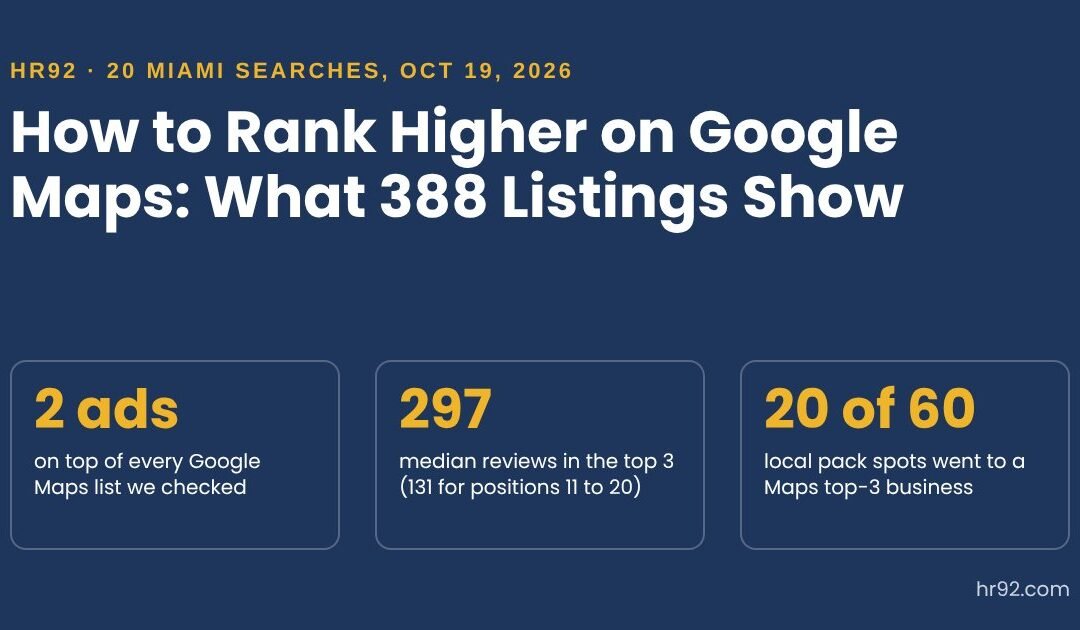

To see what that looks like on a real map, on October 19, 2026 I ran 20 common service searches for Miami in Google Maps and recorded the first 20 organic results for each: 388 listings in total, plus the ads above them. Then I compared each list with the local 3-pack Google Search showed for the same query, and checked the websites of the top 3 businesses.
Here’s what the businesses on top have in common, what they don’t, and the steps I’d take in your shoes.
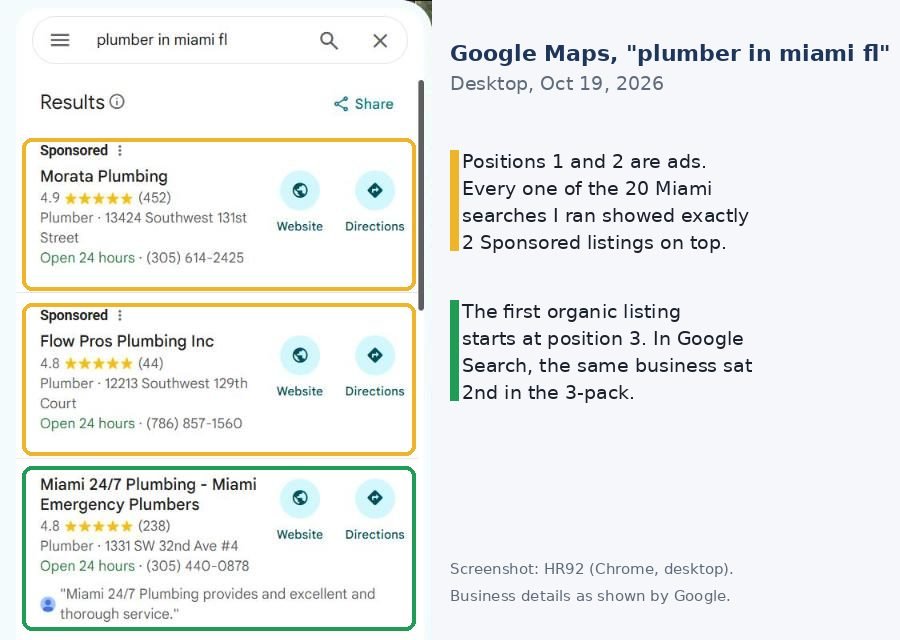
- Every one of the 20 Miami searches showed 2 Sponsored listings at the top of Google Maps. Your best organic spot in the list is often position 3.
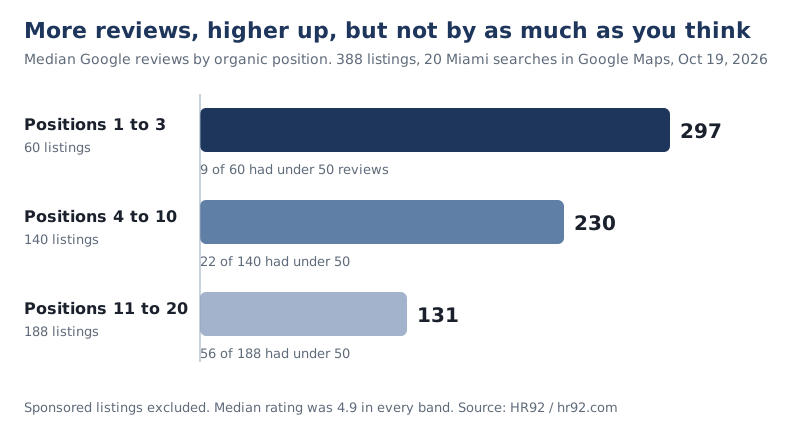
- The top 3 organic businesses had a median of about 297 reviews, versus 230 for positions 4 to 10 and 131 for 11 to 20. But 9 of the 60 top-3 listings had fewer than 50 reviews.
- The most-reviewed business made the top 3 in only 7 of 20 searches. Category, distance and the rest of the profile decide a lot.
- Google Maps and the Google Search 3-pack disagree: only 20 of 60 pack spots went to a Maps top-3 business, and no search showed the same three in both.
- Ask Maps (Gemini in Google Maps) answers from Maps data and reviews, so the same work helps there too.
What the top Google Maps results have in common (388 Miami listings)
The top Google Maps results in my Miami sample share three things: the dominant category for the search, a high rating, and more reviews than the businesses below them. What they don’t share is a keyword-heavy name. I searched “[service] in miami fl” for 20 services, from plumbers and dentists to pool service and orthodontists, in Google Maps on desktop, and recorded rank, rating, review count, primary category, name and website for the first 20 organic listings.
| Organic position in Google Maps | Listings | Median reviews | Fewer than 50 reviews | Median rating | Main category for the search | Service word in the name | City or area in the name |
|---|---|---|---|---|---|---|---|
| 1 to 3 | 60 | 297 | 9 (15%) | 4.9 | 54 (90%) | 55 (92%) | 30 (50%) |
| 4 to 10 | 140 | 230 | 22 (16%) | 4.9 | 122 (87%) | 128 (91%) | 48 (34%) |
| 11 to 20 | 188 | 131 | 56 (30%) | 4.9 | 161 (86%) | 168 (89%) | 74 (39%) |
HR92 study, October 19, 2026. 20 searches in Google Maps (desktop Chrome, location Miami), first 20 organic listings each (16 for three searches with shorter lists). Sponsored listings excluded. “Main category” = the most common primary category among the results for that search.
What the numbers say, in plain terms:
- Reviews matter, but they aren’t the ranking. More reviews went with higher positions in 19 of the 20 searches, but the link was moderate (a median rank correlation of 0.39). The single most-reviewed business made the top 3 in only 7 of 20 searches, and ranked #1 in 4.
- Ratings don’t separate anyone. The median was 4.9 stars in every band, and 59 of the 60 top-3 listings had 4.5 or more. A 4.9 is the entry ticket, not an edge.
- Category is close to a requirement. 90% of the top 3 used the category most of their competitors used. All six exceptions were close variants, such as Facial spa among med spas, HVAC contractor among AC repair services and Accounting firm among CPAs.
- A service word in the name made no difference. About 9 in 10 names contained the service at every position, mostly because that’s what the businesses are called. City or area words were more common in the top 3 (50% vs 34% and 39%), which I’d read as a hint of relevance and distance, not proof that renaming works. Google’s rules forbid adding words to your name, more on that below.
- Almost all of them have a website. 50 of 51 top-3 listings in the 17 searches whose list showed a Website button had one.
Limits of this study: one city, one day, one signed-in desktop browser, and correlations rather than causes. Google personalizes Maps results by location and history, so your list will differ. I’d treat it as a snapshot of what’s ranking, not a formula.
Google’s three local ranking factors, in Google’s own words
Google’s local ranking factors are relevance, distance and prominence. Google’s help page Tips to improve your local ranking on Google opens that section with “Local results are mainly based on relevance, distance, and popularity,” then explains the third factor under the heading Prominence. The same page says: “There’s no way to request or pay for a better local ranking on Google.”
| Factor | What Google says it means | What you control | What the Miami data showed |
|---|---|---|---|
| Relevance | How well a Business Profile matches what someone is searching for | Primary category, services, description, attributes, the content on your website | 90% of top-3 listings used the main category for the search |
| Distance | How far the business is from the searcher; without a shared location, Google uses what it knows about their location | Almost nothing beyond an accurate address or service area | The most-reviewed business missed the top 3 in 13 of 20 searches |
| Prominence (popularity) | How well known the business is, based on info like links to the business and the number of reviews | Reviews, links and mentions, a strong website, real-world reputation | Median reviews fell from 297 (top 3) to 131 (positions 11 to 20) |
Google also says that “Businesses with complete and accurate info are more likely to show up in local search results,” and that verifying your business makes it “more likely to show up in search results.” Those two are the cheapest wins on this page.
Your Google Maps rank and your local 3-pack rank aren’t the same thing
Google Maps rank and local pack rank are two separate lists, and in my test they disagreed far more than I expected. For each of the 20 searches I compared the three businesses in the Google Search local pack with their positions in the Google Maps list, from the same browser the same morning.
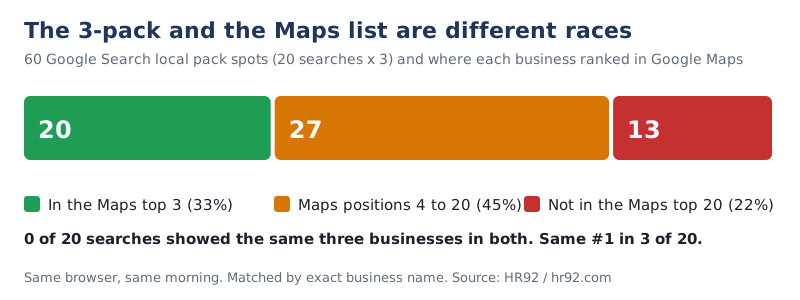
- Only 20 of the 60 pack spots (33%) went to a business that was in the Maps top 3.
- 13 pack spots (22%) went to businesses that weren’t in the Maps top 20 under the same name.
- No search showed the same three businesses in both places, and the #1 matched in just 3 of 20.
- 12 of the 20 packs also carried a Sponsored listing, and every Maps list started with 2 ads.
Two practical consequences.
First, “we’re #1 on Maps” needs three follow-up questions: on which surface, for which search, from where? A single rank check from your office tells you very little. Use a grid rank tracker that checks from many points around your area, and check the Search pack and the Maps list separately.
Second, the paid spots are real estate you’re competing with. If your money searches always open with two ads, a small Google Ads campaign can be worth testing alongside the organic work. It won’t improve your organic rank, Google is clear on that, but it can put you on the first screen while the organic work catches up.
How to rank higher on Google Maps: 9 steps, in the order I’d do them
Ranking higher on Google Maps comes down to giving Google an accurate, complete profile that matches the search, then building prominence over months. This is the order I’d follow, cheapest and fastest first.
- Verify the profile and fill every field. Google says verified businesses are more likely to show up, and complete, accurate profiles too. Hours (including holiday hours), phone, website, services, attributes, opening date, description.
- Pick the primary category your best competitors use. Search your main service, open the top 3 listings and note their primary category. Google’s guidelines ask you to “Choose the fewest number of categories it takes to describe your overall core business,” so add secondary categories only for real lines of business.
- Use your real-world business name, nothing more. Google’s guidelines say your name should match what’s on your storefront, website and stationery, and that “Including unnecessary information in your business name isn’t permitted, and could result in the suspension of your Business Profile.” Service words, locations and hours in the name are listed as not acceptable.
- Get the address or service area right. Use a staffed location. Google’s guidelines say a virtual office “isn’t eligible for a Business Profile,” and service-area businesses should have one profile for the central office with a defined service area.
- Build a steady review habit. Ask every happy customer with your Google review link or a QR code, which is what Google itself suggests. Reply to reviews, personally and promptly. Never offer anything in exchange.
- Give each location a strong page on your website. In my check of 48 top-3 websites, 40 (83%) had the city or area in the title tag, 39 had a tap-to-call link and 34 (71%) had LocalBusiness-type structured data in the HTML. Link your profile to the matching location page when you have several.
- Earn links and local mentions. Google names “how many websites link to your business” as part of prominence. Local press, chambers, suppliers, sponsorships and industry directories that real customers use beat bulk citation packages.
- Add real photos, products and updates. Google lists photos and videos, and in-store products for eligible retailers, as ways to show what you offer. Upload your own photos of the work, the team and the location, not stock images.
- Track it the right way. Check from multiple points with a grid tracker, track Maps and the Search pack separately, and judge progress over months, not days.
Does LocalBusiness schema help you rank on Google Maps?
LocalBusiness schema is a schema.org type of structured data that describes your business (name, address, hours) on your own website. Google’s LocalBusiness structured data documentation says it lets you “tell Google about business hours, different departments within a business,” and more. It doesn’t say it improves local ranking.
In my sample, 14 of the 48 top-3 websites I could fetch had no LocalBusiness-type markup in their HTML, and 8 had no structured data at all, and they still ranked. I’d still add it to every location page because it’s cheap and keeps the facts consistent, but I wouldn’t expect it to move a Maps rank by itself.
Does a website help you rank on Google Maps?
Yes, indirectly. Google’s prominence factor includes links to your business, and your website is where most of those links and mentions point. In the 17 searches where the list showed a Website button, 50 of 51 top-3 businesses had a website. If you don’t have one, our WordPress website design team builds lean local sites, and new pages still need time to get indexed, as I measured in how long Google takes to index a page.
Review gap calculator: how far behind the top 3 are you?
A review gap is the difference between your review count and the businesses ranking above you. Enter your numbers and the review counts of the three businesses in the top 3 for your main search. It tells you the gap and how long it takes at your current pace.
Reviews are one input. If the gap is small and you still rank low, look at category, distance and your website first.
Ask Maps: how Gemini in Google Maps changes the work
Ask Maps is a conversational feature in Google Maps that answers questions with Gemini models and Maps data. Google introduced Ask Maps on March 12, 2026 in the US and India on Android and iOS, “with desktop coming soon,” and said Maps “analyzes information from over 300 million places, including reviews from our community of more than 500 million contributors.”
In an August 6, 2026 update, Google said it’s rolling out in more countries and “over 150 countries and territories in English,” and that people can share tips like “more parking is available behind the building” for Ask Maps to surface to others.
What that means for a business: by Google’s own description, Ask Maps works from Maps’ information about places and from reviews, the same data behind your Business Profile.
I’d expect a question like “a plumber who can come tonight and speaks Spanish” to lean on your hours, your attributes and what reviewers wrote. So review text that describes the actual job, and attributes you’ve set correctly, are worth more attention than they used to get.
When I checked desktop Google Maps on October 19, I didn’t see an Ask Maps button, so test it on your phone. Several of the Search 3-packs I collected also showed a “Have AI get prices” button, another sign that AI is moving into local results.
What won’t help you rank on Google Maps (and what can get you suspended)
Some popular Google Maps tactics have no support in Google’s documentation, and a few break its rules. Here’s how I sort them.
| Tactic | Verdict | Why |
|---|---|---|
| Keywords or city names added to your business name | Against the rules | Listed as not acceptable; can lead to suspension |
| Discounts or freebies for reviews | Against the rules | Google calls it fake and misleading content, “strictly prohibited” |
| Virtual office or mailbox address | Against the rules | Not eligible for a Business Profile |
| Paying Google for a better organic rank | Impossible | “There’s no way to request or pay for a better local ranking” |
| Embedding a Google map on your website | No evidence | I found no Google documentation that ties it to ranking; fine for visitors |
| Adding many categories | Counterproductive | Google asks for the fewest that describe the core business |
Google’s Maps content policy defines fake engagement as “content that does not represent a genuine experience,” and its review tips say “Offering incentives, like free or discounted goods or services, in exchange for customers to post reviews, change reviews, or remove negative reviews is considered fake & misleading content and is strictly prohibited.” The name and address rules are in Google’s guidelines for representing your business.
Google Maps ranking checklist
- Profile verified, every field filled, holiday hours set
- Primary category matches the top 3 for your main search
- Business name matches your sign and website, nothing added
- Real, staffed address or a correctly set service area
- Review link or QR code in every invoice, email and receipt
- Replies to every review, good and bad
- A location page per profile with the city in the title tag and a tap-to-call number
- A plan for local links and mentions this quarter
- Rank tracked on a grid, Maps and Search pack separately
- Ask Maps tested on a phone with your customers’ real questions
FAQ
Can I pay Google to rank higher on Google Maps?
No. Google’s help page says “There’s no way to request or pay for a better local ranking on Google.” You can pay for ads, which appear in Sponsored spots above the organic list. In my 20 Miami searches, every Maps list opened with two of them, but ads don’t change your organic position.
How many reviews do I need to rank in the top 3?
There’s no fixed number. In my Miami sample, the top 3 had a median of about 297 reviews, but 9 of 60 had fewer than 50, and the most-reviewed business made the top 3 in only 7 of 20 searches. Compare yourself with the three businesses above you for your own main search, not with a national average.
Why is my business not showing up on Google Maps?
Usually one of four things: the profile isn’t verified, the information is incomplete or inaccurate, the address breaks Google’s guidelines (a virtual office, for example), or the profile has been suspended. Search your exact business name in Google Maps first. If it appears for the name but not for your service, it’s a ranking problem, not a listing problem.
Does putting keywords in my business name help?
Don’t do it. Google’s guidelines list service and location words as not acceptable in the name and warn of suspension. In my data, service words in names were just as common at positions 11 to 20 as in the top 3, so the supposed benefit didn’t show up anyway.
Is ranking on Google Maps the same as ranking in the local 3-pack?
No. In my test, only 20 of 60 local pack spots went to a business in the Google Maps top 3, and no search showed the same three businesses in both. Track them separately.
Does Ask Maps use different ranking factors?
Google hasn’t published ranking factors for Ask Maps. It says Ask Maps draws on Maps information about more than 300 million places and reviews from its contributors, and personalizes results based on things like places you’ve searched for or saved. A complete profile and descriptive reviews are the safest bet.
The next step
Pick your main money search, open Google Maps and write down the primary category, review count and name of the top 3. Then compare your profile line by line against the checklist above. That 20-minute exercise will show you if your problem is relevance, distance or prominence, and that decides where the next dollar goes.
Related services: local SEO services, multi-location and franchise SEO and talk to HR92 about your Google Business Profile. Related reading: how to get your photos found in Google Lens.