
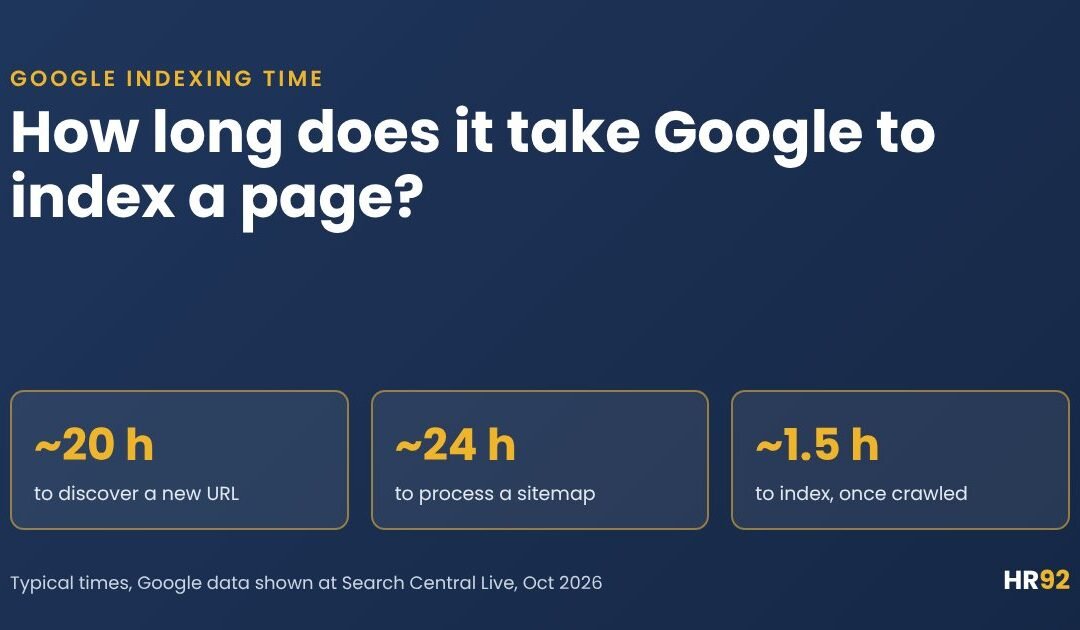

How long does it take Google to index a page? Google typically discovers a new URL in about 20 hours, and once it has crawled the page, indexing takes about an hour and a half. Those are Google’s own internal numbers, shown by Gary Illyes at Search Central Live in Barcelona in October 2026.
So on a healthy site, expect a new page in the index within a day or two. On a new site, or for a page Google doesn’t see as worth indexing, it can take weeks, and some pages are never indexed.
If you’re staring at “URL is not on Google” right now, I get it. Below: Google’s full timeline table, why the stages stack up, what happened on our own site this week, and what to do at each stage.
- Google’s typical times: about 20 hours to discover a new URL, about 24 hours to process a sitemap, and about 1.5 hours to index a page end to end once it’s crawled.
- The slow end is open-ended. Discovery and indexing can take “weeks to never”, and the reason is usually quality and priority, not server speed.
- On hr92.com, Google read our new sitemap within a day, but two posts published on October 9 still weren’t in the index about 28 hours later.
How long does it take Google to index a page?
Usually somewhere between a few hours and a few days. The 1.5 hour figure is real, but that clock only starts after Google has found the URL and crawled it, and finding it is often the slowest part.
Here’s what I’d expect in practice. The middle column is my judgment from Google’s numbers, not a Google promise.
| Your situation | What I’d expect | Why |
|---|---|---|
| Established site, new post linked from the homepage or blog and listed in the sitemap | Hours to a couple of days | Google already crawls the site often, so the new link gets found fast |
| Established site, page buried deep with few internal links | Days to a few weeks | Discovery leans on the sitemap, which Google typically processes in a day but can take up to 14 days |
| Brand-new domain | Days to weeks for the first pages | Google has little reason to crawl a site it has never seen |
| Updated page that’s already indexed | Often weeks, unless you prompt a recrawl | Google’s typical refresh crawl for a known URL is about 30 days |
| Thin, duplicate or low-value page | Possibly never | Google’s slowest bucket for indexing is “months or never”, for quality reasons |
Google’s own recrawl documentation gives the cautious version: crawling “can take anywhere from a few days to a few weeks.” And its guide to how Search works is blunt about the rest: Google doesn’t guarantee that it will crawl, index or serve your page, even if you follow every rule.
What are Google’s own indexing timelines?
In early October 2026, Gary Illyes from Google’s Search team showed internal data on how long crawling, indexing and serving take, at the Search Central Live Deep Dive event in Barcelona. Each process had a fastest, a typical and a slowest time.
Google hasn’t published this in its documentation. The numbers come from John Campbell’s day 3 recap at We Are Roast and from Barry Schwartz’s Search Engine Roundtable write-up, which includes photos of the slides. Only the typical and slowest times were reported, so that’s what I’ve charted.
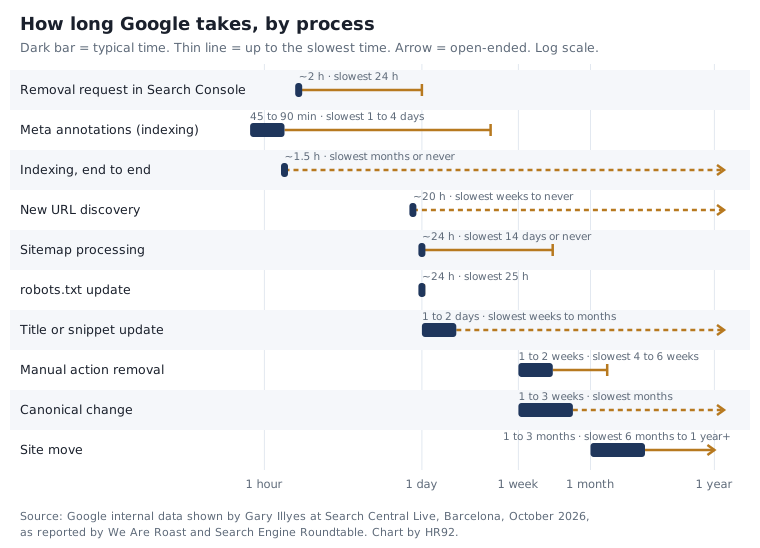
Crawling: how long until Googlebot visits
| Process | Typical | Slowest |
|---|---|---|
| Discovery of a new URL | About 20 hours | Weeks to never |
| Refresh of a known URL | About 30 days | Weeks to never |
| Sitemap processing | About 24 hours | Up to 14 days, or never (quality) |
| robots.txt update | About 24 hours | 25 hours |
| Crawl capacity update | 4 hours to 1 or 2 weeks | 1 to 3 weeks (in recovery) |
| Crawl demand update | About 20 hours | Weeks to months |
Indexing: how long until the page is in the index
| Process | Typical | Slowest |
|---|---|---|
| Rendering | Seconds to render, hours in the queue | Days to weeks |
| Meta annotations | 45 to 90 minutes | 1 to 4 days |
| Link annotations | Minutes to 1 to 3 weeks | Months |
| Indexing, end to end | About 1.5 hours | Months or never (quality) |
| Removal | 1 to 3 weeks | Months |
| Canonical change | 1 to 3 weeks | Months (conflicting signals) |
| Site move | 1 to 3 months | 6 months to over a year |
| Structured data updates | Hours to 1 or 2 weeks | Weeks or never (quality) |
| Images | Hours to days | Weeks to months |
| Videos | Hours to days | Weeks to months |
“End to end” means all the critical indexing processes finished successfully. The serving side (titles, snippets, removals, manual actions) is further down in other timelines.
Why does Google take so long to index some pages?
Because indexing is the last of several steps, each with its own queue, and the slowest steps depend on how much Google wants your page, not on how fast your server is.
- Discovery. Google finds the URL through a link on a page it knows, or your sitemap. Typical: about 20 hours.
- Crawl scheduling. Google decides when to fetch it. Its crawl budget guide describes two limits: crawl capacity (how much your server can take) and crawl demand, which depends on a site’s size, update frequency, page quality and relevance.
- Fetch and render. Googlebot downloads the page and runs its JavaScript. Rendering takes seconds, but the queue can take hours, or days to weeks at worst.
- Indexing. Google analyzes the page, picks a canonical and decides whether to store it. Typical: about 1.5 hours end to end.
- Serving. The page can now show for queries.
Add up the typical times for a brand-new URL and you land at roughly a day: about 20 hours to be discovered, then the crawl, then about 1.5 hours to index. That matches the URL Inspection help page, which says indexing after a request “typically takes only a day or so, but can take much longer in some cases.”
The “much longer” cases are mostly about priority. The point from the Barcelona recap I’d pin above every SEO’s desk: fast technical fixes don’t help if Google doesn’t think the page is worth it. Three of Google’s slowest buckets end in “never (quality)”.
Your server can slow things down too
Crawl capacity can drop in seconds when your server struggles, and recovery typically takes hours to a couple of weeks. Google updated its crawl rate documentation on October 6, 2026 to describe the Retry-After header with 503 and 429 responses, and it warns against serving those codes for more than 1 to 2 days.
How long does it take Google to index a new website?
Expect your first pages within days to a few weeks, not hours. A new domain has no crawl history and no links pointing at it, so Google has very little reason to visit, and crawl demand updates can take weeks to months in the slowest cases.
What actually moves the needle on a new site:
- Verify the site in Search Console and submit a sitemap. Google’s sitemap documentation calls submission “merely a hint”, but it’s the cheapest hint you can give.
- Get a few real links from sites Google already crawls. Partners, directories you belong to and your business profiles give Googlebot a path in.
- Request indexing for your most important pages. There’s a daily limit, so pick carefully.
- Launch with real content. Ten finished pages beat a hundred placeholders. Thin pages are exactly the ones in Google’s “never” bucket.
You’ll find neat rules on other ranking pages, like “3 to 4 weeks for sites under 500 pages”. I couldn’t find a Google source for any of them, so I’d treat them as rough guesses.
If you’re moving an existing site to a new domain, that’s a different clock. Google’s site move guide says a small to medium site can take a few weeks for most pages to move, larger sites take longer, and you should keep redirects for at least a year. Illyes’ typical figure for a site move was 1 to 3 months.
What happened when we checked hr92.com this week?
Google read our new sitemap within a day of submitting it, right in line with its typical 24 hours. But two blog posts we published on October 9 still weren’t in Google’s index about 28 hours later, even though our audit engine scored both 100 out of 100 on technical foundation. Here’s the detail.
Some background. Our own audit this month found that the sitemap in Search Console had been broken since October 2025: the old sitemap index was last read on October 21, 2025 and shows “Couldn’t fetch”. We submitted a working sitemap on October 9, 2026, and Google read it on October 10.
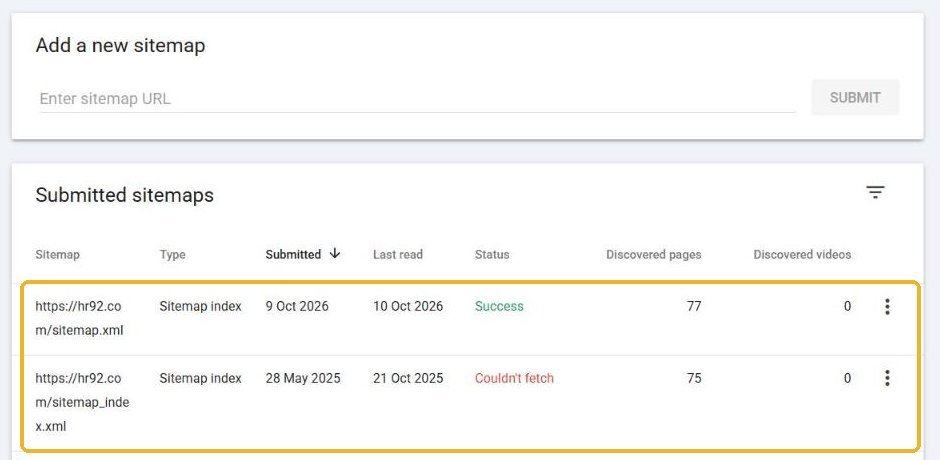
The Page indexing report shows what a year without a working sitemap looks like. Google knew about 29 URLs on our site, 21 indexed and 8 not, while our sitemap lists 77. Fewer than half of the URLs we want found were even known to Google.
Note the report’s last update: October 4, six days before I looked. This report lags, so don’t panic if it hasn’t caught up with yesterday’s fix.
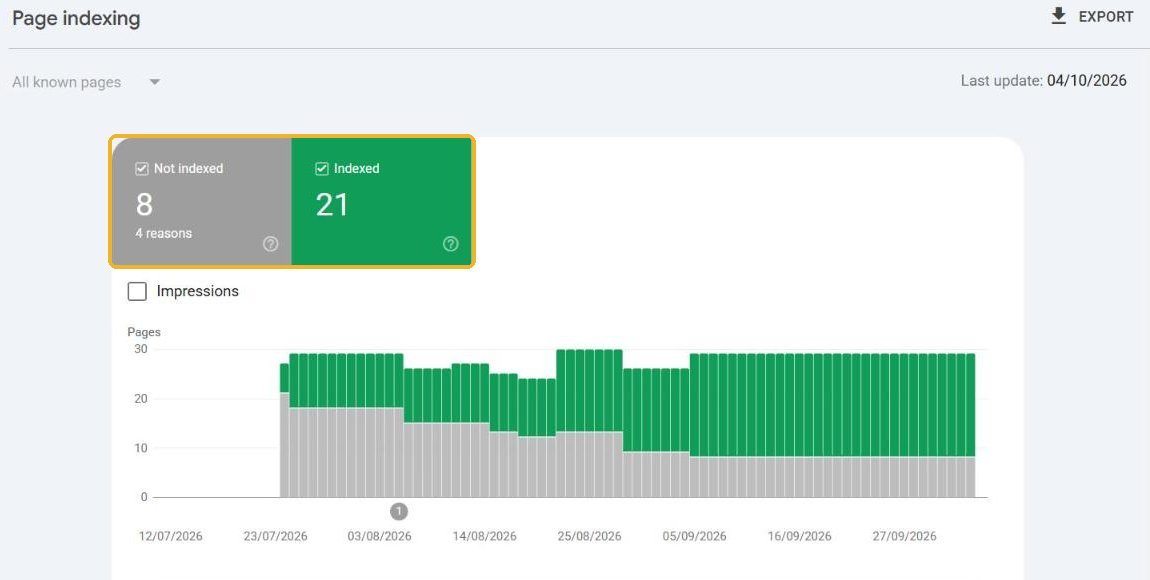
The 8 not indexed URLs are 3 redirects, 2 noindex, 2 not found (404) and the 403 I mentioned above. None of them are pages we want indexed.
Then I checked our three newest public pages with a site: search on October 10 at about 21:10 UTC:
| Page | Published (UTC) | In the sitemap? | HR92 audit, technical foundation | Found in Google on Oct 10? |
|---|---|---|---|---|
| SEO audit guide and free tool | Oct 8, 16:51 | Yes | Not checked | Yes |
| Search Console AI performance report | Oct 9, 16:46 | Yes | 100 / 100 (overall 84.2) | No |
| How to calculate target ROAS | Oct 9, 16:53 | Yes | 100 / 100 (overall 83.9) | No |
What I take from it:
- The sitemap step behaved exactly like Google’s typical number. Submitted one day, read the next.
- The posts are waiting in the discovery and crawl queue, not failing a technical check. Both pass every technical foundation check in our audit, so there’s nothing to fix. The 1.5 hour indexing clock simply hasn’t started yet.
- A site that Google rarely visits pays a discovery tax. With only 4 Google clicks in the three months before this, hr92.com doesn’t get much crawl demand yet. That’s the honest reason, and it’s the same reason most small business sites wait longer than the averages suggest.
Caveat: a site: search is a quick check. URL Inspection is the authoritative answer for one URL.
How do you tell where your page is stuck?
Inspect the URL in Search Console and read the page indexing status. The status tells you which stage the page is stuck at, and that tells you whether to wait or to fix something.
| Search Console says | Stuck at | What it means | What to do |
|---|---|---|---|
| URL is not on Google, never crawled | Discovery | Google hasn’t found or fetched it yet | Link to it from a crawled page, check it’s in the sitemap, request indexing once |
| Discovered – currently not indexed | Crawl scheduling | Found but not crawled; Google says it typically postponed the crawl to avoid overloading the site | Check server speed and errors, cut low-value URLs, then wait |
| Crawled – currently not indexed | Indexing decision | Crawled, not indexed, “may or may not be indexed in the future” | Improve or merge the page; Google says there’s no need to resubmit |
| Duplicate, Google chose different canonical than user | Canonicalization | Google picked another URL as the main version | Make the page clearly different or fix canonical signals; changes typically take 1 to 3 weeks |
| Excluded by ‘noindex’ tag | Your own setting | The page tells Google not to index it | Remove noindex, then request indexing |
| Blocked by robots.txt | Crawl | Googlebot isn’t allowed to fetch it | Fix robots.txt; Google typically picks up the change in about 24 hours |
| Blocked due to access forbidden (403) | Crawl | Your server refuses Googlebot | Check firewall, CDN and security plugin rules |
The definitions above come from Google’s Page indexing report help page. Two lines from that page save a lot of worry: you shouldn’t expect every URL on your site to be indexed, only the canonical pages, and new content “can take a few days” to be indexed.
How do you get Google to index a page faster?
You can’t force it, but you can remove every delay you control: make discovery instant, make the crawl easy, and make the page worth indexing. In order:
- Make sure it can be indexed. The page should return a 200 status, have no noindex, not be blocked in robots.txt and point its canonical at itself. Run Test live URL in URL Inspection. Google is clear that a passing live test doesn’t guarantee indexing, but a failing one guarantees it won’t happen.
- Link to it from a page Google crawls often. Your homepage, your blog index or a popular related article. Internal links are the fastest discovery path you control.
- Keep it in your XML sitemap with an accurate lastmod. Google uses lastmod only if it’s “consistently and verifiably” accurate, so don’t update it for trivial changes like a copyright year.
- Request indexing once. In URL Inspection, click Request indexing. There’s a daily limit per property, and Google says requesting a recrawl multiple times for the same URL won’t get it crawled any faster.
- Keep the server healthy. Fast responses and no 5xx errors while Google crawls.
- Make it worth indexing. Original information, a clear purpose and no near-duplicates elsewhere on your site. This is the step that decides whether the slow cases end in “indexed” or “never”.
What doesn’t work:
- The Indexing API for normal pages. Google’s Indexing API documentation limits it to job posting pages and livestream video pages, and says abuse can get your access revoked. Plugins that push blog posts through it are using it for something Google doesn’t support.
- Requesting indexing every day. Google says repeat requests don’t speed things up.
- URL returns 200 (not a redirect or 404)
- No noindex in the HTML or the X-Robots-Tag header
- Not blocked in robots.txt
- Canonical points to this URL
- Main content is in the HTML or renders in the live test screenshot
- Linked from at least one page Google already indexes
- Listed in the XML sitemap, with an honest lastmod
- Adds something the current top results don’t
If you’d rather not check all of that by hand, our free 54-check SEO audit covers the crawlability and indexability items in about a minute.
When should you worry that a page isn’t indexed?
My rule of thumb, built on Google’s typical and slowest times: on an established site, look into it after about a week; on a new site, give it two to three weeks before you assume something is broken.
| Time since publishing | Established site | New site |
|---|---|---|
| 0 to 2 days | Normal. Make sure it’s linked and in the sitemap, then wait. | Normal. Check the sitemap was read. |
| If Google has never crawled it, request indexing once. | Still normal. Request indexing for key pages. | |
| Look for a discovery or quality problem. | Inspect the URL. Add links from sites Google already crawls. | |
| 1 month or more | If crawled but not indexed, treat it as a content problem. Improve, merge or remove. | Same. Check the whole site isn’t thin or duplicated. |
If many pages are stuck at once, it’s rarely a page problem. That’s when a proper SEO audit pays for itself: sitewide noindex mistakes, broken sitemaps (like ours) and crawl traps show up there.
How long do other Google changes take?
Indexing isn’t the only clock. These serving times come from the same Google data.
| Change | Typical | Slowest |
|---|---|---|
| Removal request in Search Console (by the site owner) | About 2 hours | 24 hours |
| Title or snippet update | 1 to 2 days | Several weeks to months |
| Image shown with a text result | 1 to 2 weeks | Several weeks to months |
| Manual action removal | 1 to 2 weeks | 4 to 6 weeks, much longer for dormant sites |
| Recovery after a core update | 3 to 6 months | 6 months to a year (the next core update) |
| Change after a spam update | 1 to 2 weeks | Months |
Source: Google data shown by Gary Illyes in Barcelona, October 2026, as reported by We Are Roast and Search Engine Roundtable.
The practical one: after rewriting a title tag, give it a couple of days before judging whether Google uses it.
Do you need to be indexed to show up in AI Overviews?
Yes. Google’s AI features documentation says that to appear as a supporting link in AI Overviews or AI Mode, a page must be indexed and eligible to be shown in Google Search with a snippet, and that there are no additional technical requirements.
So every day a page waits to be indexed is a day it can’t be cited in Google’s AI answers. Once it’s indexed, you can track it with the Search Console AI performance report.
Our generative engine optimization work starts from the same place: pages Google can find, crawl and index without friction.
Google indexing time FAQ
How long does it take Google to index a new page?
On an established site, usually within a day or two. Google’s internal data puts typical discovery of a new URL at about 20 hours, and indexing at about 1.5 hours once it’s crawled. Hard-to-find or low-value pages can take weeks or never be indexed.
How long does it take Google to index a new website?
Plan for days to a few weeks for the first pages. Google’s documentation says crawling can take anywhere from a few days to a few weeks. Submitting a sitemap, requesting indexing for key pages and getting a few links from sites Google already crawls are the things that help most.
How do I get Google to index my page faster?
Make sure the page is indexable, link to it from a page Google crawls often, keep it in your XML sitemap with an accurate lastmod, and request indexing once in URL Inspection. Keep the server fast, and make sure the page adds something original.
Why is Google not indexing my pages?
Check the status in URL Inspection. “Discovered – currently not indexed” means Google postponed the crawl. “Crawled – currently not indexed” usually points to a quality or duplication issue. Noindex tags, robots.txt blocks, redirects and 403 errors are technical causes you can fix directly.
Does requesting indexing in Search Console speed things up?
It can, for a single URL. Google’s help page says indexing after a request typically takes a day or so but can take much longer, and that a request doesn’t guarantee indexing. There’s a daily limit, and requesting the same URL repeatedly won’t get it crawled any faster.
How long does it take Google to update a title or snippet?
Typically 1 to 2 days, according to Google’s internal data shown in October 2026, and several weeks to months in the slowest cases. The page has to be recrawled first, so requesting indexing after an important change helps.
Want help with the whole site? See our technical SEO services.