
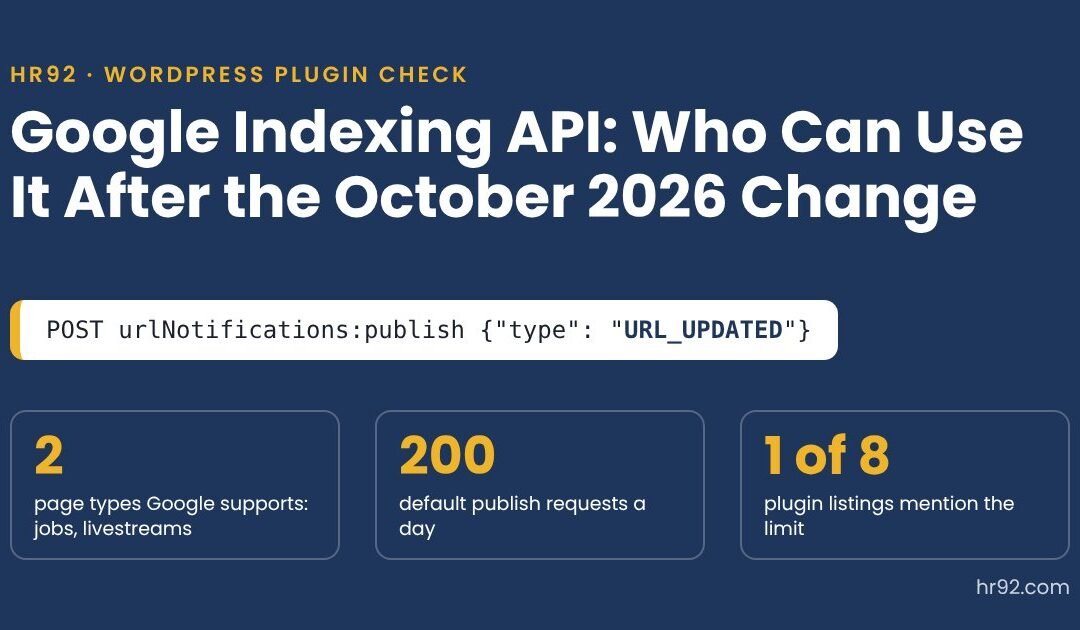

Google updated three Indexing API pages today, October 16, 2026. The approval form, the “initial default quota for testing” wording and a line about using the API instead of sitemaps are gone. The rule that matters most to most site owners didn’t move: it’s still for jobs and livestreams only.
That matters because a lot of WordPress sites send every blog post, product and service page to this API through a plugin. I checked WordPress.org and found 8 plugins with 1,000+ active installs that offer it, and only one of their listings mentions Google’s limit. Below: what changed, who the API is for, what those plugins don’t tell you, what to use instead, and how to set it up properly if you do run a job board or livestreams.
- Google’s docs say the Indexing API “can only be used to crawl pages with either JobPosting or BroadcastEvent embedded in a VideoObject.” That sentence is unchanged after today’s update.
- Google removed the quota request form and the approval wording on October 16, 2026. The documented default is still 200 publish requests a day per project.
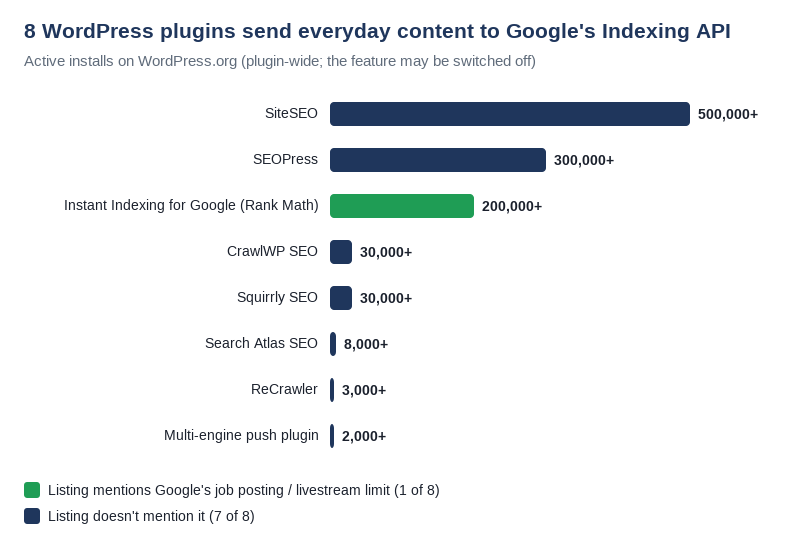
- 8 WordPress plugins with a combined 1.07 million+ active installs offer to send ordinary posts and pages to the API. 1 of 8 listings mentions the limit.
- For blog posts, service pages and products, use an accurate XML sitemap, internal links and, for a handful of URLs, Search Console’s URL Inspection tool.
- Every Indexing API submission goes through spam detection, and Google says abuse can get your access revoked.
What is the Google Indexing API?
The Google Indexing API is a Google Search Central API that lets a site owner tell Google a specific URL was added, updated or removed. Google then schedules that page for a fresh crawl. It’s free: Google’s quota page says “All use of the Indexing API is available without payment.”
According to Google’s Indexing API Quickstart, it does four things:
- Update a URL (type URL_UPDATED): tell Google a page is new or changed.
- Remove a URL (type URL_DELETED): tell Google a page is gone, so it drops it and stops crawling it.
- Get notification status: see when Google last received each kind of notification for a URL.
- Batch requests: combine up to 100 calls in one HTTP request.
Read the response codes carefully. Google’s Using the Indexing API page says an HTTP 200 “means that Google may try to recrawl this URL soon.” It says “may,” and it’s a crawl, not a promise to index or rank. The status endpoint “doesn’t tell you when Google indexes or removes a URL; it only returns whether you successfully submitted a request.”
What changed on October 16, 2026
Google’s documentation changelog for October 16, 2026 says it updated the quota page “to document the current quota limits for the Indexing API and remove an outdated form.” Search Engine Roundtable noticed edits on three pages. I compared each live page with its last archived copy (quota page, October 5) line by line. Here’s the full list:
| Page | Removed | What it means |
|---|---|---|
| Quota and pricing | “initial default quota for testing, and it requires additional approval for usage and resource provisioning” | The 200 a day is now simply “Default quota,” not a testing allowance |
| Quota and pricing | The “Request quota and approval” section with the request form, and “The quota may increase or decrease based on the document quality” | No documented way left to ask for more than the default |
| Quickstart | The “Request approval and quota” step (200 default quota for onboarding and testing) | Setup is now 3 steps: prerequisites, guidelines, send requests |
| Quickstart | “Sitemaps and the Indexing API”: use the API instead of sitemaps for short-lived pages, but still submit a sitemap | The same advice still sits in Google’s JobPosting documentation |
| Using the API | “The Indexing API provides a default quota for testing. To use the API, request approval and quota.” (3 times) | Same change as above |
What did not change: the eligibility sentence (“can only be used to crawl pages with either JobPosting or BroadcastEvent embedded in a VideoObject”), the spam warning in the Quickstart, the guideline that “Our spam policies apply to content submitted with the Indexing API,” and the warning not to get around submission limits with multiple accounts.
Google’s own AI Overview still describes the old form
A few hours after the update, I searched “google indexing api” from a US browser. The AI Overview still told people they “must submit an official approval request form” to get more quota.
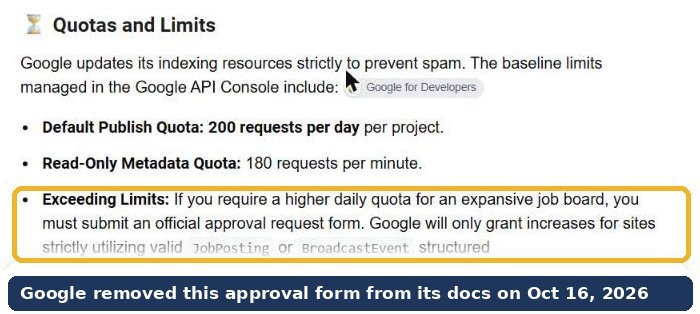
That’s a useful reminder for any API or policy question: AI answers lag the source. When the documentation page shows “Last updated” with today’s date, read the page, not the summary.
Who can use the Google Indexing API?
Any site owner can switch the Google Indexing API on, but Google supports it for only two kinds of pages. The test is the structured data on the page, not your industry or the size of your site.
| Page type | Supported? | Markup Google looks for |
|---|---|---|
| Job posting pages | Yes | JobPosting with datePosted, description, hiringOrganization, jobLocation and title |
| Livestream video pages | Yes | VideoObject with a BroadcastEvent publication (isLiveBroadcast, startDate, endDate) |
| Regular video pages | No | VideoObject without BroadcastEvent |
| Blog posts and articles | No | Article, BlogPosting |
| Product and category pages | No | Product |
| Service and location pages | No | Service, LocalBusiness |
Google’s video documentation is explicit about livestreams: call the API when the video goes live, when it stops and the markup shows the endDate, and whenever the markup changes. It adds: “The Indexing API only supports livestream videos.” The checker at the top of this page reads your JSON-LD and tells you which bucket a page falls into.
Can you use the Indexing API for blog posts?
No, not in a way Google supports. Blog posts, service pages and products aren’t JobPosting or BroadcastEvent pages, so they fall outside what Google’s documentation covers. Technically, a plugin can still send them, and the API may answer with a 200, which is why so many people think it works.
Here’s why I don’t do it on client sites:
- A 200 isn’t indexing. Google’s own wording is that it “may try to recrawl.” A crawl was never the hard part for a decent page on a healthy site. Getting chosen for the index is.
- Everything is screened for spam. The Quickstart says “All submissions through the Indexing API undergo rigorous spam detection” and that abuse “may result in access being revoked.”
- The plugin makers say it themselves. Rank Math’s Instant Indexing listing says Google recommends the API “ONLY for Job Posting and Live Streaming websites.” Their setup guide says they “do not recommend using it on money websites.” If you run a business site, that’s your site.
- You add a moving part for no documented gain. A Google Cloud project, a service account, a JSON key with Owner access in Search Console, and a plugin calling it on every save. That’s attack surface and maintenance on a business site for a benefit Google doesn’t document.
What WordPress plugins don’t tell you about the Indexing API
I searched the WordPress.org plugin directory on October 16, 2026 for “indexing api,” “instant indexing” and “google indexing api” (893 unique plugins). Then I read the listing of every plugin that mentions Google’s Indexing API and kept those with at least 1,000 active installs that send ordinary posts or pages to it.
| Finding | Count |
|---|---|
| Plugins (1,000+ installs) offering Google Indexing API submission for ordinary content | 8 |
| Their combined active installs (WordPress.org rounds these down) | 1,073,000+ |
| Listings that mention Google’s JobPosting/livestream limit | 1 of 8 |
| Listings of Yoast SEO and All in One SEO that offer Google’s Indexing API | 0 of 2 (both list IndexNow) |
Two notes before anyone panics. Active installs count the whole plugin, and in all-in-one SEO plugins this is one optional feature among dozens, so most of those sites probably never switched it on. And I’m not saying these plugins break any rule by offering it. My point is narrower: if you turn it on, the plugin’s listing usually won’t tell you that Google only supports it for two page types.
The one honest outlier was tiny: a plugin called Fast Index (300 installs) states Google’s limit in plain words and says Google “may accept a notification and answer 200” for other pages without promising a crawl. That’s the right way to describe it.
What to do if your site already sends posts to the API
- Find the setting. In your SEO plugin, look for “Instant Indexing,” “Google Indexing API” or “Instant index.” If you installed Rank Math’s separate Instant Indexing plugin, it’s under its own settings page.
- Switch off Google for non-job, non-livestream content. Keep IndexNow on if you want Bing and the other engines that support it.
- Clean up access. In Search Console settings, remove the service account from the property’s users if nothing else needs it, and disable or delete its JSON key in Google Cloud.
- Check your sitemap. Make sure new pages appear in it with an accurate lastmod.
Turning it off doesn’t remove anything from Google’s index. Pages that were indexed stay indexed on their own merits.
What to use instead of the Indexing API
For pages the Indexing API doesn’t support, Google documents three tools: the XML sitemap, the URL Inspection tool and internal links. Google’s Ask Google to recrawl your URLs page splits it by volume: URL Inspection for “just a few URLs,” a sitemap for “large numbers of URLs.”
| Situation | Use this | Why |
|---|---|---|
| New blog post or service page | XML sitemap with accurate lastmod + links from related pages | Google uses lastmod “if it’s consistently and verifiably” accurate (sitemap docs) |
| One important page, changed today | Search Console URL Inspection, Request indexing | Fine for a few URLs; repeat requests “won’t get it crawled any faster” |
| Site launch or migration | Submit the sitemap, keep redirects in place | Google calls the sitemap “very helpful” after a launch or site move |
| Bing, Yandex, Naver, Seznam, Yep | IndexNow | IndexNow.org lists these engines; Google isn’t on the list |
| Job board or livestreams | Indexing API + sitemap | The two page types Google supports |
The same Google page sets expectations: “Crawling can take anywhere from a few days to a few weeks,” and requesting a crawl “does not guarantee that inclusion in search results will happen instantly or even at all.” I covered real timings in how long it takes Google to index a page.
Our own blog, without the Indexing API
hr92.com runs no Indexing API plugin (I checked our active plugins today; our SEO plugin, All in One SEO, lists IndexNow, not Google’s Indexing API). New posts get an XML sitemap entry and internal links. On October 16, 2026 I ran a site: search for each of our last 10 posts:
| Post | Published | In Google (site: check, Oct 16) |
|---|---|---|
| Google Lens SEO | Oct 15 | Yes |
| Does Google penalize AI content? | Oct 13 | Not yet |
| AI visibility tracking | Oct 13 | Yes |
| E-E-A-T author bios | Oct 11 | Yes |
| How long does Google take to index | Oct 11 | Yes |
| Google Ads automated promotions | Oct 10 | Yes |
| Google spam update | Oct 10 | Yes |
| How to calculate target ROAS | Oct 9 | Yes |
| Search Console AI performance report | Oct 9 | Yes |
| Free SEO audit | Oct 8 | Yes |
9 of 10 show up, including yesterday’s post. One from October 13 doesn’t yet. A site: search is a rough check, not an index report, but the pattern is clear enough: a young site with a working sitemap and internal links gets most new posts picked up within days. For the one that’s missing, the fix is the boring list in the callout above, not an API.
How to set up the Indexing API for job postings or livestreams
If your pages carry valid JobPosting or livestream BroadcastEvent markup, the Indexing API is the tool Google recommends. Google’s prerequisites page lists four steps before your first call:
- Create a Google Cloud project and enable the Indexing API for it.
- Create a service account and download its private key (JSON).
- Add the service account as an owner of your Search Console property. You first verify ownership of the site yourself, then add the service account’s email as an owner.
- Get an access token with the Indexing API scope and send it with every request.
Then send a POST to https://indexing.googleapis.com/v3/urlNotifications:publish with a JSON body and the Content-Type application/json:
{
  "url": "https://example.com/jobs/senior-accountant-miami",
  "type": "URL_UPDATED"
}
When the job is filled or the page is gone, send the same call with “type”: “URL_DELETED”. Google’s rule: before you request removal, the URL must return a 404 or 410, or carry a noindex robots meta tag.
- Every job page has valid JobPosting markup with the five required properties
- validThrough set on jobs that expire
- URL_UPDATED sent when a job is posted or edited
- URL_DELETED sent only after the page returns 404/410 or noindex
- Expired jobs removed from the sitemap too
- Only job and livestream URLs go to the API, nothing else
- Errors and daily usage logged, so you see a quota problem the same day
Indexing API quota and limits
The Indexing API quota is 200 publish requests a day per Google Cloud project by default, per Google’s quota page as of October 16, 2026. URL_UPDATED and URL_DELETED both count. The other two defaults:
| Quota | Default | Notes |
|---|---|---|
| Publish requests | 200 per day per project | Resets at midnight Pacific Time; new quota can take up to 24 hours to take effect |
| Metadata (status) requests | 180 per minute per project | Read-only getMetadata calls |
| All endpoints | 380 per minute per project | Overall rate limit |
| Batch size | Up to 100 calls | Quota counts each URL, not each batch |
Can you get more than 200 a day? Google’s documentation no longer explains how. The request form is gone and the page now points you to the Google API Console to view your quota. If a job board needs more, I’d check the quota section of your Cloud project first. What I wouldn’t do is spread URLs across extra projects or accounts: the guidelines name “using multiple accounts” as something not to do.
FAQ
Is the Google Indexing API free?
Yes. Google’s quota page says all use of the Indexing API is available without payment. The costs are setup and upkeep: a Google Cloud project, a service account with owner access in Search Console, and code or a plugin that sends the right URLs at the right time.
Does the Indexing API work for blog posts?
Google doesn’t support it for blog posts. Its documentation limits the API to pages with JobPosting or BroadcastEvent inside VideoObject. A request for a blog post may still return HTTP 200, but that only means Google received it and “may try to recrawl,” not that the post will be indexed.
Did Google remove the 200-request limit?
No. On October 16, 2026 Google removed the approval form and the “for testing” wording. The quota page still lists a default of 200 publish requests per day per project, 180 metadata requests per minute and 380 requests per minute across all endpoints.
How do I ask Google to index a page?
For a few URLs, use the URL Inspection tool in Search Console and click Request indexing. You need owner or full user access to the property. For many URLs, submit an XML sitemap. Google says crawling can take from a few days to a few weeks, and a request doesn’t guarantee indexing.
Is Rank Math Instant Indexing safe to use?
For job postings and livestreams it’s a convenient way to call the API. For other content, Rank Math’s own listing says Google recommends the API only for those two page types, and its guide doesn’t recommend it on money websites. I’d keep Google submission off for a business site and use IndexNow for Bing.
Does Google support IndexNow?
IndexNow.org’s list of participating search engines on October 16, 2026 included Bing, Yandex, Seznam, Naver and Yep, plus the Internet Archive and Amazonbot. Google wasn’t on it. For Google, the sitemap and Search Console are the supported routes.
How fast does the Indexing API work?
Google doesn’t publish a time. It says a successful call means Google “may try to recrawl this URL soon.” For job postings, Google’s JobPosting documentation says the API “prompts Googlebot to crawl your page sooner” than a sitemap. Crawling sooner and being indexed are two different things.
The next step
If you run a job board or stream live, set the API up properly with the checklist above and log every response. If you don’t, turn Google submission off in your plugin and spend that effort on the things that get pages indexed: a clean sitemap, internal links from pages that already rank, and content that earns its place.
Related services: technical SEO, SEO audits and WordPress website design. Related reading: how to tell if a Google spam update hit you.