

That button just got more important. On November 16, 2026, Google said Ask Maps can now find beauty, pet care, auto and home repair appointments online and call local businesses for the person asking, starting in the US. A week earlier, local SEOs reported Google adding Book online links to profiles that never asked for one, some of them broken.
Below: the add, fix and remove steps from Google’s help pages, the setting for Google’s automated booking calls, and how 86 Miami businesses in those four categories take bookings today.
- A Book online button comes from one of three places: a booking link you added, a booking partner connected to your profile, or (reported by practitioners on Nov 9, 2026, not confirmed by Google) a link Google added on its own.
- You can’t delete a partner’s booking link inside your profile. Google says you ask the provider, who has 5 business days, and then report a violation if it’s still there.
- Google checks booking links with a crawler called Google-BusinessLinkVerification and can remove links that error out, block bots or don’t let customers finish the booking.
- Google’s automated booking calls are controlled under More, Business Profile settings, Advanced settings. Google’s help page says they aren’t available in Indiana, Louisiana, Minnesota, Montana and Nebraska.
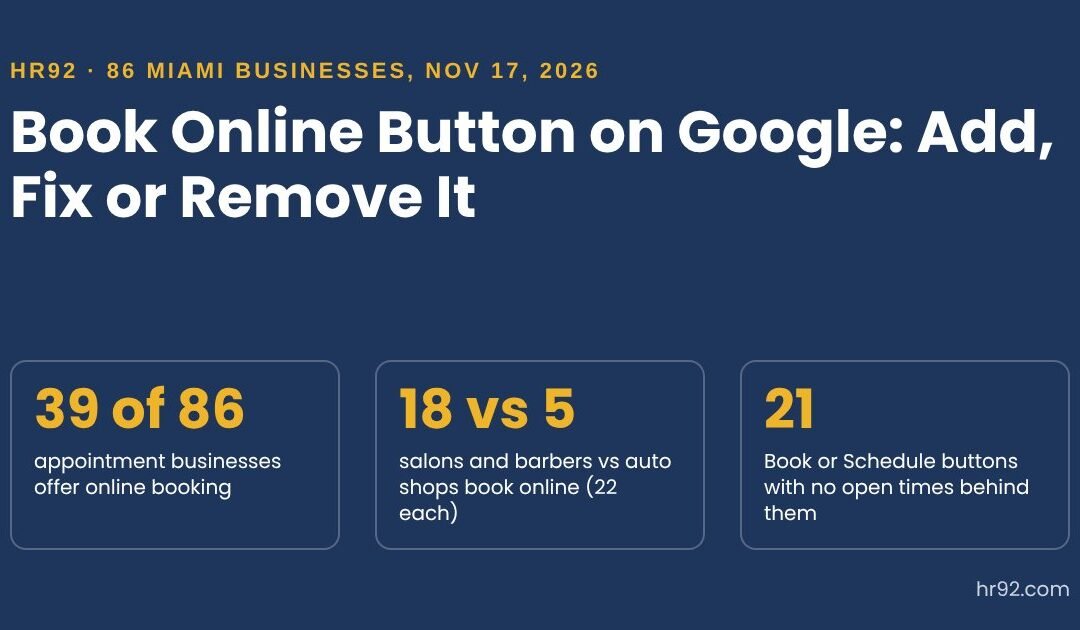
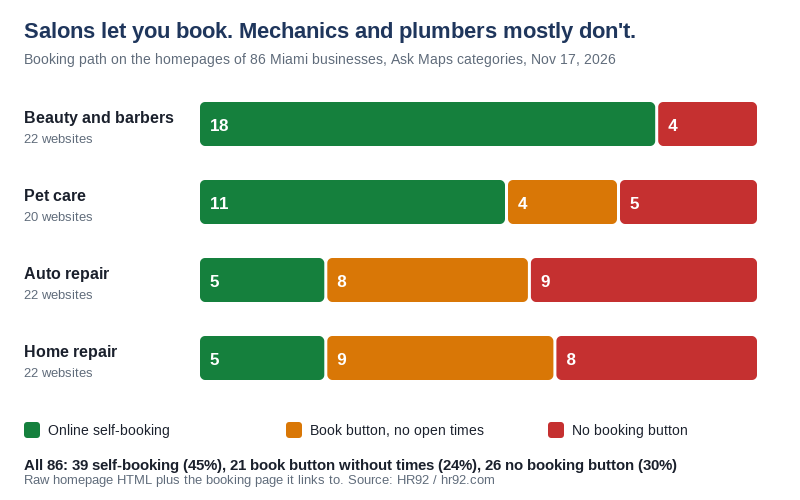
- In my check of 86 Miami businesses, 18 of 22 salons and barbers let you book online, but only 5 of 22 auto shops and 5 of 22 home repair companies did. 21 had a Book or Schedule button with no open times behind it.
Add, fix or remove the Book online button: what to do in each case
The right move on a Google Book online button depends on who put it there and where it leads. Find your situation in the table, then jump to the matching steps below.
| What you see | Where it most likely comes from | What to do |
|---|---|---|
| No button, and you want one | Nothing set up yet | Add your own booking page under Bookings, or connect a scheduler from Google’s partner list |
| A button you never added | A booking partner, or a link Google added (practitioner reports, Nov 2026) | Open Bookings in your profile and check which link or provider it is |
| Button opens an error page | A broken link, a blocked page or a Google-side redirect | Test it logged out on a phone; fix or replace the link; Google can remove links that return 500 or 503 |
| Button opens your contact page | A contact URL saved as the booking link | Replace it with a page where customers can actually book |
| Button points to an old or unwanted provider | A third-party partner link | Ask the provider to remove it; report a violation after 5 business days |
| Several booking options, wrong one first | More than one link for the Booking type | Set your own link as Business preferred |
| You don’t want Google calling to book | Google’s automated calls on behalf of customers | Turn off “Bookings and inquiries from customers” in Advanced settings |
Based on Google Business Profile Help: Manage your local business links, Business links policies and guidelines, Set up bookings through a provider, and About automated calls and texts, all checked November 17, 2026.
Where the Book online button on Google comes from
The Book online button is the Booking type of what Google calls local business links. Google’s Manage your local business links page says these links let customers “take action directly from your profile on Google Maps or Search,” including to book an appointment or make a reservation.
There are three routes onto a profile:
- A link you add. Any page where customers can book, entered by you under Bookings.
- A booking partner. A scheduling provider connected through Reserve with Google. Google’s help says “Links to certain services, like food ordering, appointments, or reservations, can automatically appear on your Business Profile through third-party partners.”
- A link Google adds. On November 9, 2026, Barry Schwartz reported at Search Engine Roundtable that a booking link had been added to his own company’s profile, and that Joy Hawkins, Brandon Schmidt and Syed Amir were seeing the same on other profiles. Some links that went through Google’s maps/reserve flow showed a 500 error. Google hasn’t confirmed this, so treat it as a practitioner report.
Syed Amir’s observation from that report matters most for owners: he said that “simply adding a website’s Contact page in the Booking Link section is now triggering the ‘Book Online’ button.” So a contact URL saved months ago can now look like a booking button to customers.
How to add a booking link to your Google Business Profile
A Google Business Profile booking link is added from the profile itself, in Search or in Maps, and only after the business is verified. Google’s steps:
- Open your profile. Go to your Business Profile while signed in to the account that manages it.
- Find Bookings. In Google Search, select Booking. In Google Maps, select Edit profile and then the transaction type you want.
- Add the link. Select Add link (or Add another link if you have one), enter the URL of your booking page and select Save.
- Pick your preferred link. If there’s more than one, select the transaction type, then Set preferred link, choose yours and save. It shows at the top as “Business preferred.”
- Tag it. Add UTM parameters to the URL so bookings from Google show up as their own source in analytics. Meevo’s Google integration does the same with utm_source=GMB, and I use the same UTM method in my GA4 traffic tracking guide.
Google’s business links policies add the rules that trip people up:
- The link must “lead to a dedicated landing page for your business,” and multi-location businesses must link to the page for that specific location.
- It must “allow customers to complete the designated action.” Social media sites, messaging links, app store links and link shorteners aren’t allowed.
- You can add one link per domain. If a third-party provider already uses that domain, Google removes the new link you added.
- The two help pages disagree on the cap: one says up to 10 links per category, the policy page says a maximum of 20 per transaction type.
- Links can’t be added through the Business Profile API or a spreadsheet upload.
Booking partners and Reserve with Google: when a link isn’t enough
Reserve with Google is Google’s program for booking through connected scheduling providers instead of a plain link. Google’s Set up bookings through a provider page says you select Get started in your profile to sign up a provider, and “Your booking providers will show up on your Business Profile within a week.” It also warns that “your provider might charge you,” and that performance data “isn’t available for custom links.”
All four Ask Maps categories qualify. Google’s Actions Center platform policies for providers list Beauty (hair salon, barber shop, nail salon), Pet (pet care, pet groomer), Vehicle (auto repair, tire shop, collision repair) and Home Services (plumber, AC contractor, electrician, appliance repair) as supported. Two limits from the same page: “Emergency departments are not supported, nor are other emergency appointment types at other facilities,” and the business must match Google Maps on name, address, phone number and website. Housecall Pro, for one, tells its users to make those details identical before connecting.
Google’s partner page lists more than 400 providers. Square Appointments, Booksy, Fresha, Mindbody, MyTime, Setmore, Housecall Pro, ServiceTitan and Wix are on it. Vagaro, Jobber, Calendly, Gingr, Phorest and Tekmetric weren’t when I checked on November 17, 2026. The page isn’t the whole story, though: Meevo documents its own Google Book Online integration without appearing there, so ask your vendor directly.
What 86 Miami businesses in the Ask Maps categories do today
Online booking is common in Miami beauty and pet care and rare in auto and home repair. On November 17, 2026, I collected 100 Miami businesses in the four categories Ask Maps now books (from web search results, local listicles and a contractor directory), fetched each homepage and followed its booking button. 86 sites answered with a working business website. I also ran each through the HR92 audit engine.
| Category | Sites | Online self-booking | Book button, no open times | No booking button | Scheduler on Google’s partner page | Click-to-call link | Phone and address on homepage | LocalBusiness schema |
|---|---|---|---|---|---|---|---|---|
| Beauty and barbers | 22 | 18 | 0 | 4 | 8 of 18 | 16 | 17 | 5 |
| Pet care | 20 | 11 | 4 | 5 | 1 of 11 | 14 | 14 | 8 |
| Auto repair | 22 | 5 | 8 | 9 | 0 of 5 | 22 | 21 | 12 |
| Home repair | 22 | 5 | 9 | 8 | 5 of 5 | 20 | 16 | 11 |
| All | 86 | 39 (45%) | 21 (24%) | 26 (30%) | 14 of 39 | 72 (84%) | 68 (79%) | 36 (42%) |
HR92 check, November 17, 2026. “Online self-booking” means the homepage, or the page its booking button opens, offers a scheduler with open times. “No open times” means a Book or Schedule button that leads to a contact or request form, WhatsApp, a callback request or a page that isn’t a customer booking page. Phone and address, and LocalBusiness schema, are passes in the HR92 audit engine (an HR92 diagnostic, not a Google metric). 14 of 100 sites were excluded: 9 didn’t respond, 2 were parked domains, 3 redirected away or were gone.
What stood out:
- The split is by industry. 18 of 22 salons, nail bars and barbers had online booking. Only 5 of 22 auto shops and 5 of 22 plumbers, AC companies and handymen did. For those trades the phone is still the booking system: every auto shop had a click-to-call link.
- A “Book” button often isn’t a booking. 21 of the 86 had a Book or Schedule button with no open times behind it, mostly contact or request forms, plus WhatsApp chats and callback requests. One pet business’s “Book an appointment” button pointed to its booking platform’s business login page instead of the customer booking page.
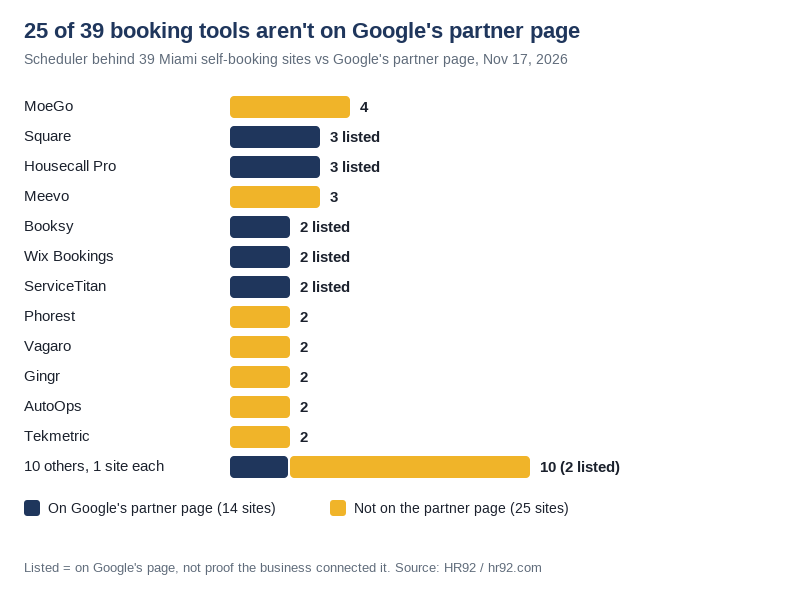
- Most schedulers aren’t on Google’s partner page. 25 of the 39 self-booking sites use a tool that wasn’t listed, led by MoeGo for groomers, Meevo and Phorest for salons, Gingr for dog daycare and AutoOps and Tekmetric for auto shops. Every home repair site with online booking used Housecall Pro or ServiceTitan, both listed.
- Contact details are there, structured data less so. 68 of 86 showed a phone and street address on the homepage; 36 had LocalBusiness schema. Median AI readiness in our engine: GEO 63.6, AIO 87.5, AEO 72.5 out of 100.
Some good examples from the sample: Oasis Plumbing, Cool Solution Services and Eugene Soul Handyman link straight to Housecall Pro booking pages, Salon Ethos and LAHH Salon book through Phorest, and FreeDOGm and Woof N Wag Miami take reservations through Gingr.
Limits: one city, one day, raw HTML plus one click. Booking widgets that load only with JavaScript can be missed, and a scheduler on the website tells you nothing certain about what’s on the Business Profile.
How to fix a broken Book online button
A broken Book online button is usually a link Google can’t load or a page where nobody can book. Google says its crawlers check business links “daily at most,” and that “Links that cannot be crawled by our automated tools may be removed.”
- Click it like a customer. Signed out, on a phone, from both Google Search and Google Maps. Note where it lands.
- Check the status code. Google’s policy says the link must return “200 OK” or a similar success code, and must not return “500 Internal Server Error” or “503 Service Unavailable.”
- Let Google’s checker in. The policy names the user agent Google-BusinessLinkVerification and says these crawlers “don’t follow robots.txt rules.” Don’t block that user agent, rate-limit it, put the page behind a CAPTCHA or login, block it by IP or geography, or show it different content.
- Make sure the page books. The link must let customers complete the action. A contact form asks for a callback; it doesn’t book. If you have no scheduler yet, even a basic online scheduler with open times is closer to what the policy asks for.
- Point each location to its own page. Multi-location businesses must link to the specific location, not a general landing page.
- If the error is on Google’s side, such as the maps/reserve 500 errors in the Roundtable report, replace the link with your own booking URL and set it as Business preferred.
How to remove the Book online button from Google
Removing a Book online button from Google works differently for links you added and links a partner added. For links you added, go back to Bookings in your profile, where Google’s help page has you add links and set the preferred one, and change or remove the link there.
For third-party booking links, Google is blunt: “You cannot manually delete third-party booking or reservation providers directly from your Business Profile settings.” The steps from the same help page:
- Contact the provider through its opt-out link, support form or account portal.
- Wait 5 business days. “Third-party providers are required to process opt-out requests within 5 business days.”
- Report a third-party violation through Google’s form if the link is still there.
If you cancel the software, turn off its Google integration first. Meevo, for example, says that after you disable its Book Online integration “it can take up to 24 – 72 hours for the Book Online button to be removed.” And note the asymmetry: Google lets you hide third-party food ordering providers with a switch, but not booking providers.
Should you remove a button Google added?
Only if it’s wrong. If an auto-added button lands on a page where people can book, it’s free visibility. If it lands on a contact form or an error, replace it with a real booking page rather than leaving the profile without one.
What happens when Ask Maps starts booking for your customers
Ask Maps appointment finding is a new Google Maps feature that looks for open slots online and can phone businesses for the user. Google’s November 16 post says: “Now, with new agentic capabilities, you can choose to have Ask Maps find beauty, pet care, auto and home repair appointments online and call local businesses for you.” Its example is “Find me a 4 p.m. nail appointment near me,” and it says finding appointments is “launching first in the U.S.”
Google’s post doesn’t explain how Ask Maps picks which businesses to check, or whether its calls follow the Business Profile call setting. Search Engine Journal pointed out the same gap. Here’s what Google does document:
- Google’s automated calls help page says that when customers book through Search or Maps, “If your business works with online booking providers, Google may book through the partner or by calling your business directly.” The calls are “monitored and recorded for quality assurance.”
- Google Search has a similar feature, launched in 2025. Its help page describes “Have AI check pricing” for services such as auto repair, hair salons and pet groomers: Google calls several providers and emails the user quotes, and the page says it “will not create a booking.” When it launched, a Google spokesperson told Search Engine Journal that businesses are picked “based on traditional local search rankings.”
- At I/O in May, Google said people could ask it to call businesses “for select categories like home repair, beauty or pet care.”
Also worth watching: on November 10, Search Engine Roundtable showed Google testing an AI Overview local pack without action buttons, reviews or photos. The more discovery moves into AI answers, the more the actions Google takes for the customer matter.
How to turn Google’s automated booking calls on or off
Google’s automated booking calls are switched on or off in your Business Profile’s Advanced settings, and only a verified business can opt out. The path on Google’s help page:
- Go to your Business Profile.
- Select More, then Business Profile settings, then Advanced settings.
- Under “Google automated calls and text messages,” switch each feature on or off: Bookings and inquiries from customers, Keep your profile up to date, and Post to your profile on your behalf.
You can also say on a call: “Please stop calling my business.” Google notes that after you opt out “you may still occasionally get manual calls from Google to confirm your business information.”
| Fact | What Google’s help page says |
|---|---|
| When Google calls | To book an appointment, check a restaurant wait time, confirm price and availability, check hours or check in-demand inventory |
| Cost | “Businesses and customers can use this feature at no charge” |
| US availability | All states except Indiana, Louisiana, Minnesota, Montana and Nebraska |
| Recording | Calls on behalf of customers are monitored and recorded |
| Profile updates from calls | Marked “Pending” and reviewed, which can take up to 5 business days |
| Scam warning | “Google will never ask for payment, credit card information, or account passwords” |
Should you turn bookings and inquiries off? I wouldn’t, if you take appointments in these four categories. Turning it off may cost you bookings from people who never call themselves. Brief whoever answers your phone instead: an automated caller from Google booking for a customer is a real lead, and a caller asking for payment to keep you on Google isn’t Google.
Google booking link checklist
- Profile verified, so you can add links and control calls
- Bookings opened in your profile and every link and provider identified
- Each booking link opens a page where customers can pick a time
- Your own link set as Business preferred
- UTM tags on your booking link
- Link tested signed out, on a phone, from Search and Maps
- Google-BusinessLinkVerification not blocked by your firewall or security plugin
- Unwanted provider links opt-out requested, with the date noted for the 5-day clock
- Name, address, phone and website identical in your profile and your scheduler
- Advanced settings checked for automated calls, and staff briefed on Google’s calls
FAQ
Why did a Book online button appear on my Google Business Profile?
Usually a booking partner connected your business, or a URL sits in your profile’s Booking section. Practitioners also reported in November 2026 that Google was adding booking links itself and that a saved contact page could trigger the button. Open Bookings to see the source.
How do I remove the Book online button from Google?
If you added the link, change or remove it under Bookings in your profile. If a third-party provider added it, Google says you can’t delete it yourself: contact the provider, wait up to 5 business days, then report a third-party violation to Google if it’s still showing.
Can I use my contact page as my Google booking link?
I wouldn’t. Google’s policy says business links must let customers complete the action, and a contact form only starts a conversation. Practitioners report it can still trigger the button, but Google says it may remove non-compliant links.
Will Ask Maps call my business?
It can. Google says Ask Maps can find appointments online and call local businesses, starting in the US. Google’s post doesn’t say how it chooses businesses or whether the Business Profile call setting applies, so check that setting and brief your staff.
How long does a new booking link or provider take to show?
Google says booking providers show up on your profile within a week. For your own link, Google says changes are published after the business is verified and the link edit is approved, without a time frame. Meevo tells its users to allow 24 to 72 hours for its integration.
The next step
Open your Business Profile today, select Bookings and click every link in it from your phone. If any of them lands on a contact form, an error or an old provider, fix that first. Then check Advanced settings for automated calls. Both take about ten minutes and decide what happens when Ask Maps goes looking for an appointment near you.
Related: local SEO services, WordPress website design with online booking pages and talk to HR92 about your Google Business Profile.