

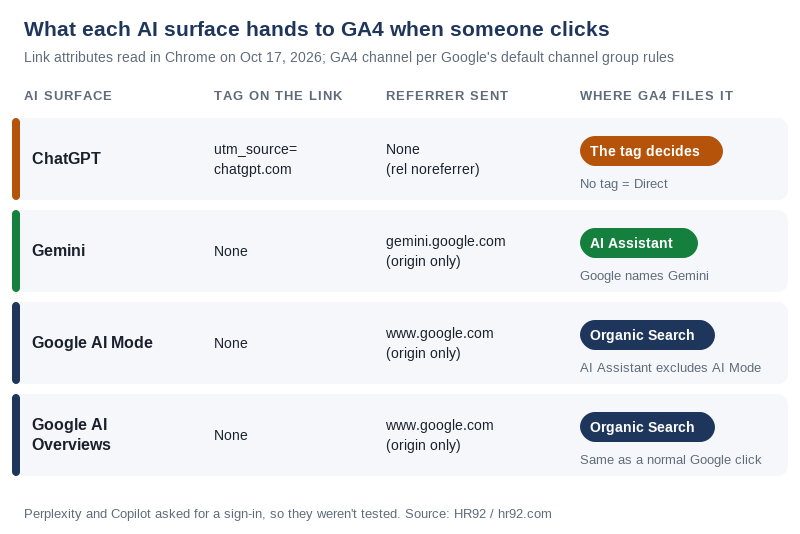
What each AI assistant actually sends to GA4 (tested October 17, 2026)
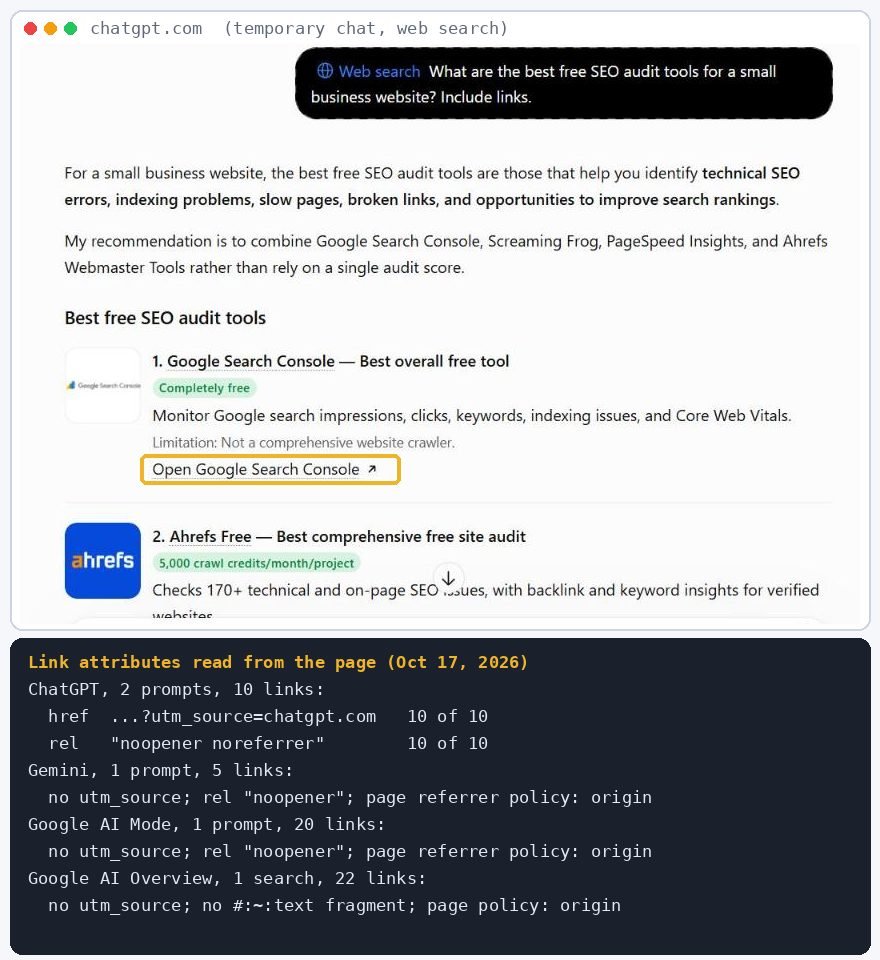
An AI assistant reaches your analytics through two things on the link: a UTM tag in the URL and the referrer the browser passes along. I opened ChatGPT, Gemini and Google AI Mode in Chrome today, asked each one for SEO tool recommendations with links, and read the attributes of every outbound link on the page. I did the same for an AI Overview on a normal Google search.
| AI surface | Links checked | UTM tag on the link | Referrer your site receives | Where GA4 should file it |
|---|---|---|---|---|
| ChatGPT (web search on) | 10 (2 prompts) | utm_source=chatgpt.com on 10 of 10 | None: every link has rel=”noopener noreferrer” | Depends on the tag alone. No tag means Direct |
| Gemini | 5 (1 prompt) | None | https://gemini.google.com/ (page referrer policy: origin) | AI Assistant |
| Google AI Mode | 20 (1 prompt) | None | https://www.google.com/ (origin) | Organic Search |
| Google AI Overview | 22 (1 search) | None | https://www.google.com/ (origin) | Organic Search |
| Perplexity, Copilot | Not tested | Unknown: both asked me to sign in first | Unknown | Check your own Session source report |
The last column follows Google’s own rules. Its default channel group documentation says the AI Assistant channel covers “sources like ChatGPT, Gemini, Deepseek, Copilot, or Grok” and “excludes Google’s AI Overviews and AI Mode.”
A visit from ChatGPT is the odd one out. ChatGPT tags its links, but it also tells the browser to send no referrer. So the tag is the only clue your analytics gets. When the tag goes missing, the visit looks exactly like someone who typed your URL.
That happened this month. Between roughly October 9 and 15, 2026, ChatGPT links went out without the tag. More on that below, because it’s the best argument I’ve seen for checking your setup now.
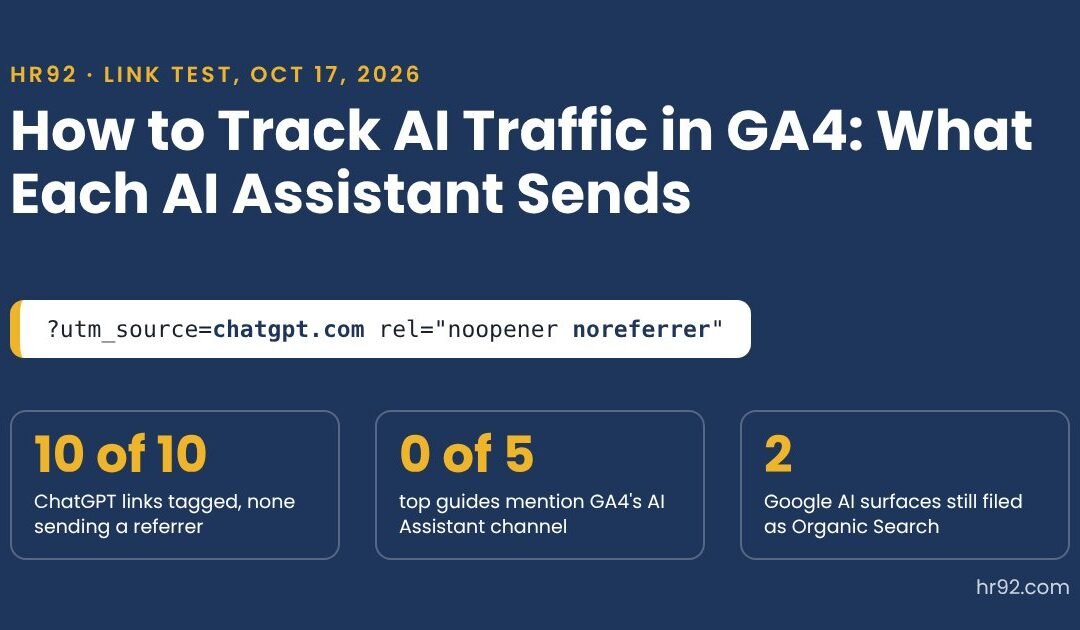
- GA4 has had a native AI Assistant channel since May 13, 2026 (medium “ai-assistant”, campaign “(ai-assistant)”). None of the top 5 guides for this query mention it.
- ChatGPT links carried utm_source=chatgpt.com in all 10 cases I checked, and all 10 had rel=”noreferrer”, so no referrer reaches your site.
- Gemini passes its origin as the referrer. Google AI Mode and AI Overviews pass www.google.com, so GA4 counts them as Organic Search.
- Google’s example regex for an AI channel misses DeepSeek and Grok and also matches gemini.com (a crypto exchange) and any .ai website.
- For AI Overviews and AI Mode, use Search Console’s generative AI report. GA4 can’t separate them from regular Google clicks.
How to track AI traffic in GA4 (the 3-minute check)
GA4’s AI Assistant channel is a default channel that Google Analytics added on May 13, 2026. According to the What’s new in Google Analytics page, GA4 sets the medium to “ai-assistant” “when the referrer matches a recognized AI Assistant,” files the visit under the AI Assistant channel and names the campaign “(ai-assistant).”
- Open the report. In GA4, go to Reports > Acquisition > Traffic acquisition.
- Pick the right dimension. Make sure the table’s primary dimension is Session default channel group. Look for the AI Assistant row.
- See which assistants. Add Session source as a secondary dimension, or filter on Session medium exactly matching ai-assistant.
- Set the date range after May 13, 2026. The release note doesn’t say the channel was applied to older data, so compare periods that start after that date.
- Check where ChatGPT lands. Change the primary dimension to Session source, search for chatgpt and add Session medium. If chatgpt.com sits under a medium other than ai-assistant, you need the custom channel group below.
Step 5 matters because of how the rule is written. Google describes the AI Assistant rule as matching the referrer, and ChatGPT sends none. Google’s documentation doesn’t say how GA4 treats a visit that carries utm_source=chatgpt.com but no utm_medium and no referrer. So I’d check it in your own data instead of assuming.
Why ChatGPT traffic can suddenly turn into Direct
ChatGPT traffic turns into Direct whenever its links lose the utm_source tag, because the link itself blocks the referrer. MDN’s reference for rel=”noreferrer” says it tells the browser to omit the Referer header. Google’s page on (direct) / (none) traffic explains what follows: when links lack UTM parameters, “traffic source information is lost.”
What happened between October 9 and 15, 2026
Search Engine Roundtable reported that ChatGPT links stopped carrying the UTM tag around the GPT-6 release. Cedric Huesler of Adobe, quoted there from his LinkedIn post, looked at about 500 pages where ChatGPT drove 5% or more of visits. Comparing October 9 to 13 with the week before, he saw ChatGPT visits fall by about 31,000 a day while Direct rose by about 26,000 a day on the same pages. On October 15 he updated his post: it was a bug, and the tag was back.
My test today matches that update: all 10 ChatGPT links I checked carried utm_source=chatgpt.com. They also all carried rel=”noopener noreferrer”. So the next time the tag slips, nothing else will tell GA4 where those visitors came from.
How to spot a missing-tag week in your data
- In Traffic acquisition, compare the AI Assistant (or chatgpt.com) row week over week, then look at Direct for the same weeks.
- Open the Landing page report (Engagement > Landing page), filter to Direct, and compare it with your usual ChatGPT landing pages. A Direct spike on deep blog posts or tool pages that people rarely type in by hand is the tell.
- Annotate October 9 to 15, 2026 in your reports so nobody reads that dip as a loss of AI visibility.
How to build a custom AI channel group in GA4
A custom channel group is a copy of GA4’s channel rules that you can edit. It lets you decide which sources count as AI, including tagged ChatGPT visits, whatever medium they arrive with. Google’s custom channel groups help page says the groups “can be applied to your reports retroactively,” so you see past data in the new grouping right away.
- Open Channel groups. In Admin, under Data display, click Channel groups. You need the Editor role or higher.
- Copy the default group. Click Create new channel group. It starts as a copy of the default one, so all your other channels keep working.
- Add a channel named AI assistants. Add two conditions joined with OR: Medium exactly matches
ai-assistant, and Source matches regex with the pattern below. - Move it up. Click Reorder and drag AI assistants above Referral. GA4 puts each visit in the first channel it matches, so order decides the result.
- Save, then compare. Open Traffic acquisition and switch the primary dimension to your new group.
This is the Source pattern I use. Keep it lowercase; the checker below lowercases whatever you paste.
^(.*\.)?(chatgpt\.com|openai\.com|perplexity\.ai|claude\.ai|gemini\.google\.com|copilot\.microsoft\.com|copilot\.com|deepseek\.com|grok\.com|meta\.ai|mistral\.ai|you\.com|poe\.com)$
Why I don’t paste Google’s example regex
Google’s help page includes an example AI regex. I tested it against 24 source values, 14 of them real AI assistants and 10 not, using full matching, which is how GA4 reads “matches regex” according to its regex documentation.
| Source value | Is it an AI assistant? | Google’s example | HR92 pattern |
|---|---|---|---|
| chat.deepseek.com | Yes | Missed | Matched |
| grok.com | Yes | Missed | Matched |
| you.com | Yes | Missed | Matched |
| poe.com | Yes | Missed | Matched |
| gemini.com (a crypto exchange) | No | Wrongly matched | Not matched |
| example.ai (any site on a .ai domain) | No | Wrongly matched | Not matched |
| The other 18 values | Mixed | Correct | Correct |
To be fair to Google: I wrote my pattern against the same list, so of course it passes. The point is the two misses that matter. Google’s own channel description names DeepSeek and Grok, and its example regex doesn’t catch either. The “.ai” part is a catch-all that will pull in any SaaS company on a .ai domain that links to you.
Check your own source list against both patterns
Export or copy the Session source column from Traffic acquisition (set a long date range so rare assistants show up) and paste it below. The checker labels each source, shows your AI share of sessions if you include the numbers, and flags anything Google’s example would get wrong.
One thing I noticed while building this: Google doesn’t publish its list of “recognized” AI assistants. The source-category file linked from the default channel group page has 819 sources in four categories (search, shopping, social, video) and no AI category at all. So you can’t check in advance whether a newer assistant lands in AI Assistant or Referral. The custom group is how you take that decision back.
Can you track AI Overviews and AI Mode traffic in GA4?
No. GA4 can’t separate clicks from AI Overviews or AI Mode from ordinary Google results. Google’s channel definition excludes both from the AI Assistant channel, and in my test both passed only https://www.google.com/ as the referrer, the same as a classic blue link.
The text-fragment trick doesn’t hold up
Several guides suggest catching AI Overview clicks by looking for #:~:text= in the landing URL. In the AI Overview I checked today, none of the 22 links carried a text fragment. Three other results on the same page did. A fragment tells you Google pointed the reader at a passage, not that the click came from an AI feature, so I’d leave it out of your AI numbers.
What to use instead
Search Console’s generative AI performance report. Google’s announcement says it shows how often your URLs appeared in AI features in Search and Discover, with pages, countries, devices and dates, and it has been available to all sites since August 31, 2026. It reports impressions, not clicks. I walk through it in my guide to the Search Console AI performance report.
The AI traffic reports worth building
An AI traffic report is only useful if it answers a business question: which pages AI sends people to, and whether those people do anything. Here’s the short set I’d build, from quickest to most work.
| Question | Where in GA4 | Setup |
|---|---|---|
| How much traffic comes from AI assistants? | Traffic acquisition, Session default channel group | None (native channel) |
| Which assistants? | Traffic acquisition, Session source, filtered to your AI channel | Custom channel group |
| Which pages do they land on? | Engagement > Landing page, add your AI channel as a filter or secondary dimension | Custom channel group |
| Do they convert? | Traffic acquisition, Key events column | Key events already set up |
| Is a dip real or a tagging problem? | Compare AI and Direct for the same landing pages, week over week | An annotation for October 9 to 15, 2026 |
For most of our clients the landing page view is the one that changes decisions. It shows which articles and tools AI assistants are already recommending, which tells you what to improve and what to build more of. If you’re working on getting cited in the first place, that’s our generative engine optimization work, and the free audit’s AI Citability score is a quick first read.
What GA4 can’t see, whatever you set up
GA4 only sees AI visits that arrive with a tag or a referrer. Three groups slip through any channel setup:
- Untagged, no-referrer clicks. Any assistant that blocks the referrer and doesn’t tag its links lands in Direct. ChatGPT did this for about a week in October.
- Copied URLs. Someone who copies your URL from an answer and pastes it into a new tab arrives with no source information at all.
- Answers without a click. When the assistant answers fully, the person may never visit. That’s what Search Console impressions and AI visibility tracking measure.
So treat your AI channel as a floor, not the total. I’d report it next to Search Console’s AI impressions and a monthly spot-check of your key prompts, and never on its own.
- AI Assistant row visible in Traffic acquisition (Session default channel group)
- chatgpt.com checked under Session source, with its medium noted
- Custom channel group “AI assistants” saved: medium ai-assistant OR source regex
- AI assistants moved above Referral
- Annotation added for October 9 to 15, 2026 (ChatGPT tag bug)
- Landing page report filtered to AI traffic, bookmarked
- Key events visible for the AI channel
- Search Console generative AI report checked monthly next to GA4
FAQ
How do I see AI traffic in GA4?
Go to Reports > Acquisition > Traffic acquisition and use Session default channel group as the dimension. GA4 has shown an AI Assistant row there since May 13, 2026. Add Session source as a secondary dimension to see which assistants sent the visits.
What does utm_source=chatgpt.com mean?
It’s the tag ChatGPT adds to links in its answers so analytics tools can credit the visit. In GA4 it shows up as the session source chatgpt.com. ChatGPT links also block the referrer, so if the tag is missing the visit is counted as Direct.
Why is my ChatGPT traffic showing as Direct?
Most likely the link arrived without its UTM tag. ChatGPT’s links use rel=”noreferrer”, so the tag is the only source information GA4 gets. Search Engine Roundtable reported tags missing between about October 9 and 15, 2026; the tag has since come back. A copied URL also shows as Direct.
Does GA4 track Google AI Overviews or AI Mode separately?
No. Google’s channel rules exclude AI Overviews and AI Mode from the AI Assistant channel, and both pass www.google.com as the referrer, so the visits count as Organic Search. Search Console’s generative AI performance report shows impressions for both instead.
Is Perplexity traffic counted as AI Assistant?
Google’s documentation doesn’t say. The channel description names ChatGPT, Gemini, Deepseek, Copilot and Grok, and Google doesn’t publish its full list. Check where perplexity.ai lands in your Session source report, and include it in a custom channel group to be sure.
Can I see AI traffic from before May 2026?
Not in the native AI Assistant channel; the release note doesn’t say it was backfilled. A custom channel group can be applied to past data, so if older AI visits arrived with an AI source, a custom group will show them.
The next step
Spend three minutes in Traffic acquisition today: find the AI Assistant row, then check where chatgpt.com lands. If it’s anywhere other than your AI channel, build the custom group above and paste your sources into the checker. Then annotate October 9 to 15 so the dip doesn’t mislead anyone later.
Related services: generative engine optimization (GEO), technical SEO and talk to HR92 about analytics setup. Related reading: how to track Google Lens visits in Search Console.