
| Lens readiness check | What Google says | 23 Shopify stores we checked |
|---|---|---|
| Main photo is a real <img> with a src | “Google doesn’t index CSS images.” Always give a src fallback | 18 of 23 |
| Descriptive alt text | Alt text is “the most important attribute” for image metadata | 9 of 23 |
| Filename names the product | Gives “very light clues” about the subject | 16 of 23 |
| Product structured data with an image | Image is a required property for merchant listings | 20 of 23 |
| og:image set to the product photo | A way to tell Google your preferred image | 23 of 23 |
| Photo at least 500 x 500 px | Merchant Center minimum, enforced from January 31, 2027 | 23 of 23 |
Since September 24, 2026 you can finally measure this. Search Console now reports “multimodal” searches (Lens, Circle to Search, image uploads and Chrome’s “Search this image”) as their own search type. No queries, no API, but real impressions and clicks per page.
Below: what the new report shows, what our own data looks like, what we found when we checked 23 well-known Shopify stores against Google’s image guidance, and the checklist I’d work through on any store or service site.
- Lens is big: Google reported nearly 20 billion visual searches a month in October 2024, 20 percent of them shopping-related, and 5 billion more a month by April 2025.
- Search Console’s new Web: Multimodal filter shows Lens and Circle to Search impressions by page, but no query data and nothing in the API yet.
- In our check, only 9 of 23 Shopify product pages had descriptive alt text on the main photo, and 3 only showed the photo after JavaScript ran.
- Nothing about Lens SEO is a trick. It is Google’s image SEO guidance applied properly, plus clean product data.
What is Google Lens SEO?
Google Lens SEO is the part of image SEO that helps your pages show up when the search starts with a picture instead of typed words. The searcher points a phone camera at a product, circles something on their screen, or uploads a screenshot, and Google returns matching images, products and pages.
The audience is large and it’s mostly mobile. Here are the numbers Google itself has published, newest last:
Sources: Google’s October 2024 Lens shopping post (nearly 20 billion visual searches a month, 20 percent shopping-related, a Shopping Graph of more than 45 billion products), Sundar Pichai’s Q1 2025 earnings remarks (monthly Lens searches up 5 billion since October) and his Q4 2025 remarks from February 2026, which add that “nearly one in six AI Mode queries are now non-text, using voice or images.”
Google hasn’t published a Lens-specific optimization guide. What it has published is its image SEO best practices, which apply to every Google feature that shows images. That page is the rulebook for everything below.
What does the Search Console multimodal report show?
The Search Console multimodal report is a new search type filter, announced on the Search Central blog on September 24, 2026, that counts impressions and clicks from searches that start with an image. It covers Google Lens, Circle to Search on Android, image uploads to Google Search and Chrome’s right-click “Search this image”. Google says it appears in the regular Performance report and in the Generative AI features report.

Three things to know before you open it:
- “Web” is now split. The Performance report help page defines Web: text-based as traffic from text typed into the search bar, and Web: multimodal as traffic “when users search using images (such as with a smartphone camera)”. Image (the Google Images tab), Video and News are still separate types.
- There are no queries. Google’s dimensions help page says that because multimodal searches mostly use images, “specific text query data isn’t available for this traffic.” You get Pages, Countries, Devices and Dates.
- No API yet. The Search Analytics API reference (last updated August 11, 2026) lists discover, googleNews, news, image, video and web as types, and nothing multimodal. If your dashboards pull Search Console data automatically, this number needs a manual export for now.
What does multimodal data look like for a small site?
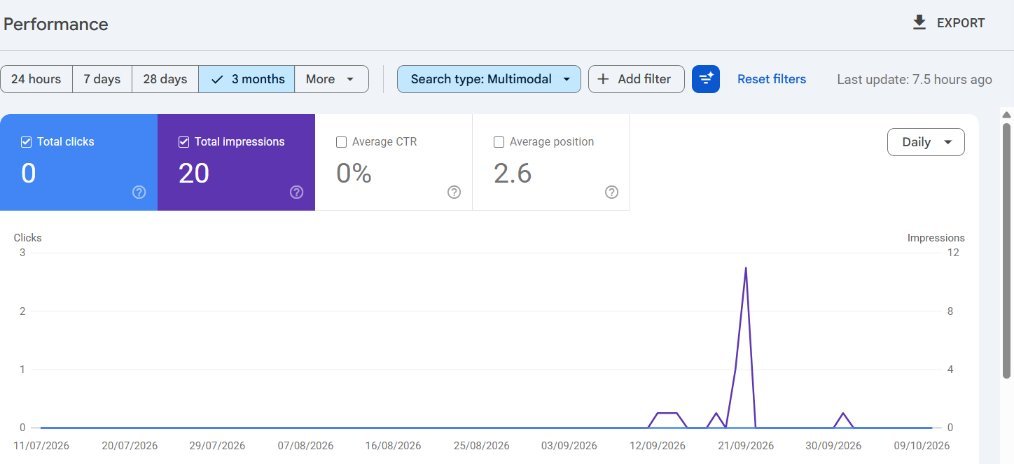
For a services business, multimodal data is tiny, and that’s useful to know before you spend money on it. Here is hr92.com’s own report for the three months to October 10, 2026.
| Metric (Jul 11 to Oct 10, 2026) | Web: multimodal | Web: text-based |
|---|---|---|
| Impressions | 20 | 691 |
| Clicks | 0 | 4 |
| Average position | 2.6 | 16.1 |
All 20 multimodal impressions went to the homepage: 19 on mobile, 1 on tablet, none on desktop. The daily view showed something else worth noting: our first multimodal impression is dated September 12, twelve days before Google announced the report. So the filter carries some data from before launch day. How far back it goes isn’t documented, so check your own property rather than assuming.
If you track AI features too, I explained how to read the companion report in my guide to the Search Console AI performance report.
How does Google Lens decide which pages to show?
Google Lens matches what the camera sees against images it has already indexed, then shows pages and products around those matches. Google’s image guidance explains the inputs it uses to understand any image: it uses “alt text along with computer vision algorithms and the contents of the page to understand the subject matter of the image.”
So there are three things you control: the image itself (sharp, clearly showing the subject), the text attached to it (alt text, filename, caption) and the page around it (title, nearby copy, structured data). For products, Google adds a fourth: its Shopping Graph, which Google’s October 2024 Lens announcement says Lens uses “to identify the exact item.”
When we loaded product photos into Lens from Chrome for this article, the results page had three tabs: AI Mode, All and Exact matches. That last tab is the reason original photography matters. If your product page uses the same manufacturer photo as every reseller, an exact match points at all of them. If the photo exists only on your site, the match can only point at you.
What we found on 23 Shopify product pages
To see how well real stores follow Google’s image guidance, we checked one product page on each of 23 well-known Shopify stores on October 13, 2026. These are established brands with in-house teams, so I expected high scores. The result was mixed.
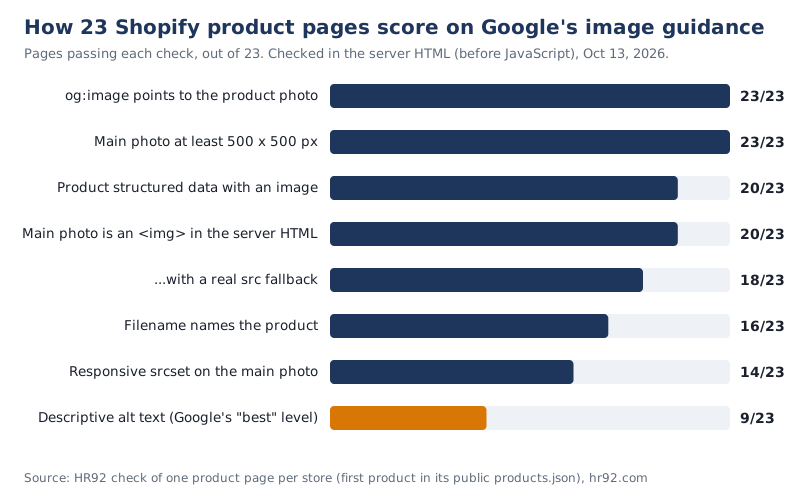
How we did it: for each store we took the first product in its public products.json feed, fetched that product page’s HTML, found the main product photo by filename and checked it against Google’s image SEO page and merchant listing documentation. Alt text and filenames were judged by hand. We checked the HTML before JavaScript runs; Google can render JavaScript, so a fail there is a risk, not proof that Google can’t see the image.
| Alt text on the main photo | Pages | Google’s own grading |
|---|---|---|
| Describes what’s in the photo | 9 | “Best” |
| Just the product name | 6 | “Better” (like alt=”puppy”) |
| Generic or unrelated (“Best Sellers”, a filename) | 3 | Not useful |
| Empty | 2 | “Bad (missing alt text)” |
| No <img> in the server HTML | 3 | Depends on rendering |
What stood out:
- Social and size basics are solved. Every store had an og:image pointing at the product photo, and every main photo was at least 650 px on its short side (median 1,600 px), well above Merchant Center’s new 500 x 500 minimum.
- Alt text is where stores lose. Fewer than half had alt text that describes the photo. The good ones read like this, from Ugmonk: “An Analog Archive (Silver Aluminum) card holder filled with tabbed index cards.”
- Three stores render the photo with JavaScript only. The image sat in og:image and, on two of them, in the Product markup, but not in an <img> tag in the HTML. Two more had no usable src on the main photo: one used srcset only, the other a placeholder that a script swaps out.
- Seven filenames were internal codes, such as a SKU plus “-edit”. The best example we saw was Outdoor Voices: cloudknit-sweatpant-outdoor-voices-navy-mid-rise-side-pockets.jpg.
- Three products had a single photo. The median was 5 photos per product.
We also ran 5 of these pages through the HR92 SEO audit. Median overall score: 78.1 out of 100. Performance had a median of 61.6 and was the weakest category on three of the five, ignoring local SEO, which doesn’t apply to national online stores. These are HR92’s own diagnostics, not Google metrics.
How to optimize images for Google Lens: the checklist
Optimizing images for Google Lens means applying Google’s image SEO guidance to the photos you most want matched: products, places, menus, packaging and anything with your brand on it. This is the order I’d work in.
- Use your own photos for anything you sell. Stock and manufacturer images are shared by every reseller. Shoot clear photos with the product as the subject, and several angles where it helps.
- Put every important image in an <img> element with a src. Not a CSS background. If you use srcset or a picture element, keep a src fallback, which Google recommends you “always specify”.
- Write alt text that describes the photo. Product, color or variant, and what the photo shows (“front view”, “on a desk”). Keep it under 125 characters, which is what Shopify recommends. No keyword lists; Google warns that stuffing alt text “may cause your site to be seen as spam.”
- Rename files before upload. stanley-everyday-tumbler-16-oz-wintergreen.png beats IMG_4471.png. It’s a light signal, and it’s free.
- Keep one URL per image. Google asks you to reference an image “with the same URL” across pages so it can be cached and reused.
- Add Product structured data with image URLs, ideally in the server HTML. More on the rules in the next section.
- Set og:image to the main product photo. Google advises against a generic image like your logo for this.
- Put the image near the text that explains it. A caption or the product description right beside the photo. Google says it pulls subject matter from captions, titles and page content.
- Make sure the image URLs are crawlable. Not blocked in robots.txt, and indexable. Use URL Inspection on a product page to see what Google renders.
- Keep pages fast. Google notes images are often the largest contributor to page size. Compress them, serve WebP or AVIF where your platform supports it, and don’t lazy-load the main photo above the fold.
- Original photo, product clearly the subject
- Real <img> with a src in the page HTML
- Alt text describes the photo, under 125 characters
- Filename names the product and variant
- Same image URL everywhere it’s used
- Product structured data with image URLs
- og:image is the product photo, not the logo
- Caption or description next to the image
- Image URL crawlable and indexable
- Main photo not lazy-loaded
If you’re on Shopify and want this done across a full catalog, it’s part of our Shopify SEO work. For theme and rendering issues like JavaScript-only images, see technical SEO.
Product data and Merchant Center: the image rules that matter
Product structured data is the most direct way to tell Google which photo belongs to which product, and Google’s merchant listing documentation makes image a required property. Its image rules are specific:
| Rule | Where it comes from |
|---|---|
| Image URLs must be crawlable and indexable | Merchant listing structured data docs |
| “Pictures clearly showing the product (for example, against a white background) are preferred” | Merchant listing structured data docs |
| Multiple high-resolution images, at least 50K pixels (width x height), in 16×9, 4×3 and 1×1 | Merchant listing structured data docs (recommended) |
| JavaScript-generated Product markup can make Shopping crawls “less frequent and less reliable” | Merchant listing structured data docs |
| Product images at least 500 x 500 px; enforcement starts January 31, 2027, warnings since July 2026 | Merchant Center Help |
| Low-quality images no longer stop products showing: “Your product will continue to show in ads and free listings” | Merchant Center Help (October 2026 wording) |
That last change is easy to misread. Google’s low image quality help page now says a blurry or pixelated image won’t block the product, but in the same paragraph it says “high image quality correlates strongly with user engagement and clicks.” Showing up with a bad photo isn’t the win.
For larger catalogs, the structured data and feed side is usually where we start in ecommerce SEO projects, because one template fix covers thousands of products.
How to track Google Lens traffic each month
Tracking Google Lens traffic means exporting the multimodal search type by page every month, because there’s no query data and no API. This routine takes about ten minutes:
- Set the date range to the last full month and Search type to Web: Multimodal.
- Open the Pages tab and export to Google Sheets.
- Export the same range for Web: text-based and join the two on URL.
- Add a share column: multimodal impressions divided by both types combined. That’s your page-level visual search share.
- Check Devices. Ours were all mobile and tablet, which fits a camera-first feature.
- Note what changed (new photos, alt text, markup) next to the month, so you can see what moved the numbers.
Pages with high multimodal share are telling you which images work. Pages with plenty of text impressions and zero multimodal impressions are the ones to fix first. If those pages aren’t indexed at all, start with how long Google takes to index a page.
Is Google Lens SEO worth it for your business?
Google Lens SEO is worth real effort when people can photograph what you sell. For everyone else, the basics are enough. Here’s how I’d prioritize. This is my judgment, not Google data:
| Business type | Lens priority | What to do |
|---|---|---|
| Fashion, home, beauty, furniture, gear stores | High | Full checklist on every product, original photos, Product markup, monthly tracking |
| Brands sold through resellers | High | Own photography on your site, consistent packaging shots, descriptive alt text |
| Restaurants, hotels, venues, local shops | Medium | Real photos of storefront, signage, menu items; same photos on your site and Business Profile |
| B2B services, SaaS, agencies | Low | Fix alt text and og:image, check the report quarterly as a brand signal |
When not to bother: if your site has no products or places to photograph and your text search basics aren’t done yet. Indexing, titles and content will move more revenue than Lens.
FAQ
Can I see Google Lens traffic in Search Console?
Yes. Since September 24, 2026, the Performance report has a Search type of Web: Multimodal that covers Google Lens, Circle to Search, image uploads and Chrome’s “Search this image”. It shows clicks, impressions, pages, countries and devices, but not queries.
Why is my multimodal report empty?
Usually because few people have run visual searches that showed your pages. Google says the data appears once your site gets traffic from these searches. Service businesses without products often see little or nothing. Check the date range too, and remember there’s no Queries data for this type at all.
Does Google Lens use alt text?
Google hasn’t published Lens-specific ranking factors. Its image SEO documentation, which covers its visual search features generally, says Google uses alt text together with computer vision and page content to understand what an image shows, and calls alt text the most important image attribute.
Does an image sitemap help with Google Lens?
It helps Google discover images it might otherwise miss, especially images on a CDN domain, which an image sitemap can list. It won’t fix a weak photo or missing alt text, and if your images are already in normal <img> tags on crawlable pages, the gain is usually small.
Do I need Product structured data for Lens?
It isn’t a stated requirement for Lens, but it’s the clearest way to connect a photo with a product name, price and availability, and image is a required property for merchant listings. Put it in the server HTML where you can; Google warns JavaScript-generated Product markup makes Shopping crawls less reliable.
Is Google Lens SEO different from image SEO?
Not in method. Lens SEO is image SEO aimed at searches that start with a photo, so photo quality, originality and product data matter more than they do for a blog illustration. The rules come from the same Google page.
Related services: Shopify SEO, SEO audits and SEO services.