

An E-E-A-T author bio is a short, accurate profile of the real person who wrote a page, linked from a visible byline, that shows readers and Google who created the content and why they’re qualified. In October 2026 Google added a direct warning to its helpful content guidance: fabricated author profiles, including AI-generated headshots, made-up names or false credentials, are deception and signal a low-quality page.
So the question isn’t whether to add author bios anymore. It’s how to add real ones that hold up. Below I’ll cover exactly what Google changed, what a strong bio and author page include, the schema Google recommends, what I found when I checked the pages ranking for this topic, and how we set it up on our own site this week.
- Google now names fake author profiles as deception in its helpful content guidance. AI headshots, invented names and false credentials are out.
- Google’s “Who” questions are simple: is it clear who wrote it, is there a byline, and does it lead to more about the author?
- In schema, mark the author as a Person, use only their name in the name field, and add url or sameAs links.
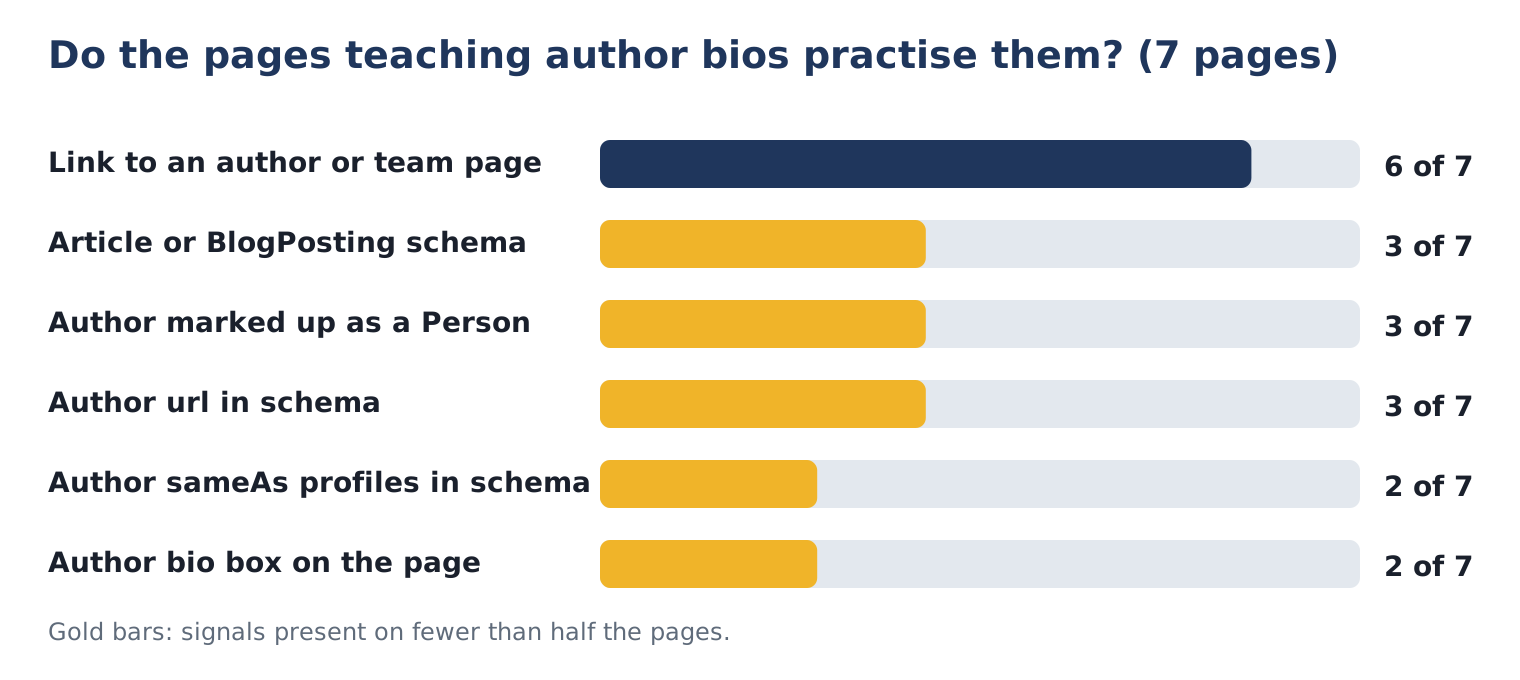
- Of 7 pages ranking for “eeat author bio”, only 3 marked their author as a Person in schema and only 2 added sameAs profiles.
What did Google change about author information?
Google added a paragraph to its guide on creating helpful, reliable, people-first content telling site owners to avoid deceptive authorship information. It gives three examples of fabricated creator profiles: AI-generated headshots, made-up names and false credentials used to make content look as if human experts wrote it. Google calls this a form of deception and says any deception makes a page untrustworthy to users and its automated quality systems, and is a signal of a low-quality page.
Search Engine Roundtable reported the change on October 6, 2026, alongside updates that added a definition of main content to the same documentation. Barry Schwartz pointed out that Google had previously said it wasn’t worried about fake author information, so this is a shift in tone.
The same guide keeps its positive advice too: Google strongly encourages adding accurate authorship information, such as bylines, where readers would expect it.
What is Google’s “Who, How and Why” test?
It’s the self-check Google suggests for any content, built around the E-E-A-T idea Google introduced when it added Experience to its rater guidelines in 2022. Who created it, how it was created, and why it exists. Author bios are the “Who” part. Google lists three questions:
- Is it self-evident to your visitors who authored your content?
- Do pages carry a byline, where one might be expected?
- Do bylines lead to further information about the author, giving background about them and the areas they write about?
Google adds that if you’re clearly indicating who created the content, you’re likely aligned with E-E-A-T. That’s a useful way to think about it: the bio isn’t a ranking trick, it’s how you answer a reader’s first question, “who is telling me this?”
| Question | What answers it on the page | What doesn’t |
|---|---|---|
| Who wrote this? | Visible byline with a real name | “Admin”, “Team”, or no byline at all |
| Why should I trust them? | Specific role, credentials you can verify, relevant work | Vague praise like “passionate expert” |
| Where can I learn more? | Byline links to an author page with background and other articles | A dead-end name or a link to the homepage |
| How was it made? | Notes on testing, data sources, and any AI assistance where readers would expect it | Silence when the reader would reasonably wonder |
How do you write an E-E-A-T author bio?
Keep it short, specific and checkable. A reader should be able to confirm every claim in it with one search. Here’s the structure I use:
- Name and role. Real name, current role, organization. “Abdullah Hussain, founder of HR92.”
- What they actually do. The work behind the writing, in concrete terms, not adjectives.
- Verifiable credentials. Certifications, licenses or degrees with their exact names. Only ones the person holds.
- Relevance to the topic. One line connecting their experience to what the page is about.
- Where to verify. Links to profiles that confirm the person exists and does this work, such as LinkedIn.
| Weak bio | Strong bio |
|---|---|
| “Our expert team is passionate about digital marketing.” | “Abdullah leads HR92’s work in SEO, AI search and Google Ads from Miami, Florida, with an office in Doha, Qatar.” |
| “Certified professional with years of experience.” | “Abdullah is a certified Project Management Professional (PMP) and holds the Google AI Professional Certificate.” |
| Stock headshot, no links | Real photo, links to LinkedIn and other active profiles |
| Same bio on every topic, including ones outside their field | Bio matches the topics the person actually writes about |
What should an author page include?
An author page is where the byline should lead. Google’s guidance asks whether bylines lead to further information about the author and the areas they write about, which is exactly what this page is for. On WordPress that’s usually the author archive, such as /author/your-name/.
- Real name as the page heading
- Real photo of the person
- A longer version of the bio: role, background, credentials
- The topics they write about, in plain words
- Links to profiles that confirm who they are
- A list of their articles on your site
- A way to contact them or the business
- The same name used everywhere: byline, author page, schema, social profiles
What author schema does Google recommend?
Mark the author up as a Person, with their name in the name field and links in url or sameAs. Google’s article structured data documentation sets out these author markup best practices:
- Include every author shown on the page, each in its own author entry. Don’t merge two names into one field.
- Use the right type. Person for people, Organization for organizations. The schema.org Person type includes jobTitle, honorificPrefix, url and sameAs.
- Use url or sameAs with valid URLs, for example the author’s page on your site.
- Only the name in the name field. No job title, honorifics, publisher name or words like “posted by”. Use jobTitle and honorificPrefix if you want those.
Here’s a minimal example for a blog post, in the format Google describes:
"author": [{
  "@type": "Person",
  "name": "Abdullah Hussain",
  "jobTitle": "Founder",
  "url": "https://hr92.com/author/hr92/",
  "sameAs": [
    "https://www.linkedin.com/in/abdullahhussain/",
    "https://twitter.com/agostians"
  ]
}]
Most SEO plugins can output this for you. All in One SEO, which we use, adds the author’s social profiles from their user profile to the Person markup automatically.
Do the pages ranking for “eeat author bio” practise what they teach?
Mostly not in their schema. On October 9, 2026, I checked the 7 non-forum pages ranking on google.com (US) for “eeat author bio” and read each page’s structured data and author links.
What stood out:
- Linking was common, markup wasn’t. 6 of 7 linked to an author or team page, but only 3 marked their author as a Person in schema.
- sameAs was rare. Only 2 of 7 connected the author to outside profiles in markup, even though Google recommends url or sameAs.
- Bio boxes were the exception. We detected an author bio box on 2 of 7 pages. Detection relied on common class names, so the real number may be a little higher.
The takeaway isn’t that these pages are bad; several rank well, and one of them, Search Engine Land’s The myth of manufacturing author E-E-A-T, argues against treating author signals as something you can fake into existence. It’s that the bar is low. A real person, a real bio, an author page and clean Person markup already puts you ahead of most pages on this exact topic.
How did we set this up on hr92.com?
We fixed our own authorship this week, so here’s exactly what changed. Until October 9, 2026, our posts showed the byline “HR92”, which was also our WordPress login name. Now:
| Element | Before | After |
|---|---|---|
| Byline | “by HR92” | “by Abdullah Hussain” with photo and role line under the title |
| Bio | None on posts | Author box at the end of every post: photo, role, credentials, short bio, profile links |
| Author page | /author/hr92/, reached only from the small theme byline | Same URL, linked from the byline and the author box on every post |
| Schema | Author name “HR92”, no profile links | Person “Abdullah Hussain” with sameAs to LinkedIn, X, Facebook and Instagram |
| Consistency | Login name shown publicly | Display name used everywhere; login name no longer shown |
Two practical notes from doing it. First, changing the display name updated the byline on every existing post at once, because WordPress stores the author per user, not per post. Second, the author box is added by a site-wide snippet, so every new post gets it without anyone remembering to paste it. You’ll see it at the bottom of this article.
A side benefit: showing the login name publicly (“HR92”) also told anyone trying to break in what username to guess. Using a separate display name is a small security win.
What about bylines on AI-assisted content?
Put the real person who’s accountable for the content in the byline, and explain how automation was used where readers would reasonably expect it. Google’s “How” section, and its earlier post on AI-generated content in Search, set the frame. The helpful content guide says AI or automation disclosures are useful when someone might wonder how a piece was created, and suggests explaining how and why automation was used.
What Google’s new paragraph rules out is inventing a person. An AI tool can help draft; it can’t be the expert in the byline, and it can’t borrow a fake face. Here’s how I’d handle the common cases:
| Situation | What I’d do |
|---|---|
| Expert writes with AI help, then reviews and edits | Expert’s byline; a short note on how AI was used if readers would wonder |
| Writer drafts, a specialist reviews | Writer’s byline plus “Reviewed by” with the reviewer’s real name and credentials |
| Mostly automated pages, such as data summaries | Organization byline and a clear note on how the content is generated |
| “Persona” author with a stock or AI photo | Retire it. Reassign posts to real people or the organization |
Which author red flags should you remove today?
Anything a reader couldn’t verify, or that would embarrass you if they tried. Go through your author pages with this list:
- AI-generated or stock headshots presented as real people
- Names that don’t match any real person on your team
- Credentials, degrees or licenses the person doesn’t hold
- “Expert reviewed” labels with no named reviewer
- One author credited with expertise in every unrelated field
- Bios that say “years of experience” with no specifics anywhere
- Author pages that are empty or redirect to the homepage
If you find a fake persona, reassign its posts to the real writer or to the organization, then remove the persona’s page. Keep a short note of what you changed and when. If you’d rather we review your site’s authorship, schema and content quality together, that’s part of our SEO content writing work, and our free SEO audit checks structured data as one of its 54 checks.
For more on how Google’s systems are treating content right now, see our guides to the Search Console AI performance report and AI and SEO in 2026.
E-E-A-T author bio FAQ
Does Google penalize fake author profiles?
Google’s helpful content guidance now says fabricated creator profiles, such as AI-generated headshots, made-up names or false credentials, are a form of deception, and that deception makes a page untrustworthy to users and its automated quality systems and is a signal of a low-quality page. It doesn’t describe a specific penalty, but the direction is clear.
Do author bios directly improve rankings?
Google doesn’t say a bio is a ranking factor. It says clearly showing who created content is likely aligned with E-E-A-T and strongly encourages accurate authorship information. Treat the bio as a trust signal for readers and quality systems, not a switch that moves rankings by itself.
What should an author bio include for E-E-A-T?
The author’s real name and role, what they actually do, credentials they genuinely hold, why they’re relevant to the topic, and links to profiles where readers can verify them. Keep it short and specific, use a real photo, and link the byline to an author page with more detail.
What is the correct author schema for a blog post?
Google recommends marking each author as a Person (or Organization for a company), putting only the name in the name field, and adding url or sameAs with valid URLs such as the author’s page and social profiles. List multiple authors as separate entries rather than one combined name.
Can AI-written content have an author byline?
The byline should be the real person accountable for the content. Google suggests explaining how automation or AI was used when readers would reasonably wonder, and its new guidance rules out inventing an author, such as an AI-generated persona, to make content look expert-written.
Should a company blog use a person or the company as the author?
Use a person when a real person wrote or reviewed the content and their experience matters to the reader. Use the organization for content no single person is responsible for. Google’s markup guidance supports both, as long as you use the matching Person or Organization type.