

Google Ads automated promotions are promotion assets that Google builds by itself from deals it finds on your website, then attaches to eligible Search and Performance Max campaigns. From October 12, 2026, Google is switching this on by default for campaigns that use location assets and have no promotion assets of their own, so if you don’t want Google quoting your offers, you need to turn it off under account level automated assets.
That’s a reasonable feature with an unreasonable default. Below I’ll show you exactly which campaigns are affected, how to check and switch it off in under two minutes, what Google can pick up from your site, and when I’d actually leave it on.
- Only Search and Performance Max campaigns with location assets and no promotion assets are in scope today.
- It’s opt out. Turn it off in Assets > More > Account level automated assets > Advanced settings > Automated promotions.
- Google only keeps an automated promotion live for under 24 hours at a time and re-checks that the offer is still visible on your site.
- The fastest way to stay in control without losing promotions in your ads: add your own promotion asset. Google skips campaigns that already have one.
What are Google Ads automated promotions?
Automated promotions is an AI feature that reads offers on your landing pages, such as “Buy one get one free” or “20% off black sweaters”, and turns them into promotion assets on your ads. Google’s help page for automated promotions describes it as sourcing deals from your website and attaching them to eligible Search and Performance Max campaigns.
The feature isn’t brand new. What changed is the default. Search Engine Roundtable published Google’s email to advertisers on October 5, 2026, which says that starting October 12, 2026, Google Ads will automatically identify and extract promotions such as coupons and deals and apply them to your campaigns, without any setup on your part. You’re opted in unless you switch it off.
Three details from Google’s documentation matter more than the headline:
- Short lifespan. Each automated promotion is eligible to serve for less than 24 hours. After that, Google can re-enable it only if its systems can still verify the offer is visibly available on your site.
- No dates yet. Google says this will change once it can extract promotion start and end dates. Today it can’t, which is why it keeps re-checking.
- Manual wins. The system skips any campaign that already has manual promotions running.
Which campaigns are affected by automated promotions?
Right now, only Search and Performance Max campaigns that have location assets attached and no manual promotion assets. That covers Local Ad campaigns too. Display, Demand Gen, Video and Shopping campaigns aren’t mentioned in Google’s requirements.
| Your campaign | In scope? | Why |
|---|---|---|
| Search with location assets, no promotion asset | Yes | Meets every requirement Google lists |
| Performance Max with location assets, no promotion asset | Yes | Same requirements apply to PMax |
| Search or PMax with a promotion asset already attached | No | Google bypasses campaigns with manual promotions running |
| Search or PMax without location assets | No (today) | Location assets are a stated requirement |
| Display, Demand Gen, Video, Shopping | Not listed | Google’s requirements only name Search and Performance Max |
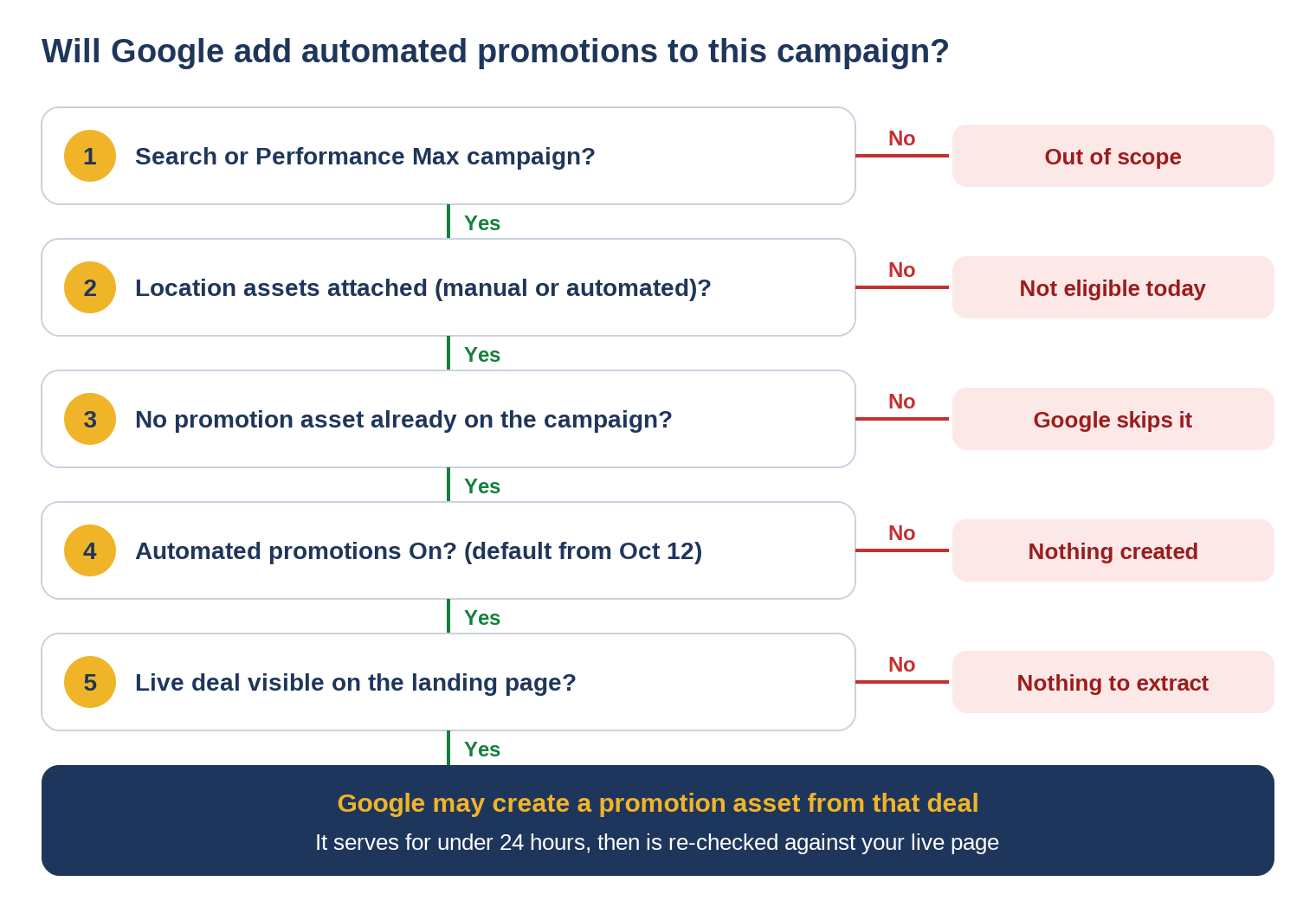
Will automated promotions touch your account? A 5-question check
Answer these in order. If you reach “No” at any step, automated promotions won’t run on that campaign today.
- Is it a Search or Performance Max campaign? If no, you’re out of scope.
- Does it have location assets, manual or automated? Check Assets, filter by Location. Location assets usually come from a linked Business Profile.
- Does it already have a promotion asset? If yes, Google skips it.
- Is Automated promotions set to On in account level automated assets? From October 12, it will be unless you change it.
- Does the landing page visibly show a deal? A banner, a coupon code, a “% off” line. If there’s nothing to find, nothing gets created.
If you answered yes five times, expect Google to start testing your on-site offers in your ads.
How do you turn off automated promotions in Google Ads?
Go to Assets, open account level automated assets, then Advanced settings, and set Automated promotions to Off. These are the steps from Google’s help page:
- In the Campaigns menu, go to Assets.
- In the filter bar, click the More (three dots) icon and select Account level automated assets.
- On that page, click the More (three dots) icon again.
- Select Advanced settings.
- Open the Automated promotions drop-down, choose Off, and give a reason if prompted.
It’s an account-level switch. If you manage several accounts, repeat it in each one, including client accounts under a manager account.
How do you see which promotions Google created?
Go to Assets, set the Asset type filter to Promotion, and look at the Added by column. Promotions Google sourced are labelled Google AI. Hover over the label for sourcing details and over the promotion name for the headline Google used.
Two reporting quirks to plan around:
- According to Google’s email as reported by Search Engine Land and PPC Land, assets with zero impressions don’t appear in the Assets section. An empty list doesn’t mean Google found nothing.
- Google suggests segmenting campaign reports by click type to measure interaction with the offer, and judging the change on overall campaign impressions and conversions rather than clicks on the promotion itself.
Manual vs automated promotions: what’s the difference?
Manual promotion assets give you control of every field. Automated promotions save setup time but you trade away dates, occasion labels and wording. If you run PPC for several locations, this table is the one to share with your team. Here’s how they compare, based on Google’s pages for promotion assets and automated promotions:
| Feature | Manual promotion asset | Automated promotion |
|---|---|---|
| Who writes it | You | Google, from your landing page |
| Start and end dates | You set them | Not extracted yet; served in windows under 24 hours |
| Occasion label (Black Friday, Eid al-Fitr, etc.) | Yes, from Google’s occasion list | Not mentioned in Google’s documentation |
| Promo code or minimum spend | Yes, in Promotional details | Only what Google can read on the page |
| Level | Account, campaign or ad group | Account-level setting, applied per eligible campaign |
| Campaign types | Search, plus Shorts and In-stream video ads | Search and Performance Max with location assets |
| Cost | Free to add; clicks charged like a headline click | Free to add; clicks charged like a headline click |
One detail in the manual table is easy to miss: occasion-specific promotion assets must be created or edited within six months of their start date, and Google pauses promotion assets that haven’t been modified for six months. If you set up a Black Friday promotion last year and forgot about it, it isn’t protecting you from automation today.
What can Google pick up from your website?
Anything that looks like a live offer on a landing page. Google’s example is a line like “20% off on black sweaters”. This is where I’d spend ten minutes before October 12, because most of the risk sits on the website, not in the ad account.
| Where offers hide on a site | Risk if Google uses it | What I’d do |
|---|---|---|
| Sitewide announcement bar (“Free shipping over $50”) | Shows on every ad that lands anywhere on the site | Keep it only if it’s true for every product and location |
| Expired codes still visible on old landing pages | Google’s checks look for visible offers; stale copy is still visible | Remove or date every code; redirect old campaign pages |
| Location-specific deals (“Doha store only”) | Can appear on ads shown in other markets | State the location clearly next to the offer |
| Fine print (“excludes sale items”) | An ad can only show a short line, so conditions may be lost | Put the key condition in the same sentence as the discount |
| Popups and exit-intent offers | Behavior unclear; Google talks about deals on landing pages | Treat them as visible offers and keep them accurate |
| Partner or affiliate coupon pages | Third-party terms you don’t control | Keep them off pages you use as ad landing pages |
- List every account with Search or PMax campaigns using location assets
- Check Account level automated assets > Automated promotions in each
- Decide per account: Off, On, or On with manual promotion assets
- Open every ad landing page and note any visible deal
- Remove or date expired offers and codes
- Add conditions in the same line as each discount
- Brief whoever edits website banners that ads may now quote them
- After October 12, filter Assets by Promotion and check the Added by column weekly
Should you leave automated promotions on?
Leave it on only if your website offers are always accurate, apply to everyone who sees the ad, and you’d be happy to see them quoted word for word. Turn it off, or add manual promotions, if any of that is shaky.
| Your situation | My call |
|---|---|
| Single-location shop with one simple, always-on offer | Leave it on, check the Added by column weekly |
| Retailer with many locations and local deals | Off, or manual promotion assets per campaign |
| Regulated or high-trust category (finance, health, legal) | Off. Offer wording often needs approval before it appears anywhere |
| Agency managing client accounts | Off by default; agree in writing with each client before enabling |
| Black Friday and holiday season planning | Manual promotion assets with occasion labels and dates; you want control in peak weeks |
My general view: automation that writes customer-facing claims should be opt in. A discount in an ad is a promise to the person who clicks. If the offer they land on doesn’t match, you pay for the click and lose the customer’s trust in the same moment. I’m not against the feature; I’m against finding out what it did after the fact.
There’s also a bidding side effect. A promotion that drives more sales at a lower price changes your margin, so the target ROAS that was profitable last month may not be now. If promotions are going to run, recheck your numbers with the target ROAS calculator before the season starts.
Which other account level automated assets should you review?
While you’re on that page, check the rest. Google’s account level automated assets documentation lists eight types that can be created for you when Google predicts they’ll improve performance:
| Automated asset | What Google adds | What I’d check |
|---|---|---|
| Dynamic sitelinks | Links to pages on your site | That they don’t point to thin or outdated pages |
| Dynamic structured snippets | Lists of products or services | That the categories are ones you still offer |
| Automated location assets | Address, directions, distance | That Google matched the right locations |
| Seller ratings | Star ratings and review info | Nothing to set; free on clicks |
| Dynamic callouts | Short claims from your pages, like “Certified technicians” | That every claim on your site is still true |
| Dynamic business information | Business name and logo | Correct name and logo in your account |
| Dynamic image assets | Images from your landing page | That landing page images are on brand |
| Automated promotions | Deals from your website | Everything in this guide |
Google also lists a Site visits asset that shows how many times your website has been visited. Notice the pattern: every one of these is built from your own website. Your site copy is now ad copy, which is a good reason to keep it accurate and to treat your website and your Google Ads account as one system.
Google is also testing a Direct Offer asset in beta, reported by Search Engine Land on October 7, 2026, which can show a one-time promo code under a sponsored result in AI Mode for campaigns using AI Max or text customization. Promotions are clearly becoming a bigger part of how Google presents ads, which is one more reason to decide your policy now. I wrote more about how AI is changing search in AI and SEO in 2026.
Google Ads automated promotions FAQ
What are automated promotions in Google Ads?
Automated promotions are promotion assets Google creates on its own from deals it finds on your website landing pages, such as a percentage discount or a buy-one-get-one offer. They attach to eligible Search and Performance Max campaigns with location assets and no manual promotions. Each one serves for under 24 hours before Google re-checks that the offer is still on your site.
How do I turn off automated promotions?
In Google Ads, go to Assets, click the three-dot More icon in the filter bar and choose Account level automated assets. Click the three-dot icon again, open Advanced settings, and set Automated promotions to Off. It’s an account-level setting, so repeat it in every account you manage.
When do automated promotions start?
Google’s email to advertisers, published by Search Engine Roundtable, says it starts automatically identifying and applying promotions from October 12, 2026. The feature existed before that date; the change is that eligible campaigns are opted in by default.
Do automated promotions cost extra?
No. Promotion assets are free to add. Google charges a click on a promotion asset the same as a click on the ad headline, and it won’t charge more than two clicks per ad impression on an ad and its assets.
Will automated promotions replace my manual promotion assets?
No. Google’s documentation says the automated system bypasses any campaign that already has manual promotions running. Adding your own promotion asset is a simple way to keep promotions in your ads while keeping control of the text and dates.
Can Google show an expired offer?
Google says its verification is designed to show only active, non-expired offers, and it re-checks every automated promotion within 24 hours. If an expired offer is still visible on your landing page, though, there’s a risk it’s read as live. Remove or clearly date old offers on pages you use for ads.