

The Search Console AI performance report shows how many times links to your site appeared in Google’s AI Overviews and AI Mode, broken down by page, country, device and date. It shows impressions only: no clicks, no queries and no position, so on its own it tells you where you’re visible in AI answers, not what that visibility is worth.
If you opened it and thought “OK, now what?”, you’re not alone. I’ve been reading this report on our own site since it appeared, and below I’ll show you our real numbers, the 20-minute monthly workflow I use, a simple formula that turns the raw count into something useful, and my honest take on the new opt-out switch.
- Find it under Performance > Generative AI. Google calls it the Generative AI performance report and it covers AI Overviews and AI Mode.
- AI impressions are already inside your normal Web totals. Never add the two numbers together.
- The most useful metric is one you calculate yourself: AI impression share (AI impressions ÷ Web impressions, per page).
- For almost every business, leave the Search generative AI control on “Include”. Opting out removes you from AI answers without helping your regular rankings.
What is the Search Console AI performance report?
It’s a dedicated view inside Google Search Console that isolates impressions from generative AI features on Google Search. Google announced it on June 3, 2026 for a subset of sites, and added a note that as of August 31, 2026 the insights were rolled out to all websites worldwide.
According to Google’s help documentation for the report, it covers two features today: AI Overviews and AI Mode. Discover has its own separate generative AI report. Search Labs experiments are excluded.
Here’s the whole thing in one table, because this is the part most write-ups get fuzzy on:
| Item | In the AI report? | Notes |
|---|---|---|
| Impressions | Yes | The only metric. A link to your site shown in an AI Overview or AI Mode answer. |
| Pages | Yes | Grouped by final URL; impressions generally go to the canonical. |
| Countries | Yes | Where the search came from. |
| Devices | Yes | Desktop, mobile, tablet (Search report only, not Discover). |
| Dates | Yes | Daily, weekly or monthly, in Pacific Time. |
| Search type filter | Yes | Web: text-based, or Web: multimodal (Lens, Circle to Search, image uploads). |
| Clicks and CTR | No | Clicks from AI features are counted in the regular Performance report instead. |
| Queries | No | You can’t see which prompts triggered your link. |
| Position | No | Not reported in this view. |
| API access | Not documented | Google’s docs describe the report and CSV export only. Use Export for now. |
The multimodal filter is newer. Google added web multimodal reporting on September 24, 2026, to both the Search results report and the Generative AI features report. If people find you by pointing a camera at a product, that’s where it shows up.
How do you find the AI performance report in Search Console?
Open Search Console, pick your property, expand Performance in the left menu and click Generative AI. The page title reads “Performance > Generative AI features” with a Beta label. That’s it.
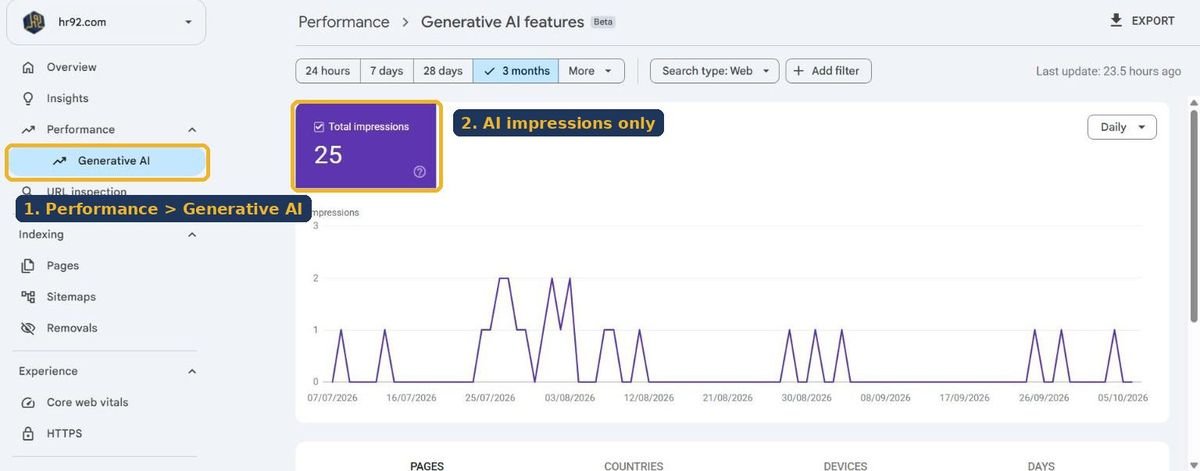
Three practical notes from using it:
- Domain vs URL-prefix properties. I use the Domain property so subdomains and http/https variants are rolled up. A URL-prefix property only shows its own slice.
- The date range starts in May. When I selected the longest range on our property, the chart began on May 18, 2026, not 16 months back. Treat anything before that as “no data”, not “zero visibility”.
- Preliminary data. The most recent day is drawn as a dotted line and can change within hours. I don’t make decisions on the last two days.
What counts as an impression in AI Overviews and AI Mode?
An impression is counted when a link to your site is shown to a user inside an AI feature. Google’s help page defines it as “how many times links to your site were shown to a user in a generative AI feature on Google Search”.
The details matter more than the definition, so here’s what Google’s impressions, position and clicks documentation says:
- AI Overviews occupy a single position. Every link inside the Overview is given that same position. Being the first citation or the eighth doesn’t change the number.
- Clicks are real clicks. Clicking a link to an external page in an AI Overview or in AI Mode counts as a click, in the main Performance report.
- AI Mode follow-ups are new queries. If someone asks a follow-up question in AI Mode, Google treats it as a new search.
- The data is already in your totals. Google’s AI features documentation says sites in AI features are included in overall search traffic and reported under the Web search type.
There’s also a visibility nuance. Brodie Clark ran a public test on AI Overview tracking and reported Google’s clarification that a citation only earns an impression once it’s scrolled or expanded into view. In plain terms: a link hidden behind “Show more” that nobody expands may never be counted.
What does the report look like on a real small business site?
Most articles about this report show Google’s demo screenshot. Here’s ours instead, warts included, because I think small business owners deserve to see what “normal” looks like before a big brand’s chart makes them panic.
For the 3 months from July 7 to October 6, 2026, on the hr92.com Domain property:
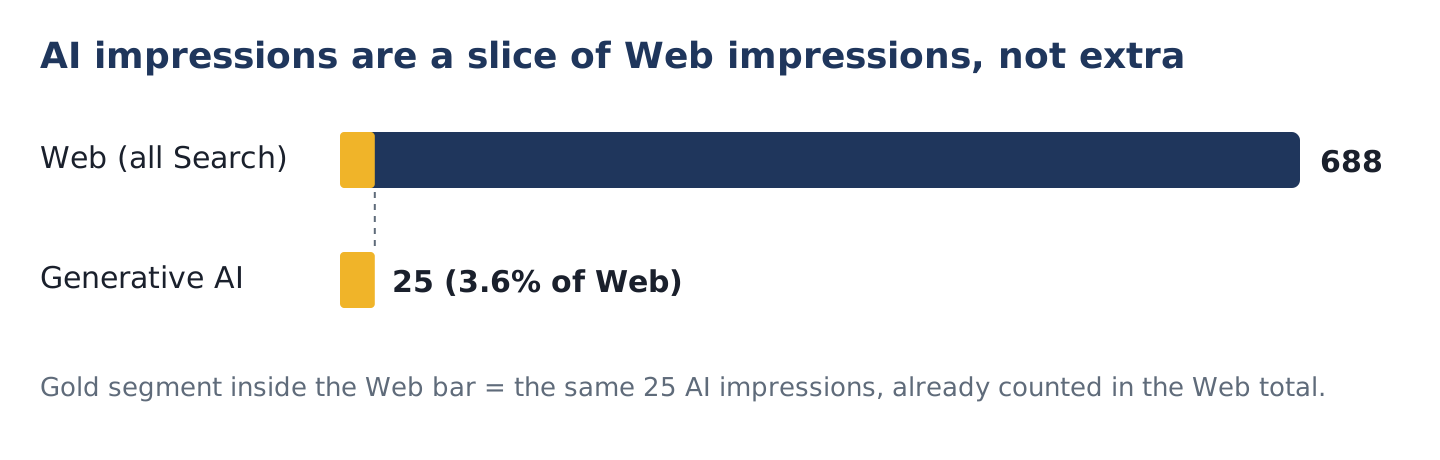
What I take from this:
- Only the homepage gets cited. All 25 AI impressions went to hr92.com/. None of our service pages appeared. That lines up with our own SEO audit of the site in October, where we found 65 service pages without a real H1 and only 21 of 76 pages indexed. Pages Google doesn’t index can’t be cited.
- The pattern is spiky. Most days are zero, with small clusters in late July and early August. At this volume, week-to-week changes are noise. I’d only compare months.
- The share is the signal. 25 impressions sounds tiny. But 3.6% of our Web impressions coming from AI answers, on a site that was badly broken at the time, tells me AI features are already part of how people find us.
How should you use the report? A 20-minute monthly workflow
Use it to answer one question each month: which pages are gaining or losing visibility in AI answers, relative to their normal search visibility? Here’s the routine I run.
- Set the same date range in both reports. Last full calendar month, then “Compare” to the month before.
- Export the AI report by page. Pages tab, Export, Google Sheets.
- Export the Web report by page for the same range, from the regular Performance report with Search type: Web.
- Join the two sheets on URL with a
VLOOKUPorXLOOKUP. - Add an AI impression share column (formula below).
- Sort and flag using the decision table further down.
- Write one line per flagged page with the action you’ll take. Next month, check whether it moved.
The AI impression share formula
AI impression share = AI impressions ÷ Web impressions for the same page and period. In Sheets, with Web impressions in column C and AI impressions in column D:
=IFERROR(D2/C2, 0)Format it as a percentage. A page at 0% isn’t being cited even though it shows in search. A page with a high share is being pulled into AI answers more than its normal results would suggest.
Four patterns and what to do about each
| Pattern | What it usually means | What I’d do |
|---|---|---|
| High Web impressions, 0 AI impressions | The page ranks but isn’t treated as a useful source for AI answers | Add a direct answer at the top, a clear definition, a table or original data. Check it’s eligible for a snippet (no nosnippet). |
| AI share rising, clicks flat | You’re cited more, but the answer satisfies people without a visit | Give a reason to click: a tool, a template, pricing, a calculator, a case study. |
| AI share falling on a key page | Competitors or newer pages are being cited instead | Search the main question yourself, see who’s cited, and update the page with what they have that you don’t. |
| Impressions only from one country or device | AI features vary by market; your content may fit one audience | Check whether that market matches your customers before spending effort on the rest. |
- Same date range in AI and Web reports
- Both exports joined on URL
- AI impression share calculated per page
- Pages with 0% share and 100+ Web impressions listed
- Top 5 pages by AI share checked for click-worthy next steps
- Search generative AI control still on “Include”
- Bing Webmaster Tools AI Performance checked for grounding queries
- One action written per flagged page
What can’t the AI performance report tell you, and how do you fill the gaps?
It can’t tell you which queries triggered your citation, how many people clicked from an AI answer, or where you sat inside the answer. You can work around each of those, partly.
Which queries trigger AI Overviews for your pages?
Search Console won’t say. The practical workaround: in the regular Performance report, filter by the page that gets AI impressions and look at its top queries. Then search the question-style ones yourself and see whether an AI Overview appears with your link.
How many clicks come from AI Overviews and AI Mode?
Those clicks exist; they’re just mixed into the regular report. Google’s documentation confirms that a click on an external link in an AI Overview or AI Mode counts as a click. You can’t separate them inside Search Console today.
What about other AI search engines?
Bing is ahead here. Microsoft introduced AI Performance in Bing Webmaster Tools in February 2026, covering Copilot, AI summaries in Bing and select partners, and it includes a sample of grounding queries. That’s the closest thing to “which prompts used my page” you can get from a search engine right now.
| Feature | Google Search Console | Bing Webmaster Tools |
|---|---|---|
| Surfaces covered | AI Overviews, AI Mode (Discover in its own report) | Copilot, Bing AI summaries, select partners |
| Main metric | Impressions | Citations |
| Page-level data | Yes | Yes |
| Queries | No | Sample of grounding queries |
| Clicks | Not in this view | Not reported as clicks |
| Country and device | Yes | Not described in the launch post |
For ChatGPT, Perplexity and Claude, there’s no equivalent webmaster console. Third-party trackers fill that space, but Google’s own guide to optimizing for generative AI features points out that no third-party tool has access to Google’s internal ranking or AI systems. I treat those tools as directional and Search Console as the record.
Should you use the Search generative AI control to opt out?
For almost every business site: no. Excluding your site removes your links and content from AI Overviews, AI Mode and Discover’s AI features, and Google says you’ll lose the traffic and impressions they bring. It doesn’t help your regular rankings either.
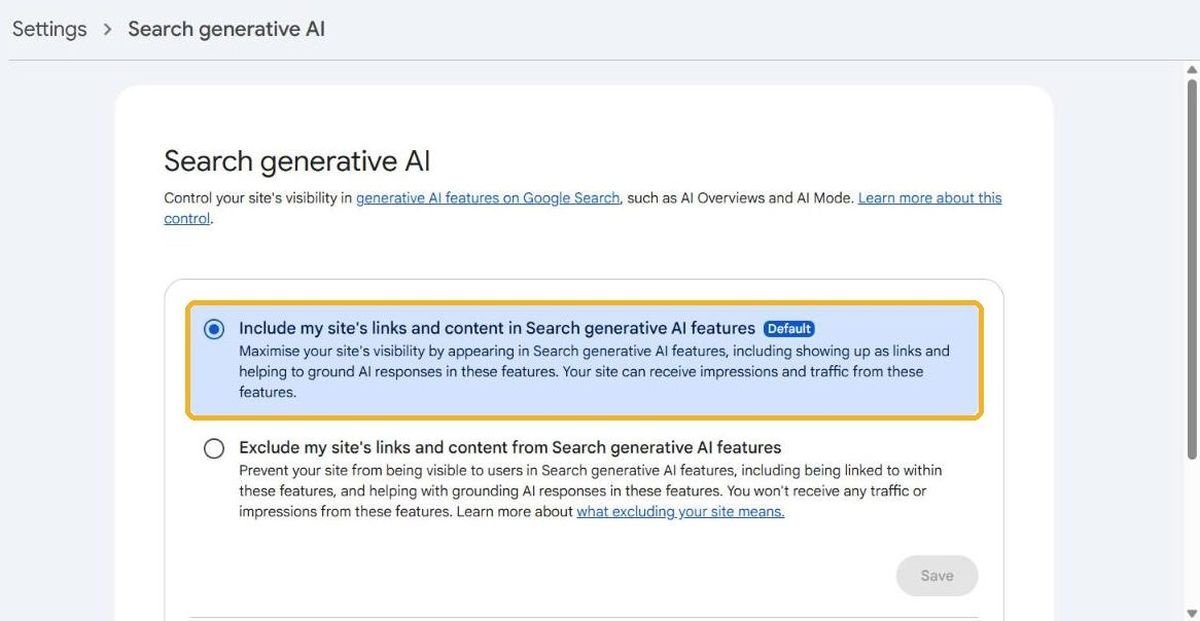
The control lives in Settings > Search generative AI. Per Google’s help page for the control, there are three options: Include (the default), Exclude, and Inherit from parent. Exclusion usually takes effect within a few days. Google’s announcement says the control won’t be used as a ranking signal for results outside these AI features.
One detail almost nobody mentions: inheritance works by property. A URL-prefix property such as example.com/business/ inherits from its closest configured parent, and owners can override it. So if you only want one section out of AI answers (say, a members area or a paid research library), you can verify that folder as its own property and set it there, leaving the rest of the site included.
Opt-out options compared
| Option | Scope | Removes you from AI Overviews and AI Mode? | Effect on regular Search |
|---|---|---|---|
| Search generative AI control: Exclude | Property (domain or folder via URL-prefix) | Yes, as links and as grounding | Not a ranking signal outside AI features |
nosnippet robots meta |
Page | Yes, blocks use as direct input | Also removes your normal text snippet |
max-snippet:[n] |
Page | Limits how much text can be used | Shorter snippets in normal results |
Google-Extended in robots.txt |
Site | Not documented as affecting Search | None. Google says it isn’t a Search ranking signal |
noindex |
Page | Yes | Removes the page from Search entirely |
Sources for the table: Google’s robots meta tag documentation (nosnippet and max-snippet explicitly mention AI Overviews and AI Mode) and the Google-Extended documentation, which covers Gemini training and grounding and says it doesn’t affect inclusion in Google Search.
When would I exclude? Only when the content itself is the product and AI answers would give it away: paid research, a subscription knowledge base, licensed data. A plumber, a law firm, a Shopify store or a SaaS company should want to be the cited source. Being cited is the new page one.
How do you get more AI impressions?
Google’s position is that there’s no special trick. Its AI features page says a page must be indexed and eligible to show with a snippet, and there are no additional requirements. Its AI optimization guide adds that you don’t need llms.txt, special markup or chunked content, and it warns against recycling what others have already said.
I wanted to see what that looks like in practice, so I ran the pages currently ranking for “search console ai performance report” through our free SEO audit tool on October 9, 2026, which scores 53 checks plus a separate AI citability score.
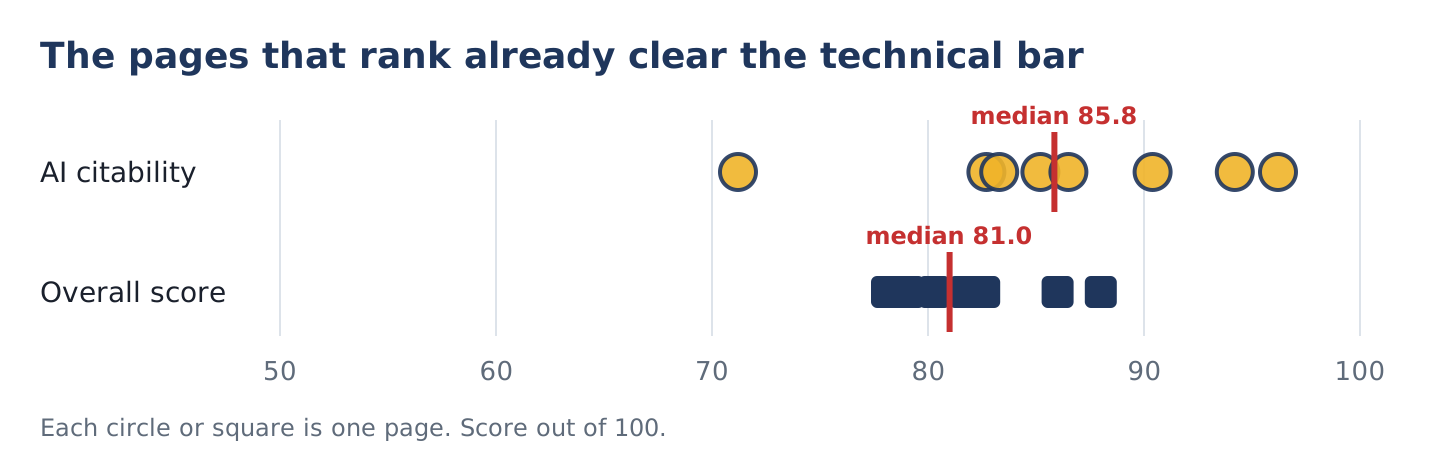
So the technical floor is high, and clearing it is necessary but not enough. What separated pages in my reading of the top results was substance: who had real screenshots, current facts and something you couldn’t get from Google’s own help page. That’s the bar I’d hold any page to:
- Get indexed first. Check Pages in Search Console. Our own service pages couldn’t be cited while most of them weren’t indexed. Our technical SEO work always starts there.
- Answer in the first two sentences. AI answers summarize. Give them a clean, quotable answer under each heading.
- Add something only you have. Your numbers, your process, your prices, your photos. Google’s guide calls this a unique point of view, and it’s the core of how we approach SEO content writing.
- Use tables for comparisons. They’re easy for people to scan and easy for systems to parse.
- Keep important content in the HTML. Don’t hide answers behind tabs that only load with JavaScript.
If you want a deeper plan for this, our generative engine optimization service covers it, and I wrote about what’s working and what’s noise in AI and SEO in 2026.
What mistakes do people make with this report?
- Reporting AI impressions as a separate traffic source. They’re visibility, not visits. Put them next to clicks, not instead of them.
- Panicking over small numbers. At under a few hundred AI impressions a month, daily swings are noise. Compare months.
- Forgetting the control. If a client says their AI report vanished, check Settings first. Someone may have clicked Exclude.
- Optimizing for AI at the expense of clicks. If the answer fully satisfies the searcher, you’re cited and still get no visit. Give people a reason to come through.
Search Console AI performance report FAQ
Does Google Search Console show AI Overview data?
Yes. Since August 31, 2026, every site can see a Generative AI performance report under Performance in Search Console. It shows impressions from AI Overviews and AI Mode by page, country, device and date. It doesn’t show clicks, queries or position, and sites need a minimum amount of AI visibility before the report appears.
Are AI Overview impressions included in the normal Performance report?
Yes. Google says impressions and clicks from AI features are part of your overall search data, reported under the Web search type. The Generative AI report is a separate view of a subset of that data. That’s why you should never add AI impressions to Web impressions; you’d count the same impressions twice.
Can I see which queries triggered my site in AI Mode?
Not in Google Search Console today. The report has no query dimension. A workable substitute is to filter the regular Performance report by a page that earns AI impressions, review its question-style queries, and check them manually. Bing Webmaster Tools does share a sample of grounding queries for Copilot and Bing AI answers.
Why don’t I see the Generative AI report?
Google says the usual reason is that your site hasn’t received enough impressions in AI features yet. The other reason is the Search generative AI control set to Exclude, either on your property or inherited from a parent property. Check Settings, then give it time if the control is on Include.
Does opting out of AI Overviews hurt my rankings?
Google says the Search generative AI control isn’t used as a ranking signal for results outside its AI features. What you lose is the visibility and traffic those AI features would have sent. For most businesses, that’s a cost with no benefit, so I’d leave it on Include.
Is the AI performance report available in the Search Console API?
Google’s documentation for the report describes the interface and CSV export, not an API method, so I’d plan around exports for now. Export both the AI report and the regular report each month and join them in a spreadsheet to calculate AI impression share per page.