
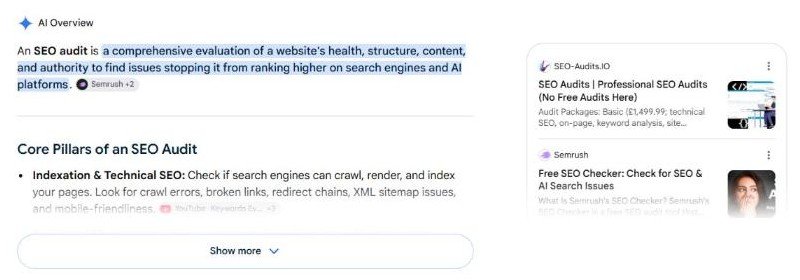
An SEO audit is a structured check of everything on a website that decides whether search engines, and now AI answer engines, can find it, read it, trust it and rank it. Done properly it tells you what is broken, what it is costing you, and what to fix first.
This page does two things. It gives you a free audit you can run right now on any website (53 checks, 10 categories, real Core Web Vitals from Google, and a separate AI search readiness score), and it explains every one of those checks in enough detail that you could do the whole thing by hand if you wanted to.
We wrote it because the guides that currently rank for “SEO audit” are mostly tool walkthroughs. They tell you which button to press in a crawler. They rarely tell you why a check exists, what a bad result actually costs, or how to tell a real problem from noise. And almost none of them deal with the question that now matters most: can ChatGPT, Perplexity and Google’s AI Overviews read your site and quote it?
How it works
Enter a domain
Any public website. Yours, a client’s, a competitor’s. No account, no credit card.
We crawl like a search bot
Homepage, robots.txt, sitemap, one article, llms.txt. Then Google’s PageSpeed API for real Core Web Vitals.
53 checks, two scores
Pass, warning or fail on every check, an overall score, and a separate AI Citability score.
Fix in the right order
An impact-ranked action plan on screen, and a nine-page PDF you can hand to a developer.
What an SEO audit is (and what it isn’t)
Think of it as the inspection you get before buying a house. The inspector does not fix anything. They walk every room with a checklist, note what is wrong, flag what is dangerous, and hand you a report ranked by severity. You then decide what to repair and in which order.
An SEO audit is the same thing for a website. It is a snapshot, not a strategy. It does not write content, build links or change rankings on its own. What it does is remove guesswork: instead of “our traffic feels low”, you get “the homepage has no H1, 7 of 8 images have no alt text, LCP is 3.4 seconds and the site blocks the crawler that feeds ChatGPT search”.
What a complete audit covers
There is a lot of disagreement about what belongs in an audit, mostly because every tool vendor defines it around what their tool measures. Our definition is deliberately wide. A complete audit in 2026 covers ten areas:
| Category | Checks | Weight in score | Question it answers |
|---|---|---|---|
| Technical foundation | 7 | 13% | Can crawlers reach and index the site? |
| On-page SEO | 7 | 15% | Does each page tell search engines what it is about? |
| Content quality | 3 | 9% | Is there enough real content to rank and to quote? |
| Structured data | 3 | 9% | Are facts about the business machine-readable? |
| Performance | 5 + Core Web Vitals | 13% | Is the site fast for real visitors? |
| Mobile and social | 2 | 5% | Does it work on a phone and preview well when shared? |
| Marketing and analytics | 6 | 10% | Can you measure and capture the traffic you get? |
| Local SEO | 3 | 5% | Can you show up for “near me” searches? |
| Security and trust | 3 | 7% | Will browsers and Google trust the site? |
| AI search readiness | 14 | 14% | Can AI engines crawl, understand and cite you? |
Technical foundation
HTTPS, status, robots.txt, sitemap, canonical, indexability, language.
On-page SEO
Title, meta description, H1, heading order, alt text, internal links, URLs.
Performance
Core Web Vitals from Google, page weight, server time, scripts, compression.
Marketing and analytics
Analytics, ad pixels, social links, email capture, chat, CMS.
AI search readiness
Crawler access, llms.txt, snippet controls, JS rendering, answer shape, entity schema, freshness.
The weights are ours and they are opinionated. On-page and AI readiness carry the most because they are where we see the most lost value on real sites. Mobile carries little because almost every modern theme passes it, so a pass there tells you nothing.
What an audit is not
It is not a backlink audit, although backlinks matter. Backlinks live on other people’s websites, and a tool that only reads your pages cannot see them. The audit on this page looks at what you control. For link profiles you need Google Search Console (free, and more accurate for your own site than any third-party index) or a paid link tool. If the profile turns out to be the weak spot, that is a link building problem rather than an audit problem.
It is also not a rank tracker, a keyword research tool, or a content strategy. Those come after the audit, once the foundation is sound. Fixing a broken foundation first is the single highest-return thing most sites can do, which is why we start here.
SEO audit vs technical SEO audit
A technical SEO audit is a subset. It covers crawlability, indexing, site speed, rendering, redirects and security. It does not look at titles, content, schema, local signals or AI readiness. On this page the technical items are categories 1, 5, 6 and 9. If someone sells you a “technical audit”, those four are what you should expect to receive. Our own technical SEO service starts with exactly those, plus a full-site crawl this tool does not do.
How the free audit works and how to read your score
Enter a domain in the box above. The engine fetches your homepage the way a search crawler would, plus your robots.txt, your XML sitemap, one article or blog page it finds through the sitemap, and your llms.txt if you have one. It asks Google’s PageSpeed Insights API for your Core Web Vitals. Then it runs 53 checks and scores them.
Nothing is installed and nothing is submitted to your site. We read public pages only. The whole thing normally takes 15 to 40 seconds; most of that is Google measuring your speed.
Watch: how a search bot reads your website
Twenty-four seconds, no sound. It shows the five things a crawler does on every visit and where the common failures sit. If you have never thought about what Googlebot or OAI-SearchBot actually does when it arrives, start here.
How the score is calculated
Every check returns one of three results: pass, warning or fail. Each check also has a weight (1 to 3) reflecting how much it matters, and an impact level (high, medium, low) that drives the fix order. Checks that only report information, such as which CMS you use, carry no weight.
Each category is scored 0 to 100 from its weighted checks. The overall score is the weighted average of the ten categories using the percentages in the table above. The AI Citability score shown next to the overall score is simply the AI search readiness category on its own, because it answers a different question and we did not want it buried in the average.
One rule we hold to: if something cannot be measured on your page, the report says “not measured”. It never invents a number. If Google has no field data for your site (common for small sites), the Core Web Vitals checks say so instead of guessing.
What a good score looks like
Scores are out of 100 with a letter grade. The bands are simple:
- 80 to 100 (A or B). The foundation is solid. Your remaining gains come from content, links and authority, not from fixing the site.
- 50 to 79 (C or D). The basics are there but you are leaking value somewhere. This is where most established business sites land, including ours on the first run.
- Below 50 (F). Something fundamental is wrong: pages blocked from indexing, no HTTPS, no titles, a site that is unreadable without JavaScript. Fix these before spending a cent on content or ads.
Please do not fixate on the number. Two sites can both score 70 for completely different reasons, and one of them might be a ten-minute fix. The useful part of any audit is the priority action plan, which sorts every failed and warned check by impact so you know what to do first.
1. Technical foundation: can crawlers reach and index the site?
If a crawler cannot get to a page, nothing else on this list matters. These seven checks are the ones we look at first on every new client, and they are the ones most likely to produce a “how did nobody notice this?” moment.
HTTPS
What we check: that the site is served over HTTPS and that it actually loaded securely.
Why: Google confirmed HTTPS as a ranking signal back in 2014, and every modern browser labels HTTP pages “Not secure”. Visitors notice.
Fix: install a certificate (free through Let’s Encrypt on most hosts) and 301-redirect every HTTP URL to its HTTPS version. Then update your canonical tags, sitemap and internal links so nothing still points at HTTP.
HTTP status
What we check: that the homepage returns a 200 status code rather than a redirect chain, a 4xx error or a 5xx server error.
Why: a homepage that redirects through three hops wastes crawl budget and leaks link equity at each step. A 5xx at the moment Google crawls can get pages dropped.
Fix: collapse redirect chains to a single hop. If you see intermittent 5xx errors, talk to your host before doing anything else.
robots.txt
What we check: that the file exists, is valid, and does not block the whole site or important sections with a blanket Disallow: /.
Why: this one file can make an entire site invisible. We see “Disallow: /” left over from staging more often than you would think, usually right after a redesign.
Fix: open yourdomain.com/robots.txt in a browser. It should allow your main crawlers and only disallow admin, cart, search and parameter URLs. Point it at your sitemap with a Sitemap: line (Google’s robots.txt guide covers the syntax). We cover the AI crawler rules in the same file further down.
A developer builds the new site on a staging domain with
Disallow: / so Google does not index the half-finished version. The site launches. Nobody removes the line. Three weeks later the client asks why traffic fell off a cliff. Check this file the day you launch anything.XML sitemap
What we check: that a sitemap is declared or discoverable at the usual location, and that it contains real URLs.
Why: the sitemap is how you tell search engines which pages matter and when they changed. Without one, discovery depends entirely on internal links.
Fix: every major CMS generates one. Make sure it only lists canonical, indexable 200 pages, and that the lastmod dates are honest. Submit it in Google Search Console. Google’s sitemap documentation lists what belongs in one and what does not.
Canonical tag
What we check: that the homepage declares a canonical URL and that it points to itself.
Why: the same page is often reachable at four addresses (http, https, www, non-www, with and without a trailing slash). Without a canonical, Google picks one for you, and it may split your ranking signals across copies.
Fix: one <link rel="canonical"> per page, absolute URL, pointing at the version you want indexed. Make sure it matches the version your redirects send people to. Google explains how it chooses a canonical when you do not.
Indexability
What we check: that the homepage does not carry a noindex directive in a meta tag or HTTP header.
Why: a noindex on the homepage is the second most common “site vanished” cause after robots.txt. It is usually a WordPress “Discourage search engines” checkbox that was never unticked after launch.
Fix: remove the directive, then request indexing in Search Console. Check the rest of the site with a crawler; noindex often spreads through a template.
Language declaration
What we check: that the <html> tag declares a language, such as lang="en".
Why: it helps search engines serve the right language version, it is required for accessibility, and screen readers use it to choose pronunciation.
Fix: one attribute in the theme header. If you serve several languages, add hreflang tags as well; that is beyond what this audit checks but it is the next thing to look at on a multilingual site.
2. On-page SEO: does each page say what it is about?
On-page SEO is the part of the audit most people think they have covered and most often have not. These seven checks look at the homepage in detail and at one article page for the heading and structure items.
Title tag
What we check: that a title exists, is unique to the page, and sits roughly between 30 and 60 characters.
Why: the title is the strongest on-page relevance signal and the headline of your search listing. Google rewrites titles it does not like, and the rewrites are rarely better than a good human one.
Fix: lead with the page’s main topic, add the differentiator, end with the brand. “Free SEO Audit Tool: 53 Checks + AI Search Score | HR92” is the pattern. Keep it under about 60 characters so it does not get cut off.
Meta description
What we check: that a meta description exists and is between roughly 70 and 160 characters.
Why: it is not a ranking factor, and it is still one of the highest-leverage lines you can write, because it is your ad copy in the results. Without one Google pulls a sentence from the page, usually a bad one.
Fix: one or two sentences that say what the page offers and who it is for, with the main keyword in natural language. Write a different one for every important page. If writing fifty of them is the blocker, that is the kind of job our SEO content writers do weekly.
Open your page in a search result for your own brand name and read the description as a stranger would. If it does not tell them what you do and why they should click, rewrite it. Thirty seconds of honesty beats an hour of keyword placement.
H1 heading
What we check: that there is exactly one H1 element on the page.
Why: the H1 confirms the page topic to crawlers and to AI engines deciding what the page answers. Page builders are the usual culprit for a missing H1: the big visual heading is a styled div, not a heading element. Our own homepage failed this check.
Fix: view the page source and search for <h1. Make the main heading a real H1 that contains the topic in plain words. Demote any extra H1s to H2.
The headline “Grow Smarter with Digital Marketing” was a styled block in a page builder for two years. Nobody noticed because it looked like a heading. It was not one. The audit flagged it in under a second, which is the entire argument for running one.
Heading hierarchy
What we check: that headings run in order (H1, then H2s, then H3s under them) without skipping levels, and that the page has headings at all.
Why: a sensible outline is how crawlers, screen readers and AI summarisers understand the structure of a long page. Skipping from H1 to H4 because the H4 “looked nicer” breaks that.
Fix: treat headings as an outline, not as font sizes. Style them in CSS if you need a different look.
Image alt text
What we check: the share of images on the page that have a non-empty alt attribute.
Why: alt text is read by screen readers, by Google Images, and by AI crawlers that cannot see pictures. It is also a legal accessibility requirement in a growing number of countries.
Fix: describe what the image shows in one sentence. Decorative images can carry an empty alt attribute (alt=""), but product, team and service images should not.
Internal links
What we check: that the page links to a reasonable number of other pages on the same site.
Why: internal links are how authority flows from your strong pages to your weak ones and how crawlers find deep pages. A homepage with six links is starving the rest of the site.
Fix: link from your homepage and top pages to the pages you want to rank, using descriptive anchor text. Then go the other way and make sure every important page is reachable within three clicks.
URL quality
What we check: that URLs are short, lowercase, readable, and free of session IDs and long query strings.
Why: clean URLs are easier to share, easier to read in results, and less likely to create duplicate versions of the same page.
Fix: hyphens between words, no dates in the slug unless the content is dated by nature, and 301 redirects from any URL you change.
3. Content quality: is there enough to rank and to quote?
Three checks here, and they are deliberately blunt. They do not judge whether your writing is good. They judge whether there is enough real text for a search engine or an AI model to work with.
Word count
What we check: the amount of visible text on the homepage.
Why: thin pages rarely rank for anything competitive, and they give AI engines nothing to lift. There is no magic number; a homepage with 80 words and a contact form is thin, a homepage with 400 words that explains what you do and for whom is usually fine.
Fix: add a short section that answers the three questions a stranger has: what do you do, who is it for, why you. Then link to the pages that go deeper.
Text-to-code ratio
What we check: how much of the HTML is actual text versus markup and scripts.
Why: a very low ratio usually means a bloated page builder, inline scripts or a page that is mostly images. It correlates with slow pages and with crawlers struggling to find the content.
Fix: move inline CSS and JS to files, remove unused builder modules, and make sure the main text is in the HTML rather than injected later.
Favicon
What we check: that the site declares a favicon.
Why: Google shows it next to your listing on mobile and in some desktop results. A missing one looks unfinished, and the generic globe icon measurably hurts clicks.
Fix: a 48 by 48 pixel (or larger, square) icon linked in the head. Most CMSs have a site icon setting.
4. Structured data: are facts about you machine-readable?
Structured data is a block of JSON in your page that states facts in a format machines agree on: this is an Organization, its name is X, its logo is here, these are its official profiles. Search engines use it for rich results. AI engines use it to work out who you are, so they can credit you.
JSON-LD schema
What we check: that the page contains at least one valid JSON-LD block, and what types it declares. We follow @graph structures, which is how WordPress SEO plugins output their markup.
Why: it is the most reliable way to tell search engines what a page is. Google has been explicit that no special markup is required for its AI features, but it still uses structured data for rich results, and consistent entity data is one of the signals AI engines use to decide whether a source is clearly identifiable.
Fix: at minimum, Organization (or LocalBusiness) on the homepage and Article on posts. Validate with Google’s Rich Results Test. Make sure what the markup says matches what is visible on the page; mismatches can get you a manual action. The vocabulary itself lives at schema.org.
Open Graph tags
What we check: og:title, og:description, og:image and og:url.
Why: these decide what your page looks like when shared on LinkedIn, Facebook, WhatsApp and Slack. A link with no image and a raw URL for a title gets a fraction of the clicks.
Fix: any SEO plugin can generate them. Use a 1200 by 630 pixel image, and set a specific one for your most shared pages. The Open Graph protocol page lists every property.
Twitter card
What we check: a twitter:card tag, ideally summary_large_image.
Why: X falls back to Open Graph for most fields, but without the card type it may show the small layout, and some other platforms read these tags too.
Fix: one line in the head. Set it once in your SEO plugin and forget it.
5. Performance and Core Web Vitals: is the site fast for real people?
Speed is the category where the numbers are least negotiable. Google publishes the thresholds, measures them from real Chrome users, and uses them in ranking. This category has five checks the engine measures itself plus the Core Web Vitals it pulls from Google.
Core Web Vitals (from Google field data)
Core Web Vitals are three measurements of how a page feels to a visitor. The thresholds, from Google’s own documentation, are assessed at the 75th percentile of real page loads, mobile and desktop separately:
| Metric | What it measures | Good | Needs work | Poor |
|---|---|---|---|---|
| Largest Contentful Paint (LCP) | How long until the main content is visible | 2.5 s or less | 2.5 to 4.0 s | over 4.0 s |
| Interaction to Next Paint (INP) | How quickly the page responds to a tap or click | 200 ms or less | 200 to 500 ms | over 500 ms |
| Cumulative Layout Shift (CLS) | How much the layout jumps around while loading | 0.1 or less | 0.1 to 0.25 | over 0.25 |
We pull these from Google’s PageSpeed Insights API. When field data exists for your site, the report shows what real visitors experienced over the last 28 days, not a lab simulation. That distinction matters: lab scores change every time you run them and depend on the testing machine. Field data is what Google ranks on. If your site is too small to have field data, the report says “not measured” rather than substituting a lab number and pretending.
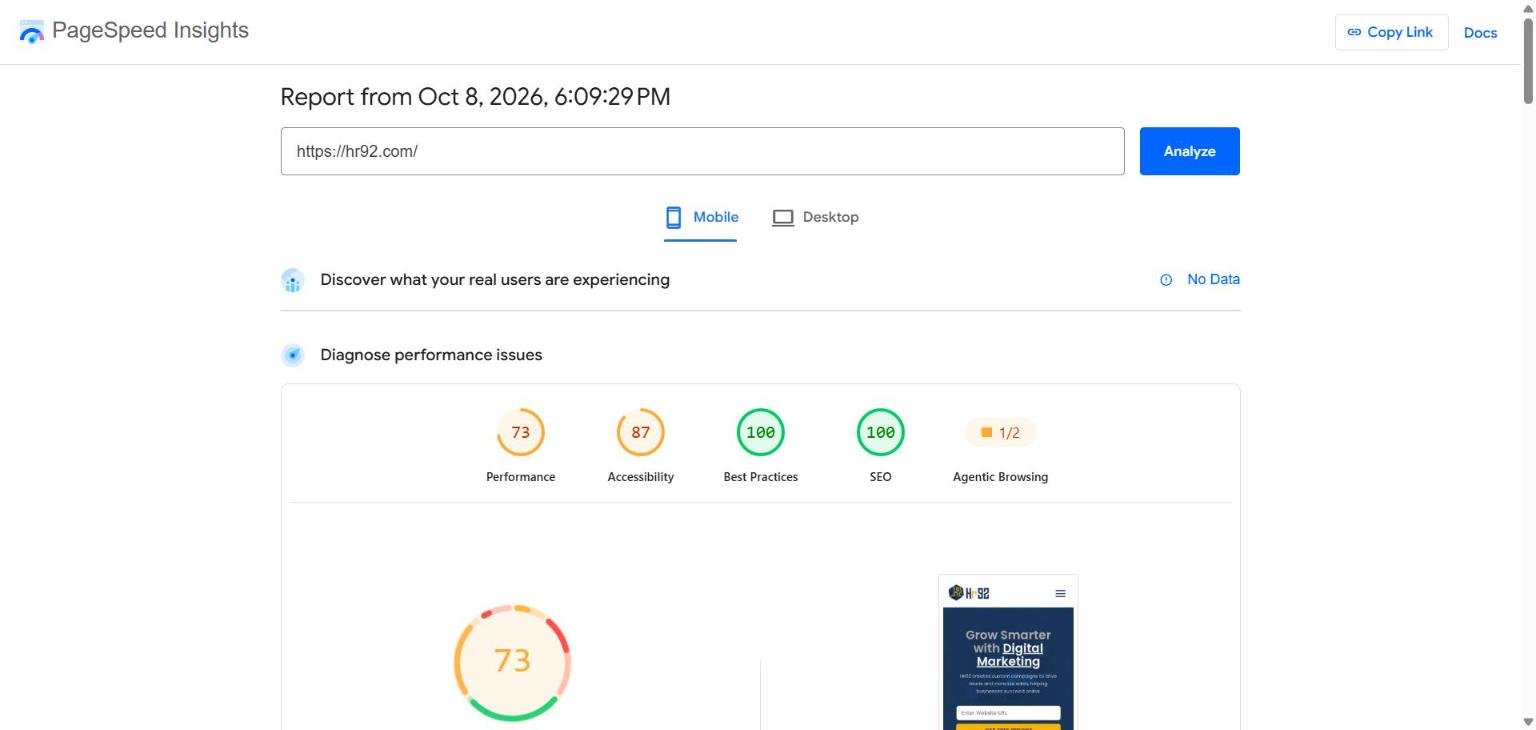
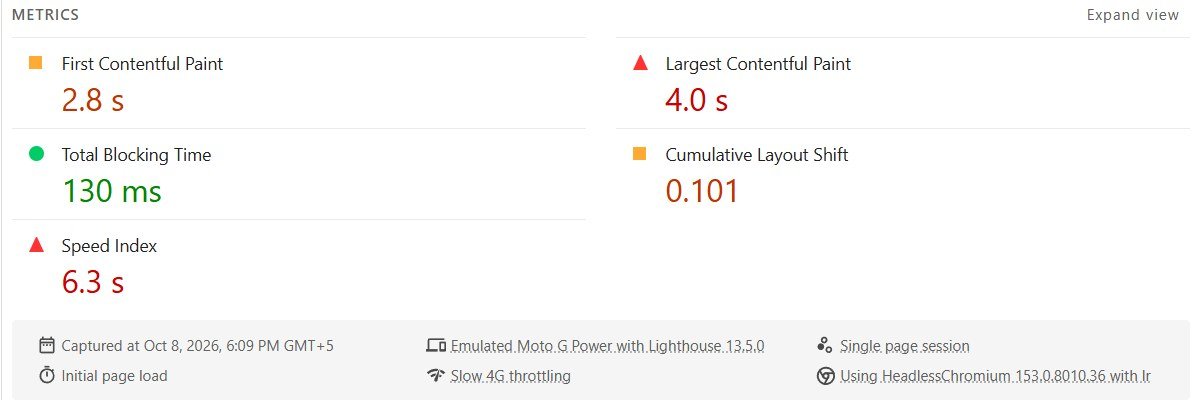
Lab data is a robot on a slow simulated phone, run once. Field data is thousands of real visitors over 28 days. Google ranks on field data. Debug with lab data. Run both in PageSpeed Insights.
The fixes that most often move LCP on business sites, in the order we try them: compress and resize the hero image (it is almost always the LCP element), add a CDN, enable server caching, and preload the hero image and the main font (web.dev’s LCP guide walks through each). For CLS it is nearly always images without width and height attributes, or ads and embeds injected above content. For INP it is usually one heavy third-party script, often a chat widget or a tag manager with too much in it (how to find it).
HTML page weight
What we check: the size of the HTML document itself (not images or scripts). Under 300 KB passes, under 800 KB is a warning, above that fails.
Why: a 1.5 MB HTML file means the browser has to download and parse all of it before it can show anything. Page builders that inline every style and script are the usual cause.
Fix: move inline CSS and JavaScript to external files, remove unused builder modules, and enable compression (next check).
Server response time
What we check: how long the server took to return the HTML. Under one second passes; over 2.5 seconds fails.
Why: every other speed optimisation sits on top of this. If the server takes three seconds to answer, no amount of image compression will get LCP under 2.5.
Fix: page caching (a plugin on WordPress, built in on most managed hosts), a CDN, and if those do not help, better hosting. Shared hosting with a database-heavy theme is the common pattern behind a slow response.
Image lazy loading
What we check: on pages with four or more images, whether at least half of them use loading="lazy".
Why: lazy loading stops the browser downloading images the visitor has not scrolled to yet. It is one attribute and it directly improves LCP on image-heavy pages.
Fix: WordPress adds it by default since version 5.5. If your theme strips it, add it back. Never lazy-load the hero image; that makes LCP worse.
Render-blocking scripts
What we check: external scripts in the <head> that have no async, defer or type="module" attribute. None passes, one or two is a warning, more fails.
Why: a script in the head without those attributes stops the page rendering until it has downloaded and run. Three analytics and chat scripts up there can add a full second before anything appears.
Fix: add defer to scripts that are not needed for first paint, or move them to the end of the body. Load chat widgets after the page is interactive.
Text compression
What we check: whether the HTML response is compressed with Brotli, gzip or zstd.
Why: compression typically cuts transfer size by 60 to 80 percent. It is a server setting, it costs nothing, and we still see sites without it.
Fix: enable Brotli (preferred) or gzip at the server or CDN. Cloudflare does it automatically on the free plan.
Open your homepage, find the biggest image, and check its file size. On most business sites it is a 2 to 4 MB hero photo that could be 150 KB as a WebP at the same visible quality. That single file is often the whole LCP problem. Squoosh (free, in the browser) will do it in a minute.
6. Mobile and social: does it work on a phone and look right when shared?
Google has indexed the mobile version of every site first since it finished the switch in 2024. If your page is broken on a phone, that is the version Google sees. Two checks here, both quick.
Mobile viewport
What we check: a <meta name="viewport"> tag with width=device-width.
Why: without it, phones render the page at desktop width and shrink it, so visitors pinch and zoom to read anything. It is the single clearest signal that a site was never built for mobile.
Fix: one line in the head. Every responsive theme includes it; if yours does not, the theme is the problem.
Legible font sizes
What we check: inline pixel font sizes below 12px.
Why: text under 12 pixels is unreadable on a phone without zooming, and Google’s mobile usability reports flag it.
Fix: body text at 16px or more on mobile, nothing below 12px anywhere. If your fonts are set in external CSS (most are), this check reports “not measured” because it cannot see them, and you should confirm with Chrome’s device toolbar.
7. Marketing and analytics: can you measure and capture what you get?
This category is not in most audit tools, and we think that is a mistake. Traffic you cannot measure is traffic you cannot improve, and traffic you cannot capture is traffic you are renting. Six checks.
Web analytics
What we check: that an analytics tag is present (Google Analytics 4, Tag Manager, Matomo, Plausible, Fathom and similar).
Why: because you would be surprised how many sites have no analytics, or an old Universal Analytics tag that stopped collecting in 2023.
Fix: install GA4 through Tag Manager, and set up Search Console at the same time; the two together are the whole free SEO measurement stack.
Ad and conversion tracking
What we check: ad pixels such as Google Ads, Meta, LinkedIn and TikTok.
Why: only relevant if you run ads, so this is a warning not a fail. But if you do run ads and the pixel is missing, you are paying for clicks you cannot attribute.
Fix: install through Tag Manager so one container handles everything.
Social media profiles
What we check: links from the page to your profiles on LinkedIn, Facebook, Instagram, X, YouTube and the like.
Why: two reasons. Visitors use them to check you are real. And search and AI engines use them, together with sameAs in your schema, to connect your website to the rest of your online presence. Our own site failed this one; the links simply were not there.
Fix: add them to the footer and to your Organization schema.
Email capture
What we check: a newsletter or lead form on the page.
Why: a visitor who leaves without giving you a way to reach them is gone. Search rankings go up and down; an email list is yours.
Fix: one form, one clear offer, no popup on the first second. A downloadable checklist or a free audit (hint) works well.
Live chat
What we check: a chat widget.
Why: low weight, and it is a judgement call. For service businesses it lifts conversion; for a blog it is noise. We report it so you can decide.
Fix: if you add one, load it after the page is interactive so it does not hurt INP.
CMS and platform
What we check: which platform the site runs on (WordPress, Shopify, Webflow, Wix, custom).
Why: informational, no score. It tells us, and you, which fixes are a plugin setting and which need a developer.
8. Local SEO: can you show up for “near me” searches?
If your business has a physical location or serves a geographic area, the map pack is often worth more than the organic results below it. Three checks look at the signals on your own site that feed it. (Your Google Business Profile matters at least as much and is outside what any site audit can see. If the map pack is where your customers are, our local SEO service covers both halves.)
LocalBusiness schema
What we check: a LocalBusiness (or a subtype such as Dentist or LegalService) block with a name, address and phone number.
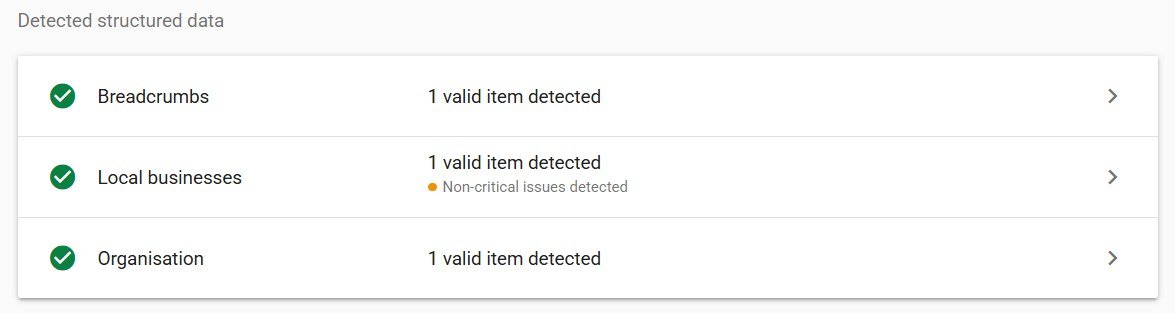
Why: it is the machine-readable version of your business card. Our own site had the block but no postal address in it, despite listing three offices in the footer. The audit caught it in a second.
Fix: fill in the address, telephone, openingHours and geo properties. If you have several locations, one block per location page.
Name, address, phone (NAP)
What we check: that a phone number and a postal address are visible in the page text.
Why: consistency between your website, your Google Business Profile and directory listings is one of the oldest and still most reliable local ranking signals. Visible contact details also reassure visitors.
Fix: put them in the footer, formatted exactly as they appear on your Google Business Profile.
Map or directions
What we check: an embedded map or a directions link.
Why: a small signal, but it reinforces the location and it is what a visitor on a phone actually wants from a contact page.
Fix: a Google Maps embed on the contact page, loaded lazily so it does not slow the page.
9. Security and trust: will browsers and Google trust the site?
These are the checks a developer should have done and usually has not, because nothing visibly breaks when they are missing. Three checks.
HSTS
What we check: a Strict-Transport-Security header.
Why: it tells browsers to never load your site over HTTP again, which closes a window for downgrade attacks and removes one redirect from every return visit.
Fix: one header at the server or CDN. Start with a short max-age and extend it once you are sure every subdomain works over HTTPS (MDN reference).
Security headers
What we check: the common protective headers: X-Content-Type-Options, X-Frame-Options or a frame-ancestors policy, Referrer-Policy, and a Content Security Policy.
Why: they stop a class of attacks (clickjacking, MIME sniffing, some injection) that can get a site flagged as dangerous. A site flagged by Safe Browsing loses most of its traffic overnight, and cleaning up after a compromise costs far more than an afternoon of hardening. These headers are part of our standard setup on every site we manage.
Fix: most hosts let you add headers in a config file or a security plugin. Test with Mozilla Observatory after adding them; the OWASP Secure Headers project explains what each one does.
Mixed content
What we check: resources (images, scripts, stylesheets) loaded over HTTP on an HTTPS page.
Why: browsers block mixed scripts outright and show a warning for mixed images. The padlock disappears. It is the most common leftover from an HTTP-to-HTTPS migration.
Fix: search the database for http://yourdomain and replace it. A single hard-coded image URL in a widget is usually the culprit.
10. AI search readiness: can AI engines crawl, understand and cite you?
This is the category most audits skip, and the reason we built our own tool rather than using somebody else’s.
Why we check AI search at all
Two years ago, “SEO” meant Google. It still mostly does, but the shape of a search result has changed and so has where people ask questions. Google’s AI Overviews appeared on roughly a quarter of queries at their July 2025 peak, and when an AI summary is present, Pew Research found users click a traditional result on 8 percent of visits instead of 15 percent. Meanwhile ChatGPT, Perplexity, Claude and Gemini answer questions directly and cite a handful of sources. BrightEdge measured ChatGPT referral traffic doubling between January and August 2026.
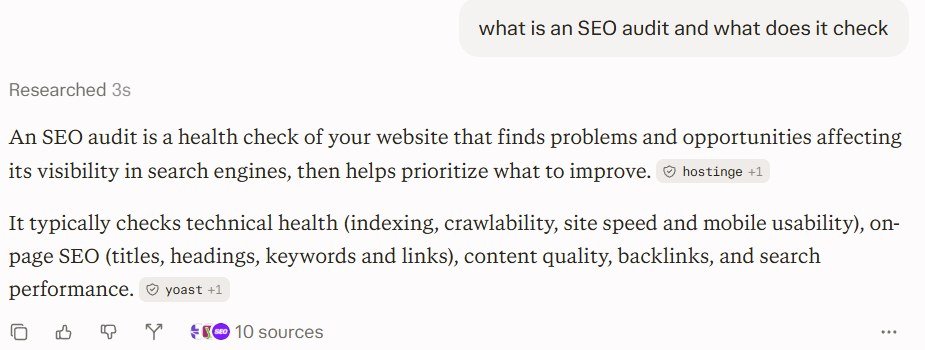
The total is still small next to Google. But the mechanism is different and that is the point. In classic search, a weak page loses a few positions. In an AI answer, a page the engine cannot read or does not trust is not cited at all. There is no position eleven. You are in the answer or you are invisible.
The good news is that almost everything that makes a page citable is also good classic SEO, and most of it is simple. Google says so in its own words: “optimizing for generative AI search is optimizing for the search experience, and thus still SEO”. We just found that nobody was checking the specifics. So we wrote fourteen checks and rolled them into one AI Citability score out of 100. (If you want the strategy behind them rather than the checklist, our generative engine optimisation service page and the AI and SEO in 2026 article cover it.)
Which AI crawlers exist and what each one does
This is where most confusion lives, so here is the full table. The distinction that matters is between crawlers that search (they fetch your page to answer a user’s question and cite you) and crawlers that train (they collect text to build the next model). Blocking a training bot is a legitimate business choice. Blocking a search bot makes you invisible in that engine.
| Crawler | Company | Purpose | Our verdict |
|---|---|---|---|
| OAI-SearchBot | OpenAI | Indexes sites for ChatGPT search results | Allow |
| ChatGPT-User | OpenAI | Fetches a page when a ChatGPT user asks about it | Allow |
| GPTBot | OpenAI | Collects training data | Your choice; does not affect search |
| Claude-SearchBot | Anthropic | Indexes sites for Claude’s search | Allow |
| Claude-User | Anthropic | Fetches a page on a user’s request | Allow |
| ClaudeBot | Anthropic | Collects training data | Your choice |
| PerplexityBot | Perplexity | Indexes sites for Perplexity answers | Allow |
| Perplexity-User | Perplexity | Fetches on user request; generally ignores robots.txt | Allow |
| Bingbot | Microsoft | Bing and Copilot; also supplies ChatGPT’s web index | Allow, always |
| Google-Extended | Controls use in Gemini training and grounding; does not affect Search or AI Overviews | Your choice | |
| Applebot | Apple | Siri and Spotlight | Allow |
| CCBot | Common Crawl | Open dataset used to train many models | Your choice |
| Meta-ExternalAgent, Bytespider, Amazonbot | Meta, ByteDance, Amazon | Training and assistant features | Your choice |
Sources: OpenAI’s crawler documentation, which states that each bot’s setting is independent of the others; Anthropic’s crawler page; Perplexity’s bot documentation; Google’s AI features documentation.
Check 1: AI search crawlers allowed
What we check: your robots.txt, group by group, for rules that block OAI-SearchBot, ChatGPT-User, Claude-SearchBot, Claude-User, PerplexityBot, Perplexity-User, Bingbot or Applebot. A rule that only blocks admin, cart, search or feed paths is treated as harmless.
Why: this is the highest-weighted AI check because it is binary. Blocked means absent. We see it most often on sites that copied a “block all AI” robots.txt template in 2023 without reading which bots it listed.
Fix: remove the Disallow rules for the search bots, or add explicit Allow: / groups for them above any wildcard block.
Check 2: AI training crawler policy
What we check: whether GPTBot, ClaudeBot, Google-Extended, CCBot and the other training bots are allowed or blocked.
Why: reported, never scored. Some businesses want their content in training data because it builds brand familiarity in the models; some do not want it on principle. Both are defensible. What is not defensible is not knowing which you have chosen.
Fix: decide, then write it down in robots.txt. If you block GPTBot, understand that OpenAI treats that as a training opt-out only; ChatGPT search is governed by OAI-SearchBot.
Check 3: Content-Signal directive
What we check: a Content-Signal: line in robots.txt.
Why: in September 2025 Cloudflare introduced Content Signals, a machine-readable way to say how your content may be used: search=yes, ai-input=yes, ai-train=no, for example. It was rolled out to millions of domains on Cloudflare’s managed robots.txt. It is not a standard yet and not every crawler honours it, so we report it and give a small credit for having it; we never fail a site for lacking it.
Fix: optional. If you are on Cloudflare, it may already be there. If not, one line expressing your policy costs nothing.
Check 4: llms.txt
What we check: whether /llms.txt exists and looks like a real Markdown index rather than an empty file or a 404 page returning 200.
Why: llms.txt is a proposed convention for giving language models a curated summary of what matters on your site. We want to be honest about its status: Google ignores it, and when asked in January 2026 whether Google hosting one was an endorsement, John Mueller answered “to be direct, no”. Some developer tooling and smaller engines do read it. So it carries almost no weight in our score, and we will not tell you it is essential, because it is not.
Fix: if you have twenty minutes, write one: a title, a one-paragraph description, and a list of your most important pages with a line each. If you do not, skip it and fix the heading structure instead.
Check 5: AI snippet controls
What we check: nosnippet, max-snippet and data-nosnippet directives on the page.
Why: these are the official controls for how much of your page Google may show, and they apply to AI Overviews and AI Mode too. A max-snippet:0 or nosnippet left on a template quietly makes the page ineligible to be quoted in an AI answer, while the page still ranks normally. Nobody notices because nothing looks broken.
Fix: remove them unless you have a specific legal reason to restrict quoting. If you do, use data-nosnippet on just the sensitive paragraph instead of the whole page.
Check 6: content readable without JavaScript
What we check: that the main text of the page is present in the raw HTML, not injected by a script after load.
Why: Googlebot renders JavaScript. Most AI crawlers do not; they read the HTML as delivered. A React or Vue site that ships an empty <div id="app"> and fills it client-side looks like a blank page to them. This is the most common reason a well-ranked site is never cited by ChatGPT.
Fix: server-side rendering or static generation for any page you want quoted. Most modern frameworks support it. Check by viewing the page source (not the inspector) and searching for a sentence from the page. Google documents how its own renderer handles this in its JavaScript SEO basics; assume AI crawlers are stricter.
A site built as a single-page app ranks on Google because Googlebot renders it. It is never cited by ChatGPT or Perplexity because their crawlers do not. The owner sees good rankings and concludes AI search does not matter for them. It does; they just cannot see the gap. If this might be you, view-source is a two-second test.
Check 7: answer-first opening
What we check: whether the first paragraph of the homepage and of the sampled article reads as a direct answer or definition, rather than a slogan or a throat-clearing introduction.
Why: AI engines extract passages. A page that opens with “In today’s fast-paced world…” or “Grow smarter with digital marketing” (ours) gives them nothing to extract. A page that opens by answering the question in two sentences gets lifted whole. This page’s first paragraph was rewritten for exactly that reason.
Fix: for every important page, write the first paragraph as the answer to the question someone typed to get there. Put the slogan second.
Check 8: question-style headings
What we check: whether any H2 or H3 headings are phrased as questions or as the direct “how to” form.
Why: headings that match how people ask are easier to match to a query, both for People Also Ask boxes and for AI engines deciding which section answers a prompt. Our homepage had fourteen subheadings and not one was a question.
Fix: you do not need every heading to be a question. Two or three per long page, phrased the way a customer would ask, is enough.
Check 9: FAQ and HowTo blocks
What we check: a visible FAQ section (and FAQPage or HowTo schema if present).
Why: a FAQ is the most extractable content structure there is: a question, then a 40 to 80 word answer. Google stopped showing FAQ rich results for most sites in 2023, which is why people stopped adding them; that was a mistake, because AI engines never stopped reading them.
Fix: three to six real questions customers ask, answered plainly, marked up with FAQPage schema. Not twenty keyword-stuffed ones. Google’s FAQPage documentation shows the markup.
Check 10: lists and tables
What we check: the presence of bulleted or numbered lists and tables in the content.
Why: structured blocks are what AI answers are made of. A comparison table or a numbered process is far more likely to be reproduced, with attribution, than the same information in three paragraphs of prose.
Fix: wherever you have a process, a comparison or a set of options, give it a list or a table. This page has four tables for that reason.
Check 11: entity clarity (Organization schema)
What we check: Organization or LocalBusiness schema with a name, a logo, a description and sameAs links to your official profiles.
Why: of all fourteen checks, this is the one that moves the AI Citability score most for a typical business site. An engine that is about to cite you needs to know who “you” are. Clear entity data is how it connects your domain to your LinkedIn page, your Wikipedia mention if you have one, and your reviews. Without it you are an anonymous URL.
Fix: one JSON-LD block on the homepage. Most SEO plugins generate it; fill in every field, especially sameAs.
Check 12: author and dates
What we check: on the sampled article, a visible author, a published date and a modified date, and Article schema carrying the same.
Why: these are the signals that separate a source worth citing from a page that could be anyone’s. Google’s quality guidelines have talked about experience and expertise for years; AI engines behave the same way in practice, preferring attributed, dated content when several sources say similar things.
Fix: a real author name with a short bio page, dates in the template, and Article schema (your SEO plugin does this).
Check 13: content freshness
What we check: the most recent lastmod in your sitemap and the dates on the sampled article.
Why: an engine answering a question in 2026 prefers a source updated in 2026. A blog whose last post is from 2022 reads as abandoned, to people and to models.
Fix: update your three or four most important pages at least twice a year, and update the modified date honestly when you do. Do not fake dates; the sitemap and the page text get compared.
Check 14: trust pages
What we check: links to About, Contact, Privacy and Terms pages.
Why: they are the baseline of a legitimate business online. Their absence is one of the fastest ways to be classified as a low-quality site, by Google’s raters and by the models trained on the same patterns.
Fix: four pages, linked from the footer. Twenty minutes.
How the AI Citability score is weighted
Crawler access, readable HTML and entity schema carry the most weight, because each of them on its own can make the difference between cited and absent. Content shape (answer-first, questions, FAQ, lists) is next. Content-Signal and llms.txt carry almost none, because they are conventions, not requirements, and we would rather you spend the time on headings. Google’s own guidance that no special files or markup are needed to appear in its AI features shaped that decision.
What the audit found on our own site
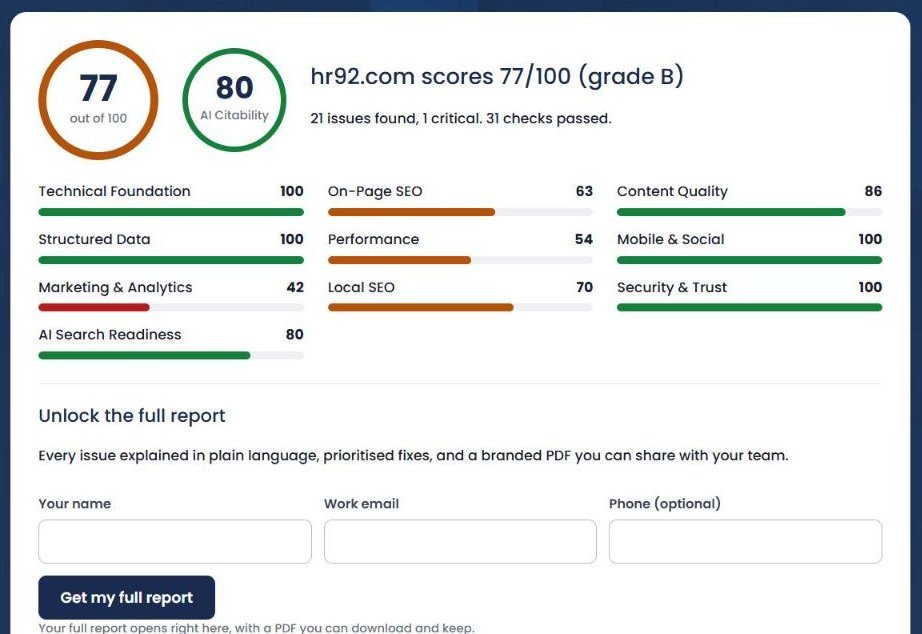
Before putting this in front of anyone else we ran it on hr92.com. Result: 77 out of 100, grade B, AI Citability 80. Twenty-one issues, one critical.
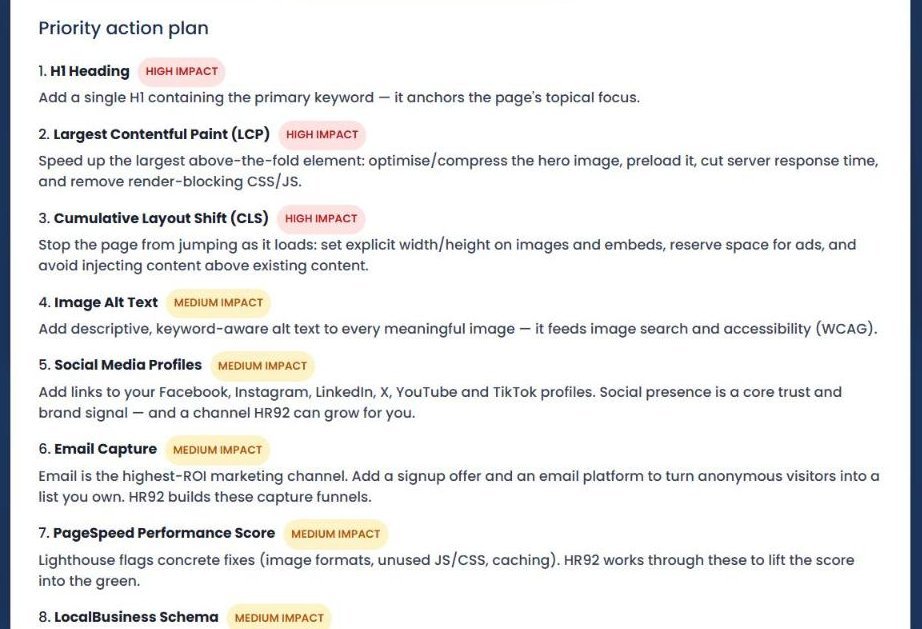
Here is what it caught. The homepage had no H1; the big “Grow Smarter with Digital Marketing” heading was a styled block, not a heading element, and nobody on the team had noticed in two years. Seven of eight images had no alt text. Largest Contentful Paint was 3.4 seconds against the 2.5 second target, and the layout shifted as it loaded. There were no links to our social profiles anywhere on the page, no email capture, and our LocalBusiness schema had no postal address even though the footer lists three offices.
On the AI side we scored well on crawler access, entity schema and freshness, and badly on content shape: no FAQ, none of the fourteen subheadings phrased as a question, and an opening line that read like a slogan rather than an answer. Which, to be fair, it was.
Every one of those is on our list now, and this page is partly the result: it has an H1, a table of contents, question headings, four tables and a FAQ. We mention all this because it is the whole point of an audit. It finds the things you stopped seeing on your own site years ago.
What is in the PDF report
After the on-page result you can download the full report as a PDF. It is the version most of our clients forward to their developer or agency, so it is written to be understood by someone who did not run the audit. It runs to about nine pages:
- A cover with both score gauges, the pass/warning/fail split, and a plain-language verdict.
- “Where you stand”: a radar chart of the ten categories next to a bar chart, and the top three wins.
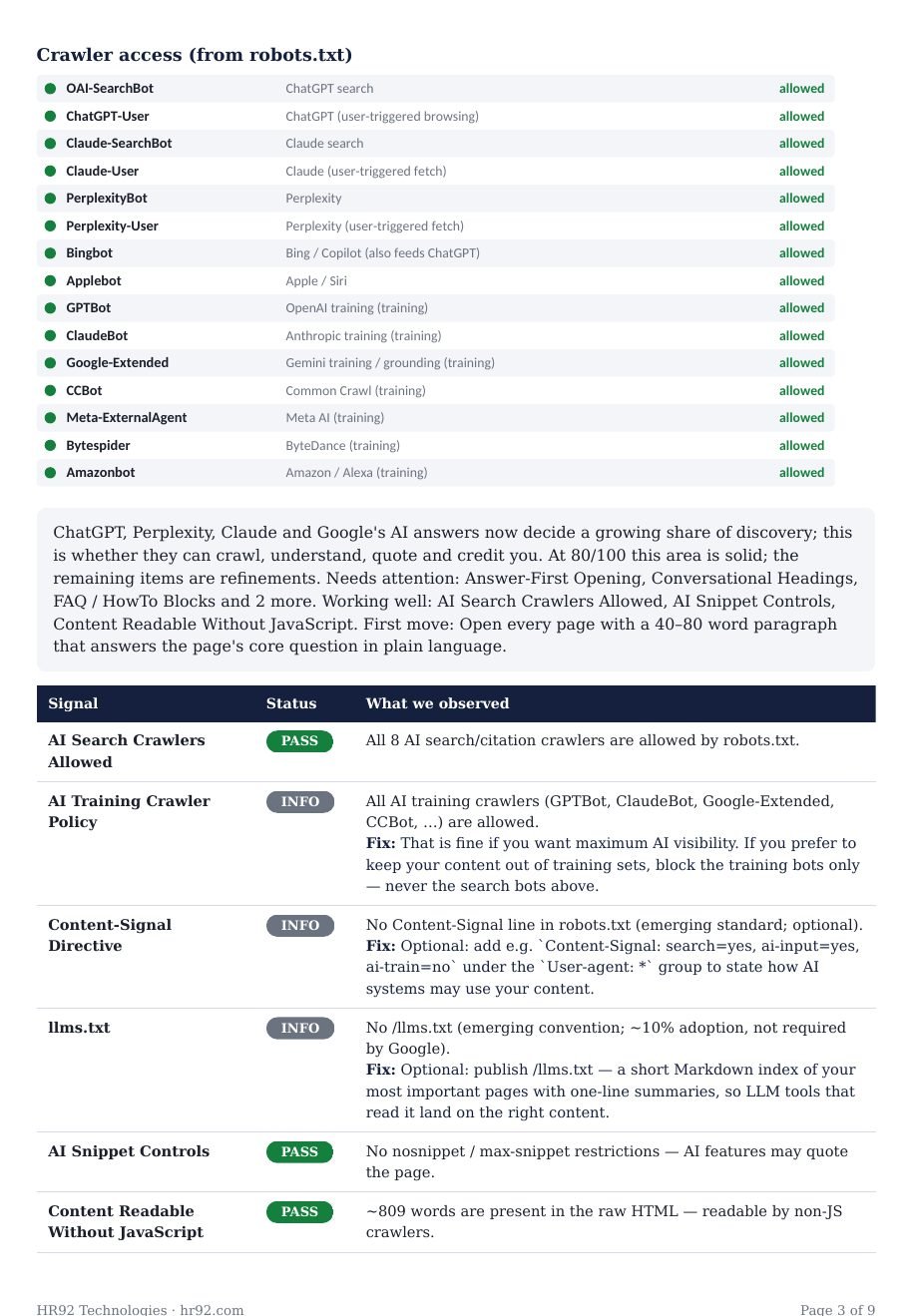
- A dedicated AI search readiness page with the crawler access table (every bot above, allowed or blocked) and the fourteen signals with fixes.
- The priority action plan, ranked by impact.
- Detailed findings by category. Each category gets an insight paragraph written from what the checks actually observed on your site, not a template, followed by the full table of checks.
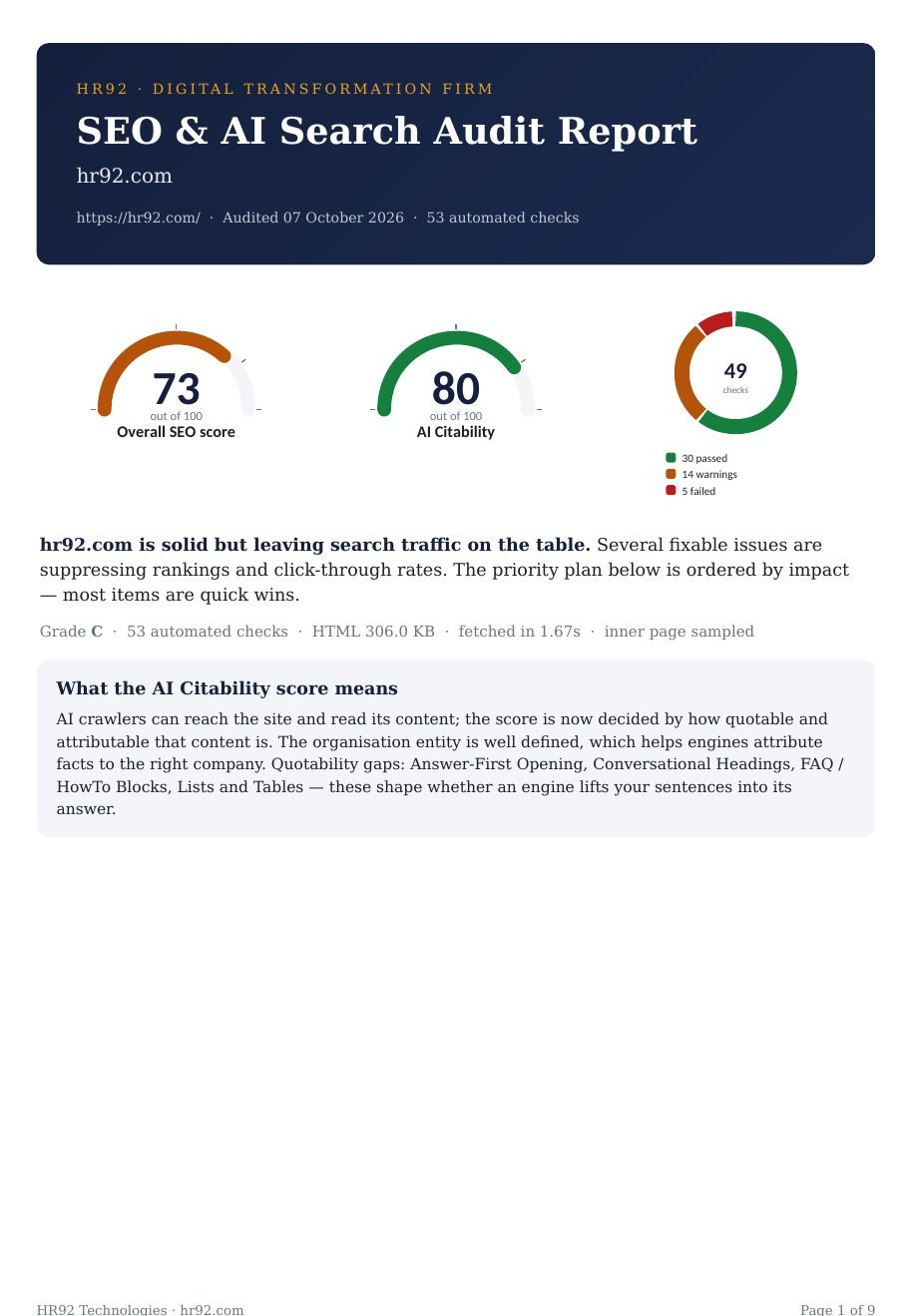
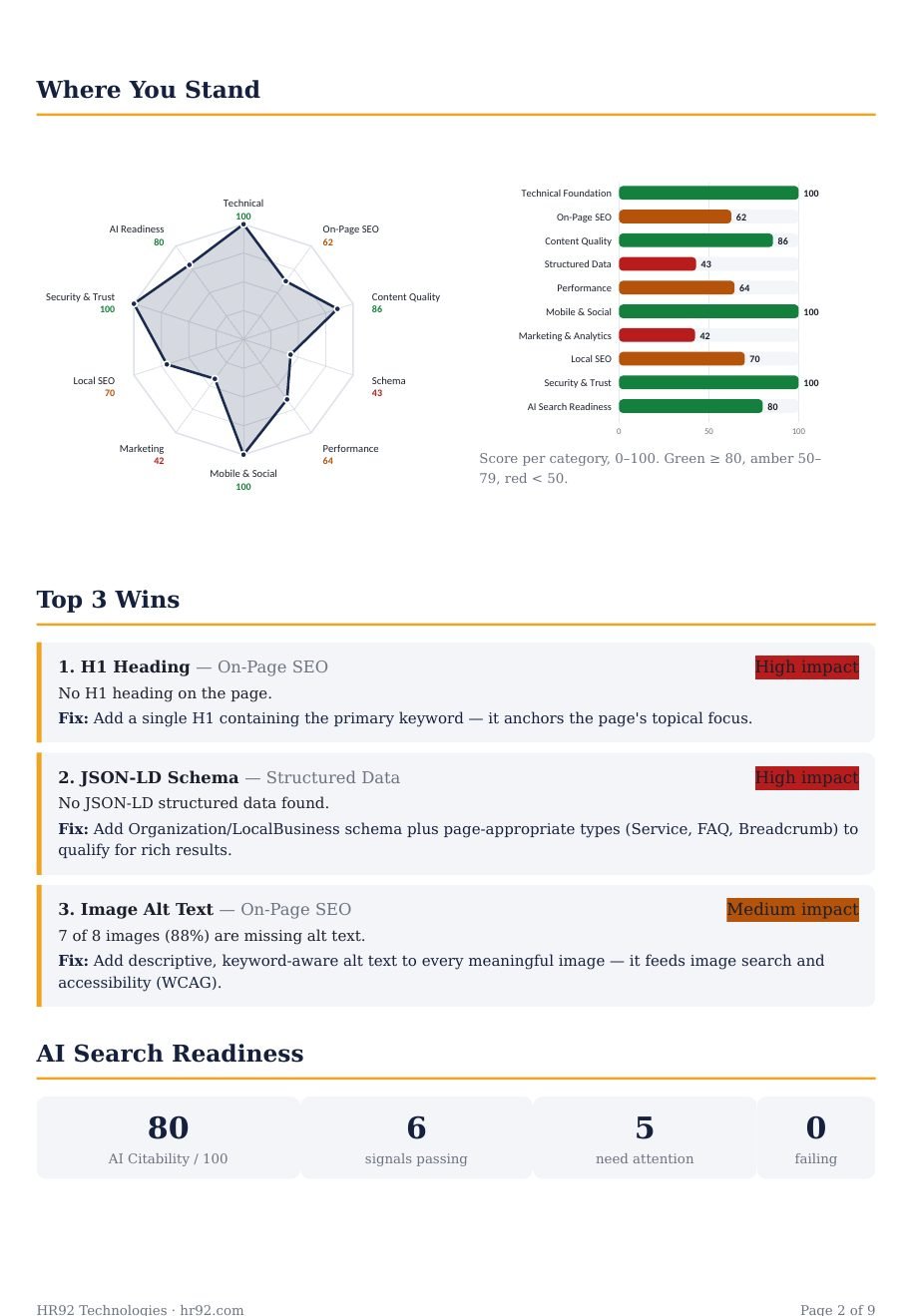
Click either page to open it full size.
Turning 53 findings into a plan
A report with twenty issues is useless if you try to fix all twenty at once. Here is the order we use, and it is the order the action plan in the report follows.
The fix-order rule
- Anything that hides the site. Noindex, robots.txt blocks (including AI search bots), no HTTPS, server errors. These are rare and they are emergencies. Fix today.
- Anything high-impact and cheap. Missing title, meta description, H1, Organization schema, alt text, viewport tag, security headers. Most of these are under an hour each. Fix this week.
- Speed. Core Web Vitals failures, page weight, render-blocking scripts, server response. These often need a developer or a hosting change. Plan them, budget them, fix this month.
- Content shape. Answer-first openings, question headings, FAQ, lists and tables, author and date signals. This is editorial work and it compounds; schedule it page by page over the quarter.
- Everything else. Live chat, llms.txt, Content-Signal, Twitter cards. Nice to have, do them when a developer is already in the template.
A 30/60/90 day version
| Window | Do | Measure |
|---|---|---|
| Days 1 to 30 | Everything in groups 1 and 2 above. Submit the sitemap. Set up Search Console and GA4 if missing. | Indexed page count in Search Console; impressions trend. |
| Days 31 to 60 | Speed work. Compress images, add caching and CDN, defer scripts, fix layout shift. | Core Web Vitals report in Search Console moves from “poor” or “needs improvement” to “good” on mobile. |
| Days 61 to 90 | Rewrite the opening of your top ten pages. Add FAQs. Add author bios and dates. Re-run the audit. | Score difference between the two audits; first appearances in AI answers (search your brand in ChatGPT and Perplexity and see what they say). |
How often, how long, how much
How often should you run an SEO audit?
Quarterly for most business sites, plus immediately after any redesign, migration, theme change or plugin update that touches templates, because those are when things break silently. Large sites that publish daily should run the automated part monthly. There is no cost to running this one more often; it is free and takes under a minute.
How long does an SEO audit take?
The automated audit on this page: 15 to 40 seconds. A manual audit of a small site using the checklist below: one to two hours. A professional audit of a large site, where someone crawls every page, reviews content, checks the link profile and writes recommendations: anywhere from a week to over a month. WebFX, which publishes its pricing, puts a professional audit at 30 to 45 days.
How much does an SEO audit cost?
The one on this page is free, with no account. Agency audits vary enormously because “audit” means different things to different agencies. The same WebFX survey found most businesses pay between $101 and $750, with large-site audits running into the thousands. Our view: a paid audit is worth it when a human needs to judge content quality, link risk and competitive positioning, which no tool can do. It is not worth it for the fifty-three things on this page, because a tool does those better and faster than a person. (Our own paid audit exists for the first kind of work, and we tell people to run the free one first.) Run the free one first; if the score is under 50, fix the basics before paying anyone for anything.
Does running an audit affect my rankings?
No. The audit reads your public pages the way a search crawler would. It changes nothing on your site and sends nothing to Google. The only thing that affects rankings is what you fix afterwards.
The manual SEO audit checklist
If you would rather check things by hand, or want to understand what the tool is doing, this is the order we work through on a new client site. It mirrors the ten categories.
- Load the site over HTTP and confirm it redirects to HTTPS in a single hop. Check for the padlock.
- Open
/robots.txt. No blanketDisallow: /. Confirm OAI-SearchBot, PerplexityBot, Claude-SearchBot and Bingbot are not blocked. Note your policy on GPTBot and the other training bots. - Find the XML sitemap. Every URL should be a real, indexable, 200 page with an honest
lastmod. - View the homepage source. Exactly one H1. A title of 50 to 60 characters. A meta description. A canonical pointing at itself. No
noindex. Alangattribute. - Search the source for
alt=. Every meaningful image should have one. - Count internal links. Fewer than ten on a homepage is a warning sign.
- Run the homepage through PageSpeed Insights. Read the field data at the top, not the lab score. LCP under 2.5 s, INP under 200 ms, CLS under 0.1.
- Disable JavaScript (or just read the raw source) and confirm the main text is still there.
- Paste the URL into Google’s Rich Results Test. Look for Organization or LocalBusiness with a name, logo, address and
sameAs. - Share the URL into a WhatsApp or Slack message and look at the preview. If there is no image, your Open Graph tags are missing.
- Check that About, Contact, Privacy and Terms exist and are linked from the footer.
- Open one blog post. Author, publish date, updated date, all visible.
- Read the first paragraph of your five most important pages. Would each one work as the answer to a question, on its own?
- Look at the response headers (browser dev tools, Network tab).
Strict-Transport-Security,X-Content-Type-Options,Content-Security-Policy, andcontent-encoding: brorgzip. - Search your brand name in ChatGPT and Perplexity. Read what they say and which pages they cite. That is your AI visibility baseline.
Doing this by hand takes an hour or two per site. The audit above does it in under a minute, which is why we built it, but the list is worth keeping either way.
Mistakes people make with audits
Chasing the score instead of the action plan. A score is a summary. The plan is the work. Two sites with the same score can need completely different things.
Run the audit on a prospect’s site before the first call and open with the three biggest findings. It changes the conversation from “why should we hire you” to “how fast can you fix this”. We built the audit engine for our own sales calls before we put it on this page.
Fixing warnings before fails. Warnings are things that could be better. Fails are things that are costing you now. The report colours them for a reason.
Treating the lab speed score as the truth. The PageSpeed lab number changes every run and is measured on a simulated slow phone. Field data is what visitors experienced and what Google ranks on. When they disagree, believe the field data.
Auditing once and never again. Themes update, plugins update, someone pastes a noindex into a template. The site you audited in January is not the site you have in June.
Blocking every AI bot because a template said to. Blocking training bots is a legitimate choice. Blocking OAI-SearchBot and PerplexityBot removes you from ChatGPT and Perplexity entirely. Most “block AI” templates from 2023 do both.
Adding llms.txt and calling AI SEO done. It is a text file that Google ignores. The things that actually get you cited are readable HTML, clear entity data and content with an extractable shape.
Auditing only the homepage. This tool samples the homepage and one article, which is enough to find template-level problems. It is not a full crawl. Once the template is fixed, run a crawler across every URL; Search Console’s page indexing report is the free place to start, and Screaming Frog crawls 500 URLs free.
Frequently asked questions
What is an SEO audit?
A structured review of a website against a checklist of things known to affect search visibility: whether crawlers can reach and index it, whether each page says what it is about, how fast it loads, whether it is secure, whether its business data is machine-readable, and now, whether AI engines can read and cite it. The output is a list of problems ranked by how much they cost you.
Is this SEO audit really free?
Yes. The score, the category breakdown and the on-page report are free with no account. We ask for a name and email only when you want the full report and the PDF, so we can send it to you. Nobody will cold-call you.
How long does the audit take?
Usually 15 to 40 seconds. Most of that time is Google’s PageSpeed Insights measuring your Core Web Vitals. Slow sites can take a little longer; the audit keeps running in the background and the page checks again automatically.
Does the tool change anything on my website?
No. It reads your public pages the way a search engine crawler would: the homepage, robots.txt, the sitemap, one article page and the llms.txt file if you have one. Nothing is installed and nothing is submitted to your site.
What is a good SEO score?
80 and above means the foundation is solid and your gains now come from content and authority. 50 to 79 means the basics are there but you are leaking value; most established business sites land here. Below 50 means something fundamental is wrong and should be fixed before any other marketing spend.
What is an AI Citability score?
It is the score for the AI search readiness category on its own: fourteen checks on whether AI answer engines such as ChatGPT, Perplexity, Claude and Google’s AI Overviews can crawl your site, understand who you are, and quote you with attribution. It is reported separately from the overall SEO score because the two can diverge; a site can rank well on Google and be invisible to ChatGPT.
What is the difference between SEO, AEO and GEO?
AEO (answer engine optimisation) and GEO (generative engine optimisation) are names for making content easy for AI systems to find, extract and cite. In practice the work overlaps almost entirely with good SEO: crawlable pages, clear structure, direct answers, trustworthy signals. Google’s own guidance says optimising for its AI features is still SEO. We treat AI readiness as a category inside the audit rather than a separate discipline for that reason.
Do I need llms.txt?
No. Google does not use it and has said so. A few smaller engines and developer tools read it, so it does not hurt, and our audit reports whether you have a valid one. It carries almost no weight in the score. Readable HTML, Organization schema and a FAQ matter far more.
Should I block GPTBot?
That depends on whether you want your content used to train OpenAI’s models, which is a business decision. Blocking GPTBot does not remove you from ChatGPT search; that is controlled by a separate crawler, OAI-SearchBot, and OpenAI documents that each setting is independent. Our audit reports both so you can see exactly what your robots.txt currently does.
SEO audit vs technical SEO audit: what is the difference?
A technical audit covers crawlability, indexing, speed, rendering and security. A full SEO audit adds on-page elements, content, structured data, local signals and, in our case, AI search readiness. This tool does both; the technical items are mostly in categories 1, 5, 6 and 9.
Can ChatGPT do an SEO audit?
Partly. ChatGPT can read a page you paste in and comment on titles, headings and copy, and that is useful. It cannot fetch your robots.txt, measure Core Web Vitals from Google’s field data, read your response headers, test every image for alt text or tell you which AI crawlers you are blocking, because it is not a crawler and does not see your site the way one does. Use it to improve the writing after the audit tells you what to write.
Can I audit a competitor’s website?
Yes. Any public website works. Comparing your result against two or three competitors is one of the fastest ways to see where you are behind, and the AI readiness section in particular will show you who is set up to be cited and who is not.
Do I still need an agency if I use the free tool?
Not for the fifty-three things on this page; the tool does those faster than a person. You need a person for the things no tool can judge: whether your content is actually better than the page ranking above you, whether your link profile carries risk, which keywords are worth the effort, and what to build next. If you want that, our SEO audit service starts with this exact report and the first call is free. Ecommerce sites have their own set of problems (faceted navigation, product schema, thin category pages) that we cover under ecommerce SEO.
Run the audit, then fix what matters
Enter your website address below, read the action plan before the score, and start with the first three items. If you want help with the fixes, that is what we do all day: a full manual SEO audit for one site, enterprise audits for large ones, and franchise audits where fifty locations share one template. If you would rather understand the bigger picture first, our piece on what is actually working in AI and SEO in 2026 covers the strategy side.