
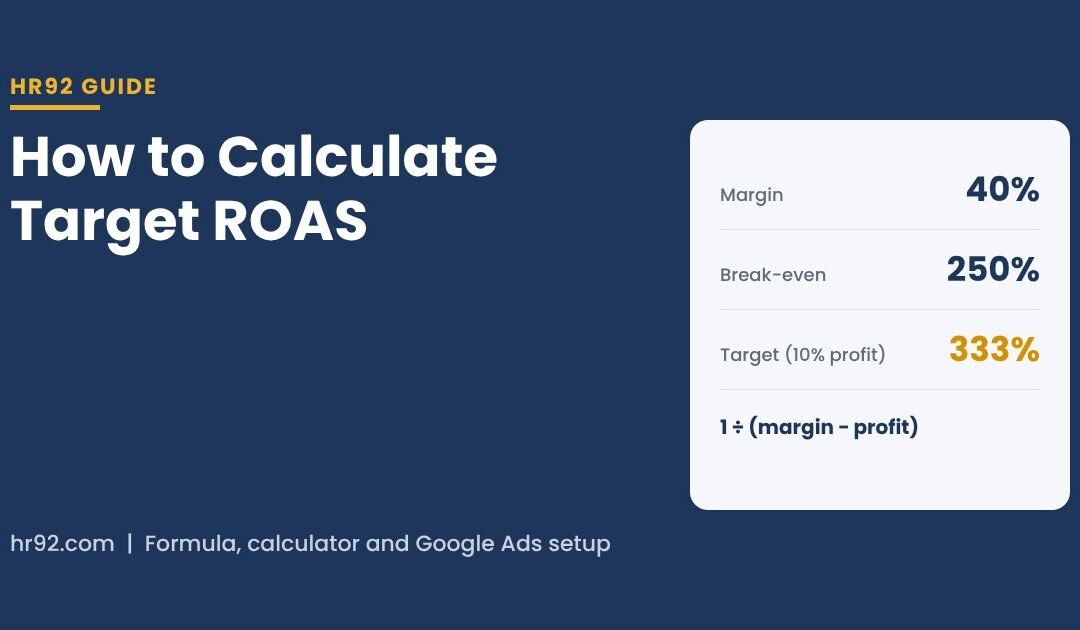

To calculate target ROAS, divide 1 by your contribution margin to get break-even ROAS, then subtract the profit you want from that margin first: Target ROAS = 1 ÷ (margin − desired profit) × 100. With a 40% margin and a 10% profit goal, that’s 1 ÷ 0.30 = 333%, which is the number you type into Google Ads.
Most ROAS calculators stop at break-even, or “add a buffer” in a way that quietly wipes out most of the profit you were aiming for. Google is now testing its own profit-margin calculator inside Google Ads, which helps, but it relies on the same inputs. Below I’ll walk you through the full method I use in PPC accounts, with a calculator, the tables I use, and the setup mistakes I see most.
- Break-even ROAS = 1 ÷ contribution margin. A 25% margin needs 400% ROAS just to break even.
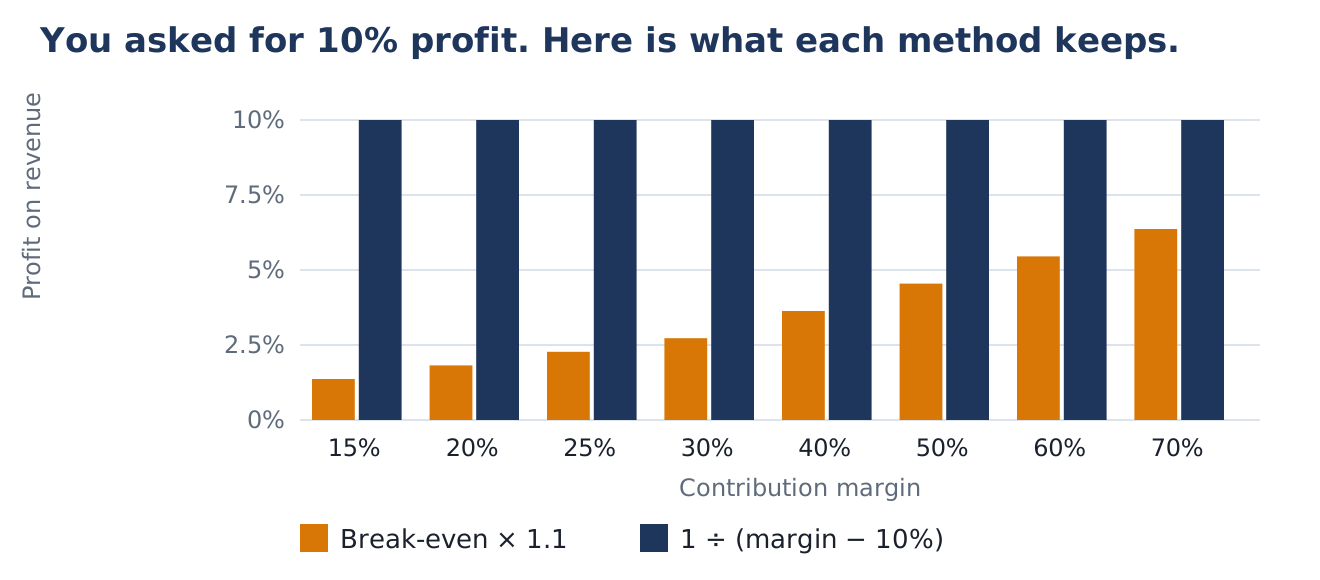
- For a real profit target, subtract it from the margin before dividing. “Break-even × 1.1” gives you a few percent of profit, not 10%.
- Your target only works if the conversion value Google receives matches the revenue you used in the math. Tax and shipping in the tag inflate ROAS.
- Google Ads needs at least 15 conversions in 30 days for Target ROAS on Search and Shopping, and 1 to 2 conversion cycles to settle after each change.
What is target ROAS in Google Ads?
Target ROAS is the average conversion value you want back for every dollar of ad spend, entered as a percentage. Google’s Target ROAS help page uses a shoe store example: $5 in sales for every $1 in ad spend is a 500% target.
Smart Bidding then predicts the value of each auction and bids higher where it expects valuable conversions and lower where it doesn’t, trying to keep the overall return near your target. Two recent changes worth knowing:
- New label. From June 2026, Google started renaming “Maximize conversion value with a Target ROAS” to simply “Target ROAS”. The bidding behavior is the same.
- Bidding system update. Since August 17, 2026, target-based strategies hold closer to the target you set. Per Google’s changes to target based bid strategies, budget-limited campaigns that were beating their target now move toward it. If your target is lower than what you were getting, Google will now spend toward that lower number.
The key thing: Google optimizes to conversion value, not profit. It has no idea what your products cost unless you build that into the target or the values you send. That’s the job of the next four steps.
Step 1: How do you find your contribution margin?
Contribution margin is what’s left from each sale after every cost that scales with that sale, before ad spend. Use this, not your gross margin from the accounting system, because shipping, payment fees and returns are real costs of every ad-driven order.
| Include (variable costs) | Leave out (fixed costs) |
|---|---|
| Product cost (COGS) | Rent, salaries, software subscriptions |
| Shipping and packaging you pay | Agency or management retainer (judge it separately) |
| Payment processing fees | Brand or creative production costs |
| Marketplace or app commissions per order | Overheads that don’t change with one more order |
| Expected returns and refunds | |
| Discounts and coupons |
Here’s a worked example with illustrative numbers. A product sells for $80. It costs $28 to make, $8 to ship, payment fees run about 3% ($2.40), and you lose roughly 5% to returns ($4.00).
Step 2: How do you calculate break-even ROAS?
Break-even ROAS is the return where ad spend eats your entire contribution margin, so you make zero profit on the order. The formula is simple:
For our $80 product: 1 ÷ 0.47 = 2.13, so a 213% ROAS is break-even. Anything below that loses money on the first order. Here’s the table I keep handy:
| Contribution margin | Break-even ROAS (ratio) | Enter in Google Ads | Meaning |
|---|---|---|---|
| 15% | 6.67 | 667% | 667% ROAS = $6.67 back per $1 |
| 20% | 5.00 | 500% | 500% ROAS = $5.00 back per $1 |
| 25% | 4.00 | 400% | 400% ROAS = $4.00 back per $1 |
| 30% | 3.33 | 333% | 333% ROAS = $3.33 back per $1 |
| 40% | 2.50 | 250% | 250% ROAS = $2.50 back per $1 |
| 50% | 2.00 | 200% | 200% ROAS = $2.00 back per $1 |
| 60% | 1.67 | 167% | 167% ROAS = $1.67 back per $1 |
| 70% | 1.43 | 143% | 143% ROAS = $1.43 back per $1 |
Look at the top row. A 15% margin needs 667% ROAS just to break even. That matches the example Search Engine Land reported for Google’s new calculator, and it’s why thin-margin stores struggle on Google Ads unless repeat purchases make up the difference.
Step 3: How do you add a profit target to break-even ROAS?
Subtract the profit you want from the margin, then divide. If you want 10% of revenue left as profit after ads, your 47% margin leaves 37% for ad spend: 1 ÷ 0.37 = 270%.
A lot of calculators do something different: they take break-even ROAS and multiply it by 1.1 or 1.2 to “add 10% or 20% profit”. The math doesn’t work that way. Multiplying ROAS by 1.1 doesn’t leave you with 10% profit. I ran both methods across common margins:
| Margin | Break-even | “Break-even × 1.1” | Actual profit you get | 1 ÷ (margin − 10%) | Actual profit you get |
|---|---|---|---|---|---|
| 15% | 667% | 733% | 1.4% | 2000% | 10.0% |
| 20% | 500% | 550% | 1.8% | 1000% | 10.0% |
| 25% | 400% | 440% | 2.3% | 667% | 10.0% |
| 30% | 333% | 367% | 2.7% | 500% | 10.0% |
| 40% | 250% | 275% | 3.6% | 333% | 10.0% |
| 50% | 200% | 220% | 4.5% | 250% | 10.0% |
| 60% | 167% | 183% | 5.5% | 200% | 10.0% |
| 70% | 143% | 157% | 6.4% | 167% | 10.0% |
HR92 calculation, October 9, 2026. Profit shown as a share of revenue after ad spend, assuming the campaign hits its target exactly.
Step 4: Does your conversion value match the revenue in your math?
Your target only works if the value Google receives is the same kind of number you used in steps 1 to 3. Google’s help page defines target ROAS as conversion value per dollar of spend, so if your tag sends order totals with sales tax and shipping included, every ROAS figure in your account looks better than it is.
Same example: say your tag reports $80 plus 8% sales tax plus an $8 shipping charge, so $94.40 per order instead of $80. That’s 18% higher. Your real break-even of 213% becomes 251% in the terms Google sees, and a 270% “10% profit” target needs to be about 319%.
Three ways to fix it, from best to quickest:
- Send net revenue. Use transaction-specific conversion values and configure the purchase tag to report the product subtotal, excluding tax and shipping. Then the math above works as is.
- Send profit as the value. Some advanced setups pass contribution or gross profit as the conversion value. Then break-even ROAS is 100% and your target becomes your desired profit return on spend.
- Adjust the target. If you can’t change the tag, multiply your target by reported value ÷ net revenue (1.18 in this example).
- Use conversion value rules for known differences. Google’s conversion value rules let you raise or lower values by location, device or audience, and Smart Bidding uses the adjusted values in real time for Target ROAS. Handy when margins differ by region.
If you sell through Merchant Center, it’s also worth setting up conversions with cart data. Google says it reports orders, average cart size, revenue and gross profit, using the cost of goods sold from your Merchant Center feed. It’s a reporting feature, so it shows you profit by product without changing how the bid strategy optimizes.
Calculate target ROAS with this free calculator
Enter your own numbers. Everything runs in your browser and nothing is saved or sent anywhere.
The calculator uses the same formulas as the steps above: contribution margin from your costs, break-even = 1 ÷ margin, target = 1 ÷ (margin − profit), and the target multiplied by your reported-value ratio if your tag includes tax or shipping.
What is Google’s new target ROAS calculator?
Google Ads is testing a calculator that suggests a Target ROAS from your profit margin. Search Engine Land reported it on October 6, 2026, after it was spotted by an advertiser on LinkedIn. It’s a beta, and I haven’t found a Google help page for it yet.
Based on that report, here’s how it works:
- You enter the campaign’s average profit margin, excluding ad spend.
- Google suggests a Target ROAS, treating your reported conversion value as revenue. Their example: a 15% margin gives a 667% break-even target.
- It shows weekly estimates of clicks, revenue, ad spend and total profit, and you can move the target to see the trade-off.
- If you don’t know your margin, it can walk you through a short set of questions to estimate it.
Two cautions. First, Search Engine Land quotes the point that Google isn’t directly optimizing bids for profit with this calculator. It still bids to conversion value.
Second, it treats your conversion value as revenue, so the tax-and-shipping problem from step 4 carries straight into its suggestion. I’d use it for the profit estimates, after checking what your tag sends. Like most of the AI features Google has added this year, it’s useful when the inputs are right; I wrote more about telling the useful tools from the noise in AI and SEO in 2026.
How do you set target ROAS in Google Ads?
Check you have enough conversion data, look at your actual return, then set a target between that and your profit target. Google’s minimum data requirements depend on campaign type:
| Campaign type | Minimum conversions for Target ROAS |
|---|---|
| Search and Shopping | 15 in the past 30 days (at conversion tracking level) |
| Display | 15 with valid values in 30 days across campaigns (new Display campaigns exempt) |
| Demand Gen | 50 in 35 days in the campaign (10 in the last 7), or 100 across the account |
| Video action | 30 in the past 30 days |
| App | 10 per day, or 300 in 30 days |
Source: Google Ads Help, About Target ROAS bidding, checked October 9, 2026. Conversions need a value greater than 0 to count.
- Add the column. In the Campaigns view, Columns, Modify columns, add Conv. value / cost. Multiply by 100 for your actual ROAS percentage.
- Exclude the lag. Leave out the most recent days your conversions take to come in, or your actual ROAS will look low.
- Compare three numbers. Actual ROAS, break-even ROAS and your profit target.
- Start near actual. If actual is above your profit target, set the target close to actual rather than at your lower profit target, because since August 2026 a budget-limited campaign will move toward whatever target you set. If it’s between break-even and target, start at actual and move toward target in steps.
- Use an experiment if you can. Google lets you save the change as an experiment instead of applying it straight away.
- Wait 1 to 2 conversion cycles before judging, as Google recommends, and check budget: Google says to be comfortable with daily spend up to 2 times your average daily budget.
- Contribution margin calculated per product group
- Break-even ROAS and profit target written down
- Purchase tag value checked: tax and shipping in or out
- 15+ valued conversions in the last 30 days (Search/Shopping)
- Actual ROAS checked with the conversion lag excluded
- Target set close to actual, not at your dream number
- Change saved as an experiment where possible
- Review date set 1 to 2 conversion cycles out
Should you aim for break-even ROAS or higher?
Neither number is the goal on its own. Break-even is a floor for first-order profit, and a very high target can starve the campaign of volume. Google’s help page is clear on the trade-off: lowering the target generally brings more conversion volume, raising it brings more value per dollar but can limit traffic.
| Situation | Where I’d set the target |
|---|---|
| One-off purchases, thin margins | At or above your profit target. There’s no second order to rescue a loss. |
| Strong repeat purchase rate | Between break-even and profit target. The first order can earn less if customers come back. |
| Launching a new product or market | Near break-even for a set period, with a hard stop date. |
| Budget isn’t being spent | Lower the target in small steps to open up more auctions. |
| Spending fully but profit is thin | Raise the target in small steps and watch total profit as well as ROAS. |
The number that matters is total profit: (revenue × margin) − ad spend. A campaign at 300% ROAS on $10,000 spend can make more money than one at 600% on $1,000. Google’s help page points to the bid simulator for comparing results against your average target, which is the safest place to test a new number before you commit.
How do you calculate target ROAS for lead generation?
Give each lead a value first. Estimated lead value = close rate × average profit per closed deal. If 1 in 5 leads closes and a closed deal brings $2,000 of profit, each lead is worth $400. Send that as the conversion value and your break-even ROAS is 100%, because the value already is profit. For more on setting this up, see our lead generation services.
Target ROAS vs target CPA: which should you use?
Use Target ROAS when conversions have different values, and Target CPA when they don’t. Target ROAS suits an online store with a $20 and a $400 product; Target CPA suits a single lead form where every conversion is worth roughly the same. Google’s own guidance suggests running Target CPA and reporting values for at least 4 weeks (or 1 to 2 conversion cycles, whichever is longer) before switching to value-based bidding.
| Target CPA | Target ROAS | |
|---|---|---|
| Optimizes for | Number of conversions at a cost | Conversion value at a return |
| Best when | All conversions are worth about the same | Conversion values vary |
| Needs | Conversion tracking | Conversion tracking with accurate values |
| Break-even point | CPA = profit per conversion | ROAS = 1 ÷ margin |
Converting between them is straightforward: target CPA = average order value ÷ target ROAS (as a decimal). For the $80 product at 270%, that’s about $29.60 per sale.
What are the most common target ROAS mistakes?
- Using gross margin instead of contribution margin. Shipping, fees and returns are real costs of every order.
- Multiplying break-even by 1.1 to “add 10%”. See step 3. It leaves you a fraction of what you planned.
- Ignoring what the tag sends. Tax and shipping in the value make every ROAS look better than it is.
- Big jumps. Moving from 300% to 600% overnight usually just cuts traffic. Change in steps and give each one 1 to 2 conversion cycles.
- Judging the last few days. Recent conversions haven’t all arrived yet. Exclude the lag window.
- Too little data. Below Google’s minimums the strategy has little to learn from. Use Target CPA or Maximize conversions until you get there.
- One target for the whole catalog. Split by margin band so each target means something.
If you also sell on Amazon, the same margin logic applies to ACoS. I cover marketplace specifics in our Amazon marketing work.
Target ROAS FAQ
What is a good target ROAS for Google Ads?
There’s no universal good number, because it depends on your margin. A store with a 60% contribution margin breaks even at 167% ROAS, while one with a 20% margin needs 500%. Work out your break-even ROAS first (1 ÷ margin), then set a target that leaves the profit you want, using 1 ÷ (margin − profit).
What does a 4:1 ROAS mean?
A 4:1 ROAS means $4 of conversion value for every $1 of ad spend. In Google Ads that’s entered as 400%. Whether 4:1 is profitable depends on your margin: it’s break-even at a 25% contribution margin, profitable above that and a loss below it.
What ROAS is 25% ACoS?
25% ACoS equals 4.0 ROAS, or 400%. Amazon’s ACOS guide defines it as ad spend divided by ad revenue and notes that ROAS is its inverse, so ROAS = 1 ÷ ACoS. A 20% ACoS is 500% ROAS and a 50% ACoS is 200%.
How does Google Ads calculate ROAS?
Google Ads calculates ROAS as conversion value divided by cost. You’ll find it in the “Conv. value / cost” column; multiply by 100 to compare it with a target ROAS percentage. The value is whatever your conversion tracking reports, so it’s only as accurate as your tag.
How long does target ROAS take to work after a change?
Google says the bidder reacts immediately to a new target but needs time to reach it, and recommends giving it 1 to 2 conversion cycles. If customers usually buy within a week of clicking, judge the change after one to two weeks, not the next day.
Can I use target ROAS with few conversions?
Search and Shopping campaigns need at least 15 conversions in the past 30 days, and other campaign types need more, according to Google’s help page. Below that, start with Target CPA or Maximize conversions, report conversion values, and switch once you have enough data.